

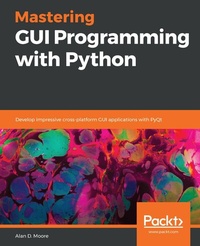
Mastering GUI Programming with Python
Develop impressive cross-platform GUI applications with PyQt
1st Edition
Published on 3. June 2024
542 pages
978-1-78961-582-1 (ISBN)
Description

An advanced guide to creating powerful high-performance GUIs for modern, media-rich applications in various domains such as business and game developmentKey Features - Gain comprehensive knowledge of Python GUI development using PyQt 5.12
- Explore advanced topics including multithreaded programming, 3D animation, and SQL databases
- Build cross-platform GUIs for Windows, macOS, Linux, and Raspberry Pi
Book DescriptionPyQt5 has long been the most powerful and comprehensive GUI framework available for Python, yet there is a lack of cohesive resources available for Python programmers to learn how to use it. This book will be your comprehensive guide to exploring GUI development with PyQt5. You will get started with an introduction to PyQt5, before going on to develop stunning GUIs with modern features. You will learn how to build forms using QWidgets and delve into important aspects of GUI development such as layouts, size policies, and event-driven programming. Moving ahead, you'll discover PyQt5's most powerful features through chapters on audio-visual programming with QtMultimedia, database-driven software with QtSQL, and web browsing with QtWebEngine. Next, in-depth coverage of multithreading and asynchronous programming will help you run tasks asynchronously and build high-concurrency processes with ease. In later chapters, you'll gain insights into QOpenGLWidget, along with mastering techniques for creating 2D graphics with QPainter. You'll also explore PyQt on a Raspberry Pi and interface it with remote systems using QtNetwork. Finally, you will learn how to distribute your applications using setuptools and PyInstaller. By the end of this book, you will have the skills you need to develop robust GUI applications using PyQt.What you will learn - Get to grips with the inner workings of PyQt5
- Understand how elements in a GUI application communicate with signals and slots
- Study techniques for styling an application
- Explore database-driven applications with the QtSQL module
- Create 2D graphics with QPainter
- Delve into 3D graphics with QOpenGLWidget
- Build network and web-aware applications with QtNetwork and QtWebEngine
Who this book is forThis book is for programmers who want to create attractive, functional, and powerful GUIs using the Python language. You'll also find this book useful if you are a student, professional, or anyone who wants to start exploring GUIs. Although prior knowledge of the Python language is assumed, experience with PyQt, Qt, or GUI programming is not required.
- Explore advanced topics including multithreaded programming, 3D animation, and SQL databases
- Build cross-platform GUIs for Windows, macOS, Linux, and Raspberry Pi
Book DescriptionPyQt5 has long been the most powerful and comprehensive GUI framework available for Python, yet there is a lack of cohesive resources available for Python programmers to learn how to use it. This book will be your comprehensive guide to exploring GUI development with PyQt5. You will get started with an introduction to PyQt5, before going on to develop stunning GUIs with modern features. You will learn how to build forms using QWidgets and delve into important aspects of GUI development such as layouts, size policies, and event-driven programming. Moving ahead, you'll discover PyQt5's most powerful features through chapters on audio-visual programming with QtMultimedia, database-driven software with QtSQL, and web browsing with QtWebEngine. Next, in-depth coverage of multithreading and asynchronous programming will help you run tasks asynchronously and build high-concurrency processes with ease. In later chapters, you'll gain insights into QOpenGLWidget, along with mastering techniques for creating 2D graphics with QPainter. You'll also explore PyQt on a Raspberry Pi and interface it with remote systems using QtNetwork. Finally, you will learn how to distribute your applications using setuptools and PyInstaller. By the end of this book, you will have the skills you need to develop robust GUI applications using PyQt.What you will learn - Get to grips with the inner workings of PyQt5
- Understand how elements in a GUI application communicate with signals and slots
- Study techniques for styling an application
- Explore database-driven applications with the QtSQL module
- Create 2D graphics with QPainter
- Delve into 3D graphics with QOpenGLWidget
- Build network and web-aware applications with QtNetwork and QtWebEngine
Who this book is forThis book is for programmers who want to create attractive, functional, and powerful GUIs using the Python language. You'll also find this book useful if you are a student, professional, or anyone who wants to start exploring GUIs. Although prior knowledge of the Python language is assumed, experience with PyQt, Qt, or GUI programming is not required.
More details
Other editions
Additional editions
Alan D. Moore
Mastering GUI Programming with Python
Develop impressive cross-platform GUI applications with PyQt
Book
05/2019
Packt Publishing
€61.90
Shipment within 3-4 weeks
Person
Moore Alan D. :
Alan D. Moore is a data analyst and software developer who has been solving problems with Python since 2006. He's developed both open source and private code using frameworks like Django, Flask, Qt, and of course Tkinter, and is known to contribute to various open-source Python and JavaScript projects. Alan maintains a YouTube channel, "Alan D Moore Codes", where he posts Python, PyQt, and Tkinter tutorials. Alan lives in Franklin, Tennessee, where he works for the County Government, and with his wife Cara raises a crew of children who are just as geeky as their dad.
Alan D. Moore is a data analyst and software developer who has been solving problems with Python since 2006. He's developed both open source and private code using frameworks like Django, Flask, Qt, and of course Tkinter, and is known to contribute to various open-source Python and JavaScript projects. Alan maintains a YouTube channel, "Alan D Moore Codes", where he posts Python, PyQt, and Tkinter tutorials. Alan lives in Franklin, Tennessee, where he works for the County Government, and with his wife Cara raises a crew of children who are just as geeky as their dad.
Content
Table of Contents - Getting Started with PyQt
- Building Forms with QtWidgets
- Handling events with signals and slots
- Building applications with QMainWindow
- Creating data interfaces with Model/View classes
- Styling Qt Applications
- Working with Audio-visual Using QtMultimedia
- Networking with QtNetwork
- Exploring SQL with QtSQL
- Multithreading with QTimer and Qthread
- Creating Rich text with QTextDocument
- Creating 2D graphics with Qpainter
- Creating 3D graphics with QtOpenGL
- Embedding data plots with QtCharts
- PyQt Raspberry Pi
- Web browsing with QtWebEngine
- Preparing Your Software for Distribution
- Appendix A: Answers to Questions
- Appendix B: Upgrading Raspbian 9 to Raspbian 10
- Building Forms with QtWidgets
- Handling events with signals and slots
- Building applications with QMainWindow
- Creating data interfaces with Model/View classes
- Styling Qt Applications
- Working with Audio-visual Using QtMultimedia
- Networking with QtNetwork
- Exploring SQL with QtSQL
- Multithreading with QTimer and Qthread
- Creating Rich text with QTextDocument
- Creating 2D graphics with Qpainter
- Creating 3D graphics with QtOpenGL
- Embedding data plots with QtCharts
- PyQt Raspberry Pi
- Web browsing with QtWebEngine
- Preparing Your Software for Distribution
- Appendix A: Answers to Questions
- Appendix B: Upgrading Raspbian 9 to Raspbian 10
