

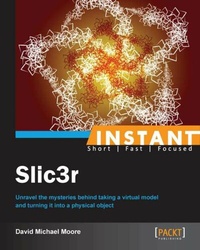
Instant Slic3r
Unravel the mysteries behind taking a virtual model and turning it into a physical object
Published on 13. January 2025
68 pages
978-1-78328-498-6 (ISBN)
Description

Unravel the mysteries behind taking a virtual model and turning it into a physical object
Key Features
Learn something new in an Instant! A short, fast, focused guide delivering immediate results
Use Slic3r to make your printed objects the best quality possible
Make Slic3r work for you, automating tasks and doing post processing on Slic3r output
The book is put together in a friendly and accessible manner to help walk you through the learning and how to use the software
Book DescriptionOne of the most critical parts of 3D printing is taking a 3D model and converting it to a format that a 3D printer can print. Slic3r is one of the best pieces of software out there. It gives great control over how an object is converted, and can save you hours upon hours of frustration by producing great prints. This book will show you how. Instant Slic3r strives to give you a good foundation for what Slic3r can do. It offers a hands-on way to learn about how Slic3r works, and how you can use its powerful features to produce great prints. It takes you from the beginning setup, through advanced features such as post processing the G-Code that it produces. You will get a good grasp on how Slic3r works, and ways to troubleshoot your prints to make the best objects your printer can produce. Instant Slic3r covers where to get Slic3r and how to install it on a variety of platforms, and helps lead you through the setup and tweaking your personal printer settings. The book is clearly laid out and easy to follow, but with information that even experienced users of Slic3r will find useful. You will learn how Slic3r converts your model into G-Code. Then, you will learn how to not only read that G-Code, but how you can write scripts for post-processing the output, before it is sent to the printer. You will also learn what things can go wrong with printing, and how you can use Slic3r to troubleshoot the issue and then fix it. Along with this, you will learn how to improve your printing by delving into Slic3r's expert settings. The book is filled with examples, leading you through not only how to do things, but why they need to be done. After you are finished with this book, you will have a deeper understanding of Slic3r and 3D printing.What you will learn
Learn what Slic3r does and how it works
Set up and calibrate Slic3r to your printer and plastics
Use Slic3r with different printers and software
Understand advanced setup techniques and profiles for various printing scenarios
Change settings to correct model issues while printing
Run Slic3r from the command line for automation and greater control
Read the G-Code that Slic3r outputs
Create and use post-processing scripts to alter Slic3r s output
Who this book is forInstant Slic3r is for people new to 3D printing and its software, and also for people who are new to Slic3r. You will need to know the basics of 3D printing, and how to use your printer and the other software associated with it.
Key Features
Learn something new in an Instant! A short, fast, focused guide delivering immediate results
Use Slic3r to make your printed objects the best quality possible
Make Slic3r work for you, automating tasks and doing post processing on Slic3r output
The book is put together in a friendly and accessible manner to help walk you through the learning and how to use the software
Book DescriptionOne of the most critical parts of 3D printing is taking a 3D model and converting it to a format that a 3D printer can print. Slic3r is one of the best pieces of software out there. It gives great control over how an object is converted, and can save you hours upon hours of frustration by producing great prints. This book will show you how. Instant Slic3r strives to give you a good foundation for what Slic3r can do. It offers a hands-on way to learn about how Slic3r works, and how you can use its powerful features to produce great prints. It takes you from the beginning setup, through advanced features such as post processing the G-Code that it produces. You will get a good grasp on how Slic3r works, and ways to troubleshoot your prints to make the best objects your printer can produce. Instant Slic3r covers where to get Slic3r and how to install it on a variety of platforms, and helps lead you through the setup and tweaking your personal printer settings. The book is clearly laid out and easy to follow, but with information that even experienced users of Slic3r will find useful. You will learn how Slic3r converts your model into G-Code. Then, you will learn how to not only read that G-Code, but how you can write scripts for post-processing the output, before it is sent to the printer. You will also learn what things can go wrong with printing, and how you can use Slic3r to troubleshoot the issue and then fix it. Along with this, you will learn how to improve your printing by delving into Slic3r's expert settings. The book is filled with examples, leading you through not only how to do things, but why they need to be done. After you are finished with this book, you will have a deeper understanding of Slic3r and 3D printing.What you will learn
Learn what Slic3r does and how it works
Set up and calibrate Slic3r to your printer and plastics
Use Slic3r with different printers and software
Understand advanced setup techniques and profiles for various printing scenarios
Change settings to correct model issues while printing
Run Slic3r from the command line for automation and greater control
Read the G-Code that Slic3r outputs
Create and use post-processing scripts to alter Slic3r s output
Who this book is forInstant Slic3r is for people new to 3D printing and its software, and also for people who are new to Slic3r. You will need to know the basics of 3D printing, and how to use your printer and the other software associated with it.
All prices
More details
Edition
Digital original
Language
English
Place of publication
Birmingham
United Kingdom
Target group
Professional and scholarly
US School Grade: College Graduate Student
Edition type
Digital original
File size
1,52 MB
ISBN-13
978-1-78328-498-6 (9781783284986)
Copyright in bibliographic data and cover images is held by Nielsen Book Services Limited or by the publishers or by their respective licensors: all rights reserved.
Schweitzer Classification
Other editions
Additional editions
David Moore
Instant Slic3r
Unravel the mysteries behind taking a virtual model and turning it into a physical object
Book
09/2013
Packt Publishing
€28.70
Shipment within 3-4 weeks
Person
Moore David :
David Michael Moore has been a lifelong maker. Starting at an early age taking apart his parents' alarm clocks, he has always been curious about how things work, and how they are put together. This drive was cemented in the seventh grade when he had a wood and metal shop. A developer and designer by trade, David has been working with software for years. The current explosion of making rekindled his love of the physical act of making. He is often found in his workshop or in the basement working with wood, metal, plaster, plastic, and electronics, or musing about the act of making on http://vandermore.com. He hopes to pass on his desire for making to his two daughters, so that their making spirit isn't overwhelmed by the consumer side of life.
David Michael Moore has been a lifelong maker. Starting at an early age taking apart his parents' alarm clocks, he has always been curious about how things work, and how they are put together. This drive was cemented in the seventh grade when he had a wood and metal shop. A developer and designer by trade, David has been working with software for years. The current explosion of making rekindled his love of the physical act of making. He is often found in his workshop or in the basement working with wood, metal, plaster, plastic, and electronics, or musing about the act of making on http://vandermore.com. He hopes to pass on his desire for making to his two daughters, so that their making spirit isn't overwhelmed by the consumer side of life.
Content
Table of Contents

