

Make
Description

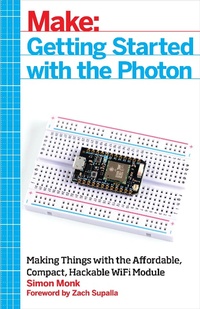
The Photon is an open source, inexpensive, programmable, WiFi-enabled module for building connected projects and prototypes. Powered by an ARM Cortex-M3 microcontroller and a Broadcom WiFi chip, the Photon is just as happy plugged into a hobbyist''s breadboard as it is into a product rolling off of an assembly line.
While the Photon--and its accompanying cloud platform--is designed as a ready-to-go foundation for product developers and manufacturers, it''s great for Maker projects, as you''ll see in this book. You''ll learn how to get started with the free development tools, deploy your sketches over WiFi, and build electronic projects that take advantage of the Photon''s processing power, cloud platform, and input/output pins. What''s more, the Photon is backward-compatible with its predecessor, the Spark Core.
More details
Other editions
Additional editions
Content
- Intro
- Copyright
- Table of Contents
- Foreword
- Preface
- What's in a Name?
- Conventions Used in This Book
- Using Code Examples
- Safari® Books Online
- How to Contact Us
- Chapter 1. The Photon
- The Internet of Things
- Sparks in the Clouds
- Other IoT Platforms
- Arduino
- Raspberry Pi and BeagleBone
- Intel Edison
- A Tour of the Photon
- The Spark Core vs. Photon
- Programming
- Summary
- Chapter 2. Quick Start
- Signing Up
- Connecting to WiFi
- Connecting a Core
- Connecting a Photon
- Controlling Pins with the Tinker App
- Project 1. Blink the Tiny Blue LED
- Project 2. Control the Photon's LED
- Summary
- Chapter 3. Programming the Photon
- The Web IDE
- Coding an App
- Comments
- Variables
- Morse Code
- Flashing SOS
- Functions
- Types
- The int Type
- The float Type
- Other Types
- Arrays
- Loops
- Strings
- Ifs
- Project 3. Morse Code Flasher
- Software
- Summary
- Chapter 4. Breadboard
- How a Breadboard Works
- Attaching an LED
- Digital Outputs
- Project 4. Morse Flasher (External LED)
- Parts
- Hardware
- Software
- Attaching a Switch
- Digital Inputs
- Project 5. Morse Flasher with Switch
- Parts
- Software
- Hardware
- Running the Project
- Analog Outputs
- analogWrite
- An Example
- A Real Analog Output
- Summary
- Chapter 5. The Internet of Things
- Functions
- Project 6. Control an LED over the Internet
- Software
- Security
- Trying It Out
- Interacting with loop
- Running Functions from a Web Page
- Project 7. Control Relays from a Web Page
- Parts
- Design
- Construction
- Software
- Project 8. Morse Code Text Messages
- Parts
- Software
- Hardware
- Using the Project
- Variables
- Analog Inputs
- Project 9. Measuring Light over the Internet
- Parts
- Software
- Hardware
- Using the Project
- Project 10. Measuring Temperature over the Internet
- Parts
- Software
- Hardware
- Using the Project
- Summary
- Chapter 6. If This Then That
- If This Then That
- Project 11. Temperature Email Alerts
- Project 12. Ring a Bell for Tweets
- Software
- IFTTT
- Hardware
- Using the Project
- Project 13. Flash Email as Morse Code
- Software
- Hardware
- IFTTT
- Using the Project
- Summary
- Chapter 7. Robotics
- Project 14. Web-Controlled Robot
- Parts
- Software (Photon)
- Software (Web Page)
- Hardware
- Using the Project
- Summary
- Chapter 8. Machine-to-Machine Communication
- Publish and Subscribe
- Temperature Monitor Example
- IFTTT and Publish/Subscribe
- Advanced Publish and Subscribe
- Publish
- Subscribe
- Project 15. Magic Rope
- Parts
- Software
- Hardware
- Using the Project
- Summary
- Chapter 9. Advanced Photon
- Configuring a Photon Using USB
- Factory Reset
- Programming a Photon Using Particle Dev
- Debugging with the Serial Monitor
- The Electron
- Power Management
- Summary
- Appendix A. Parts
- Component Suppliers
- Parts
- Electronic Components
- Modules and Shields
- Hardware and Connectors
- Other
- Appendix B. Photon LED Codes
- Reset Sequence
- Other Status Codes
- Error Codes
- Appendix C. Photon and Core Pinouts
- Core
- Photon
