

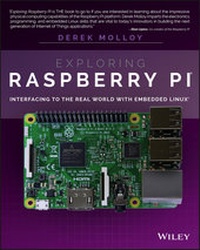
Exploring Raspberry Pi
Description

Exploring Raspberry Pi is the innovators guide to bringing Raspberry Pi to life. This book favors engineering principles over a 'recipe' approach to give you the skills you need to design and build your own projects. You'll understand the fundamental principles in a way that transfers to any type of electronics, electronic modules, or external peripherals, using a "learning by doing" approach that caters to both beginners and experts. The book begins with basic Linux and programming skills, and helps you stock your inventory with common parts and supplies. Next, you'll learn how to make parts work together to achieve the goals of your project, no matter what type of components you use. The companion website provides a full repository that structures all of the code and scripts, along with links to video tutorials and supplementary content that takes you deeper into your project.
The Raspberry Pi's most famous feature is its adaptability. It can be used for thousands of electronic applications, and using the Linux OS expands the functionality even more. This book helps you get the most from your Raspberry Pi, but it also gives you the fundamental engineering skills you need to incorporate any electronics into any project.
* Develop the Linux and programming skills you need to build basic applications
* Build your inventory of parts so you can always "make it work"
* Understand interfacing, controlling, and communicating with almost any component
* Explore advanced applications with video, audio, real-world interactions, and more
Be free to adapt and create with Exploring Raspberry Pi.
More details
Other editions
Additional editions
Person
Content
Part I Raspberry Pi Basics 1
Chapter 1 Raspberry Pi Hardware 3
Chapter 2 Raspberry Pi Software 23
Chapter 3 Exploring Embedded Linux Systems 55
Chapter 4 Interfacing Electronics 113
Chapter 5 Programming on the Raspberry Pi 159
Part II Interfacing, Controlling, and Communicating 217
Chapter 6 Interfacing to the Raspberry Pi Input/Outputs 219
Chapter 7 Cross-Compilation and the Eclipse IDE 275
Chapter 8 Interfacing to the Raspberry Pi Buses 309
Chapter 9 Enhancing the Input/Output Interfaces on the RPi 363
Chapter 10 Interacting with the Physical Environment 405
Chapter 11 Real-Time Interfacing Using the Arduino 453
Part III Advanced Interfacing and Interaction 481
Chapter 12 The Internet of Things 483
Chapter 13 Wireless Communication and Control 535
Chapter 14 Raspberry Pi with a Rich User Interface 577
Chapter 15 Images, Video, and Audio 615
Chapter 16 Kernel Programming 647
Index 677
Introduction
The core idea behind the Raspberry Pi (RPi) project was the development of a small and affordable computing platform that could be used to stimulate the interest of children in core information and communications technology (ICT) education. The rapid evolution of low-cost system on a chip (SoC) devices for mobile applications made it possible to widely deliver the affordable RPi platform in early 2012. The impact was immediate; by February 2015, more than five million Raspberry Pi boards were sold. Given the proliferation of smartphones, the idea of holding in one hand computers that are capable of performing billions of instructions per second is easy to take for granted, but the fact that you can modify the hardware and software of such small yet powerful devices and adapt them to suit your own needs and create your own inventions is nothing short of amazing. Even better, you can now purchase a Raspberry Pi Zero for as little as $5 (the price of a large cup of coffee)!
The Raspberry Pi boards on their own are too complex to be used by a general audience; it is the ability of the boards to run embedded Linux in particular that makes the resulting platform accessible, adaptable, and powerful. Together, Linux and embedded systems enable ease of development for devices that can meet future challenges in smart buildings, the Internet of Things (IoT), robotics, smart energy, smart cities, human-computer interaction (HCI), cyber-physical systems, 3D printing, advanced vehicular systems, and many, many more applications.
The integration of high-level Linux software and low-level electronics represents a paradigm shift in embedded systems development. It is revolutionary that you can build a low-level electronics circuit and then install a Linux web server, using only a few short commands, so that the circuit can be controlled over the Internet. You can easily use the Raspberry Pi as a general-purpose Linux computer, but it is vastly more challenging and interesting to get underneath the hood and fully interface it to electronic circuits of your own design-and that is where this book comes in!
This book should have widespread appeal for inventors, makers, students, entrepreneurs, hackers, artists, dreamers-in short, anybody who wants to bring the power of embedded Linux to their products, inventions, creations, or projects and truly understand the RPi platform in detail. This is not a recipe book; with few exceptions, everything demonstrated here is explained at a level that will enable you to design, build, and debug your own extensions of the concepts presented. Nor does this book include any grand design project for which you must purchase a prescribed set of components and peripherals to achieve a very specific outcome. Rather, this book is about providing you with enough background knowledge and "under-the-hood" technical details to enable and motivate your own explorations.
I strongly believe in learning by doing, so I present low-cost, widely available hardware examples so that you can follow along. Using these hands-on examples, I describe what each step means in detail, so that when you substitute your own hardware components, modules, and peripherals you will be able to adapt the content in this book to suit your needs. As for that grand design project, that is up to you and your imagination!
In late 2014, I released a well-received book on the BeagleBone platform titled Exploring BeagleBone: Tools and Techniques for Building with Embedded Linux. Given the focus of this book on embedded Linux and the emphasis on introducing the core principles, there are some similarities between the introductory content in that book and this book. However, this book has been written from first principles purely for the RPi platform, focusing on its strengths and addressing several of its weaknesses. I also took the opportunity to extend the coverage of the material to cover topics such as Linux kernel development, the Arduino as a service processor, Wi-Fi sensor nodes, XBee communication, MQTT messaging, the Internet of Things (IoT), platform as a service (PaaS), and much more. If you have a copy of Exploring BeagleBone, you should visit this book's website (www.exploringrpi.com) to compare the content in both books before you make your purchasing decision.
When writing this book, I had the following aims and objectives:
- To explain embedded Linux and its interaction with electronic circuits-taking you through the topics and challenges on the popular RPi platform.
- To provide in-depth information and instruction on the Linux, electronics, and programming skills that are required to master a pretty wide and comprehensive variety of topics in this domain.
- To create a collection of practical Hello World hardware and software examples on each and every topic in the book, from low-level interfacing, general-purpose input/outputs (GPIOs), buses, bus-attached analog-to-digital converters (ADCs), and universal asynchronous receiver/transmitters (UARTs) to high-level libraries such as OpenCV and the Qt Framework. The book also covers more advanced topics such as low-level register manipulation and Linux loadable kernel module (LKM) development.
- To enhance and extend the interfacing capability of the RPi platform by developing frameworks for connecting it to circuits (e.g., SPI-based ADCs), to service processors (e.g., Arduino and NodeMCU), and to cloud-based IoT platforms and services.
- To ensure that each circuit and segment of code has a broad pedagogical reach and is specifically designed to work on the Raspberry Pi. Every single circuit and code example in this book was built and tested on the RPi platform (most on multiple board versions).
- To use the Hello World examples to build a library of code that you can use and adapt for your own Raspberry Pi projects.
- To make all the code available on GitHub in an easy-to-use form.
- To support this book with strong digital content, such as the videos on the DerekMolloyDCU YouTube channel, and the
www.exploringrpi.comcustom website that was developed specifically to support this book. - To ensure that by the end of this book you have everything you need to imagine, create, and build advanced Raspberry Pi projects.
How This Book Is Structured
There is no doubt that some of the topics in this book are quite complex. After all, Raspberry Pi boards are complex devices! However, everything that you need to master them is present in this book within three major parts:
- Part I: Raspberry Pi Basics
- Part II: Interfacing, Controlling, and Communicating
- Part III: Advanced Interfacing and Interaction
In the first part of the book, I introduce the hardware and software of the RPi platforms in Chapters 1 and 2, and subsequently provide three primer chapters:
- Chapter 3, "Exploring Embedded Linux Systems"
- Chapter 4, "Interfacing Electronics"
- Chapter 5, "Programming on the Raspberry Pi"
If you are a Linux expert, electronics wizard, and/or software guru, feel free to skip these primers. However, for everyone else, I have put in place a concise but detailed set of materials to ensure that you gain all the knowledge required to effectively and safely interface to the Raspberry Pi. The remaining chapters refer to these primers often.
The second part of the book, Chapters 6-11, provides detailed information on interfacing to the Raspberry Pi GPIOs, buses (I2C, SPI), UART devices, and USB peripherals. You learn how to configure a cross-compilation environment so that you can build large-scale software applications for the Raspberry Pi. Part II also describes how to combine hardware and software to provide the Raspberry Pi with the capability to interact effectively with its physical environment. In addition, Chapter 11, "Real-Time Interfacing Using the Arduino," shows you how to use the Arduino as a slave processor with the Raspberry Pi, which helps you to overcome some of the real-time constraints of working with embedded Linux.
The third and final part of the book, Chapters 12-16, describes how to use the Raspberry Pi for advanced interfacing and interaction applications such as IoT; wireless communication and control, rich user interfaces; images, video, and audio; and Linux kernel programming. Along the way, you encounter many technologies, including TCP/IP, ThingSpeak, IBM Bluemix, MQTT, Cgicc, Power over Ethernet (PoE), Wi-Fi, NodeMCUs, Bluetooth, NFC/RFID, ZigBee, XBee, cron, Nginx, PHP, e-mail, IFTTT, GPS, VNC, GTK+, Qt, XML, JSON, multithreading, client/server programming, V4L2, video streaming, OpenCV, Boost, USB audio, Bluetooth A2DP, text-to-speech, LKMs, kobjects, and kthreads!
Conventions Used in This Book
This book is filled with source code examples and snippets that you can use to build your own applications. Code and commands are shown as follows:
This is what source code looks like. When presenting work performed in a Linux terminal, it is often necessary to display both input and output in a single example. A bold type is used to distinguish the user input from the output. For example:
pi@erpi ~ $ ping www.raspberrypi.org PING lb.raspberrypi.org (93.93.128.211) 56(84) bytes of data. 64 bytes from 93.93.128.211: icmp_seq=1 ttl=53 time=23.1 ms 64 bytes from 93.93.128.211: icmp_seq=2 ttl=53 time=22.6 ms . The...
