

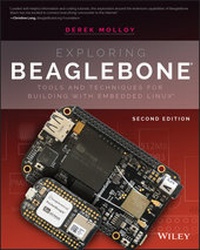
Exploring BeagleBone
Description

Exploring BeagleBone is a hands-on guide to bringing gadgets, gizmos, and robots to life using the popular BeagleBone embedded Linux platform. Comprehensive content and deep detail provide more than just a BeagleBone instruction manual-you'll also learn the underlying engineering techniques that will allow you to create your own projects. The book begins with a foundational primer on essential skills, and then gradually moves into communication, control, and advanced applications using C/C++, allowing you to learn at your own pace. In addition, the book's companion website features instructional videos, source code, discussion forums, and more, to ensure that you have everything you need.
The BeagleBone's small size, high performance, low cost, and extreme adaptability have made it a favorite development platform, and the Linux software base allows for complex yet flexible functionality. The BeagleBone has applications in smart buildings, robot control, environmental sensing, to name a few; and, expansion boards and peripherals dramatically increase the possibilities. Exploring BeagleBone provides a reader-friendly guide to the device, including a crash course in computer engineering. While following step by step, you can:
* Get up to speed on embedded Linux, electronics, and programming
* Master interfacing electronic circuits, buses and modules, with practical examples
* Explore the Internet-connected BeagleBone and the BeagleBone with a display
* Apply the BeagleBone to sensing applications, including video and sound
* Explore the BeagleBone's Programmable Real-Time Controllers
* Updated to cover the latest Beagle boards, Linux kernel versions, and Linux software releases.
* Includes new content on Linux kernel development, the Linux Remote Processor Framework, CAN bus, IoT frameworks, and much more!
Hands-on learning helps ensure that your new skills stay with you, allowing you to design with electronics, modules, or peripherals even beyond the BeagleBone. Insightful guidance and online peer support help you transition from beginner to expert as you master the techniques presented in Exploring BeagleBone, the practical handbook for the popular computing platform.
More details
Other editions
Additional editions
Content
- Cover
- Title Page
- Copyright Page
- About the Author
- About the Technical Editor
- Credits
- Acknowledgments
- Contents at a Glance
- Contents
- Introduction
- Why the BeagleBone and PocketBeagle?
- How This Book Is Structured
- Conventions Used in This Book
- What You'll Need
- Errata
- Digital Content and Source Code
- Part I Beagle Board Basics
- Chapter 1 The Beagle Hardware Platform
- Introduction to the Boards
- Who Should Use the Beagle Platform
- When to Use Beagle Boards
- When Should You Not Use the Beagle Boards
- BeagleBone Documentation
- The Beagle Hardware
- BeagleBone Versions
- The Beagle Hardware
- Beagle Accessories
- Highly Recommended Accessories
- Headers for the PocketBeagle
- Micro-SD Card (for Booting or Flashing eMMCs)
- External 5V Power Supply (for Peripherals)
- Ethernet Cable (for Wired BBB Network Connection)
- HDMI Cable (for Connection to Monitors/Televisions)
- USB to Serial UART TTL 3.3 (for Finding Problems)
- Optional Accessories
- USB Hub (to Connect Several USB Devices to a USB Host)
- Micro-HDMI to VGA Adapters (for VGA Video and Sound)
- Wi-Fi Adapters (for Wireless Networking)
- USB Webcam (for Capturing Images and Streaming Video)
- USB Keyboard and Mouse (for General-Purpose Computing)
- Capes
- How to Destroy Your Board!
- Summary
- Support
- Chapter 2 Beagle Software
- Linux on the Beagle Boards
- Linux Distributions for Beagle Boards
- Create a Linux Micro-SD Card Image
- Communicating with the Boards
- Installing Drivers
- Wired Network Connections
- Internet-over-USB (All Boards)
- Regular Ethernet (BBB and BeagleBoard Only)
- Ethernet Crossover Cable (BBB and BeagleBoard Only)
- Communicating with Your Board
- Serial Connection over USB
- Serial Connection with the USB-to-TTL 3.3 V Cable
- Connecting Through Secure Shell
- Secure Shell Connections Using PuTTY
- Chrome Apps: Secure Shell Client
- Transferring Files Using PuTTY/psftp over SSH
- Controlling the Beagle Board
- Basic Linux Commands
- First Steps
- Basic File System Commands
- Environment Variables
- Basic File Editing
- What Time Is It?
- Package Management
- Beagle-Specific Commands
- Expand the File System on an SD Card
- Update the Kernel
- Interacting with the On-Board LEDs
- Shutdown
- Node.js, Cloud9, and BoneScript
- Introduction to Node.js
- Introduction to the Cloud9 IDE
- Introduction to BoneScript
- Summary
- Further Reading
- Chapter 3 Exploring Embedded Linux Systems
- Introducing Embedded Linux
- Advantages and Disadvantages of Embedded Linux
- Is Linux Open Source and Free?
- Booting the Beagle Boards
- Bootloaders
- Kernel Space and User Space
- The systemd System and Service Manager
- Managing Linux Systems
- The Superuser
- System Administration
- The Linux File System
- Links to Files and Directories
- Users and Groups
- File System Permissions
- The Linux Root Directory
- Commands for File Systems
- The Reliability of SD Card/eMMC File Systems
- Linux Commands
- Output and Input Redirection (&, &&, and &)
- Pipes (| and tee)
- Filter Commands (from sort to xargs)
- echo and cat
- diff
- tar
- md5sum
- Linux Processes
- How to Control Linux Processes
- Foreground and Background Processes
- Other Linux Topics
- Using Git for Version Control
- A Practice-Based Introduction
- Cloning a Repository (git clone)
- Getting the Status (git status)
- Adding to the Staging Area (git add)
- Committing to the Local Repository (git commit)
- Pushing to the Remote Repository (git push)
- Git Branching
- Creating a Branch (git branch)
- Merging a Branch (git merge)
- Deleting a Branch (git branch -d)
- Common Git Commands
- Desktop Virtualization
- Code for This Book
- Summary
- Further Reading
- Bibliography
- Chapter 4 Interfacing Electronics
- Analyzing Your Circuits
- Digital Multimeter
- Oscilloscopes
- Basic Circuit Principles
- Voltage, Current, Resistance, and Ohm's Law
- Voltage Division
- Current Division
- Implementing Circuits on a Breadboard
- Digital Multimeters and Breadboards
- Example Circuit: Voltage Regulation
- Discrete Components
- Diodes
- Light-Emitting Diodes
- Smoothing and Decoupling Capacitors
- Transistors
- Transistors as Switches
- Field Effect Transistors as Switches
- Optocouplers/Optoisolators
- Switches and Buttons
- Hysteresis
- Logic Gates
- Floating Inputs
- Pull-Up and Pull-Down Resistors
- Open-Collector and Open-Drain Outputs
- Interconnecting Gates
- Analog-to-Digital Conversion
- Sampling Rate
- Quantization
- Operational Amplifiers
- Ideal Operational Amplifiers
- Negative Feedback and Voltage Follower
- Positive Feedback
- Concluding Advice
- Summary
- Further Reading
- Chapter 5 Practical Beagle Board Programming
- Introduction
- Performance of Different Languages
- Setting the CPU Frequency
- Scripting Languages
- Scripting Language Options
- Bash
- Lua
- Perl
- Python
- Dynamically Compiled Languages
- JavaScript and Node.js on the Beagle boards
- Java on the Beagle Boards
- C and C++ on the Beagle Boards
- C and C++ Language Overview
- Compiling and Linking
- Writing the Shortest C/C++ Program
- Static and Dynamic Compilation
- Variables and Operators in C/C++
- Pointers in C/C++
- C-Style Strings
- LED Flashing Application in C
- The C of C++
- First Example and Strings in C++
- Passing by Value, Pointer, and Reference
- Flashing the LEDs Using C++ (non-OO)
- Writing a Multicall Binary
- Overview of Object-Oriented Programming
- Classes and Objects
- Encapsulation
- Inheritance
- Object-Oriented LED Flashing Code
- Interfacing to the Linux OS
- Glibc and Syscall
- Improving the Performance of Python
- Cython
- Boost.Python
- Summary
- Further Reading
- Bibliography
- Part II Interfacing, Controlling, and Communicating
- Chapter 6 Interfacing to the Beagle Board Input/Outputs
- General-Purpose Input/Outputs
- Introduction to GPIO Interfacing
- GPIO Digital Output
- GPIO Digital Input
- GPIO Configuration
- Internal Pull-Up and Pull-Down Resistors
- GPIO Pin Configuration Settings
- Interfacing to Powered DC Circuits
- C++ Control of GPIOs
- The Linux Device Tree
- Flattened Device Tree on the Beagle Boards
- Modifying a Board Device Tree
- Boot Configuration Files
- Analog Inputs and Outputs
- Analog Inputs
- Enabling the Analog Inputs
- Analog Input Application-A Simple Light Meter
- Analog Outputs (PWM)
- Output Application-Controlling a Servo Motor
- BoneScript
- Digital Read and Write
- Analog Read
- Analog Write (PWM)
- GPIO Performance
- Advanced GPIO Topics
- More C++ Programming
- Callback Functions
- POSIX Threads
- Linux poll (sys/poll.h)
- Enhanced GPIO Class
- Using GPIOs without Using sudo
- Root Permissions with setuid
- Summary
- Further Reading
- Chapter 7 Cross-Compilation, Eclipse, and Building Linux
- Setting Up a Cross-Compilation Toolchain
- Cross-Compiling Under Debian
- Testing the Toolchain
- Emulating the armhf Architecture
- Cross-Compilation with Third-Party Libraries (Multiarch)
- Cross-Compilation Using Eclipse
- Installing Eclipse on Desktop Linux
- Configuring Eclipse for Cross-Compilation
- Remote System Explorer
- Integrating GitHub into Eclipse
- Remote Debugging
- Automatic Documentation (Doxygen)
- Adding Doxygen Editor Support in Eclipse
- Cross-Building Linux
- Downloading the Kernel Source
- Building the Linux Kernel
- Building a Poky Linux Distribution (Advanced)
- Summary
- Chapter 8 Interfacing to the Beagle Board Buses
- Introduction to Bus Communication
- I2C
- I2C Hardware
- I2C on the Beagle Boards
- I2C Devices on the Beagle Boards
- An I2C Test Circuit
- A Real-Time Clock
- The ADXL345 Accelerometer
- Wiring the Test Circuit
- Using Linux I2C-Tools
- i2cdetect
- i2cdump
- i2cget
- i2cset
- I2C Communication in C
- Wrapping I2C Devices with C++ Classes
- SPI
- SPI Hardware
- SPI on the Beagle Boards
- Testing an SPI Bus
- A First SPI Application (74HC595)
- Wiring the 74HC595 Circuit
- SPI Communication Using C
- Bidirectional SPI Communication in C/C++
- The ADXL345 SPI Interface
- Connecting the ADXL345 to the Beagle Boards
- Wrapping SPI Devices with C++ Classes
- Three-Wire SPI Communication
- Multiple SPI Slave Devices
- UART
- The Beagle Board UART
- UART Examples in C
- Beagle Board Serial Client
- LED Serial Server
- UART Applications: GPS
- CAN Bus
- Beagle Board CAN Bus
- SocketCAN
- A CAN Bus Test Circuit
- Linux CAN-utils
- A SocketCAN C Example
- Logic-Level Translation
- Summary
- Further Reading
- Chapter 9 Interacting with the Physical Environment
- Interfacing to Actuators
- DC Motors
- Driving Small DC Motors (up to 1.5 A)
- Controlling a DC Motor Using sysfs
- Driving Larger DC Motors (Greater than 1.5 A)
- Controlling a DC Motor Using C++
- Stepper Motors
- The EasyDriver Stepper Motor Driver
- A Beagle Board Stepper Motor Driver Circuit
- Controlling a Stepper Motor Using C++
- Relays
- Interfacing to Analog Sensors
- Protecting the ADC Inputs
- Diode Clamping
- Op-Amp Clamping
- Analog Sensor Signal Conditioning
- Scaling Using Voltage Division
- Signal Offsetting and Scaling
- Analog Interfacing Examples
- Infrared Distance Sensing
- ADXL335 Conditioning Example
- Interfacing to Local Displays
- MAX7219 Display Modules
- Character LCD Modules
- Building C/C++ Libraries
- Makefiles
- CMake
- A Hello World Example
- Building a C/C++ Library
- Using a Shared (.so) or Static (.a) Library
- Summary
- Further Reading
- Chapter 10 Real-Time Interfacing Using External Slave Processors
- Real-Time Beagle Board
- Real-Time Kernels
- Real-Time Hardware Solutions
- Extended GPIO Availability
- The MCP23017 and the I2C Bus
- Controlling the GPIO LED Circuit
- Reading the GPIO Button State
- An Interrupt Configuration Example (Advanced)
- The MCP23S17 and the SPI Bus
- A C++ Class for the MCP23x17 Devices
- Adding External UARTs
- The Arduino
- An Arduino Serial Slave
- A UART Echo Test Example
- UART Command Control of an Arduino
- An Arduino I2C Slave
- An I2C Test Circuit
- I2C Register Echo Example
- I2C Temperature Sensor Example
- I2C Temperature Sensor with a Warning LED
- Arduino Slave Communication Using C/C++
- An I2C Ultrasonic Sensor Application
- Summary
- Further Reading
- Part III Advanced Beagle Board Systems
- Chapter 11 The Internet of Things
- The Internet of Things
- A Beagle Board IoT Sensor
- The Beagle Board as a Sensor Web Server
- Installing and Configuring a Web Server
- Configuring the Apache Web Server
- Creating Web Pages and Web Scripts
- PHP on the Beagle Board
- GNU Cgicc Applications (Advanced)
- Replacing Bone101 with Apache
- A C/C++ Web Client
- Network Communications Primer
- A C/C++ Web Client
- Secure Communication Using OpenSSL
- A Beagle Board as a "Thing"
- ThingSpeak
- The Linux Cron Scheduler
- System crontab
- User crontab
- Sending E-mail from the Beagle Board
- If This Then That
- IoT Frameworks
- MQ Telemetry Transport
- MQTT Server/Broker
- MQTT Publisher/Subscriber on a Beagle Board
- The mqtt-spy Debug Tool
- Writing MQTT Code
- A Paho MQTT Publisher Example
- A Paho MQTT Subscriber Example
- Adafuit IO
- Configuring the Adafruit IO Account
- Connecting to Adafruit IO with MQTT
- An MQTT Node.js Publish Example
- The C++ Client/Server
- IoT Device Management
- Remote Monitoring of a Beagle Board
- Beagle Board Watchdog Timers
- Static IP Addresses
- Power over Ethernet
- PoE Power Extraction Modules (Advanced Topic)
- Summary
- Chapter 12 Wireless Communication and Control
- Introduction to Wireless Communications
- Bluetooth Communications
- Installing a Bluetooth Adapter
- Checking the LKM
- Configuring a Bluetooth Adapter
- Making the Beagle Board Discoverable
- Android App Development with Bluetooth
- Wi-Fi Communications
- Installing a Wi-Fi Adapter
- The NodeMCU Wi-Fi Slave Processor
- Flashing with the Latest Firmware
- Connecting the NodeMCU to Wi-Fi
- Programming the NodeMCU
- The NodeMCU Web Server Interface
- JSON
- The NodeMCU and MQTT
- ZigBee Communications
- Introduction to XBee Devices
- AT versus API Mode
- XBee Configuration
- XCTU
- Configuring an XBee Network Using XCTU
- An XBee AT Mode Example
- Setting Up the Arduino XBee Device (XBeeA)
- Setting Up the PocketBeagle XBee Device (XBeePB)
- An XBee API Mode Example
- Setting Up the PocketBeagle XBee Device (XBee1)
- Setting Up the Stand-Alone XBee Device (XBee2)
- XBee API Mode and Node.js
- XBee and C/C++
- Near Field Communication
- Summary
- Chapter 13 Beagle Board with a Rich User Interface
- Rich UI Beagle Board Architectures
- Beagle Boards as General-Purpose Computers
- Connecting a Bluetooth Input Peripheral
- BeagleBone with a LCD Touchscreen Cape
- Virtual Network Computing
- VNC Using VNC Viewer
- VNC with Xming and PuTTY
- VNC with a Linux Desktop Computer
- Fat-Client Applications
- Rich UI Application Development
- Introduction to GTK+ on the Beagle Boards
- The "Hello World" GTK+ Application
- The Event-Driven Programming Model
- The GTK+ Temperature Application
- Introduction to Qt for the Beagle Board
- Installing Qt Development Tools
- The "Hello World" Qt Application
- Qt Primer
- Qt Concepts
- The QObject Class
- Signals and Slots
- Qt Development Tools
- A First Qt Creator Example
- A Qt Temperature Sensor GUI Application
- Remote UI Application Development
- Fat-Client Qt GUI Application
- Multithreaded Server Applications
- A Multithreaded Temperature Service
- Parsing Stream Data
- The Fat Client as a Server
- Parsing Stream Data with XML
- The Beagle Board Client Application
- Summary
- Further Reading
- Chapter 14 Images, Video, and Audio
- Capturing Images and Video
- USB Webcams
- Video4Linux2 (V4L2)
- Image Capture Utility
- Video4Linux2 Utilities
- Writing Video4Linux2 Programs
- Streaming Video
- Image Processing and Computer Vision
- Image Processing with OpenCV
- Computer Vision with OpenCV
- Boost
- BeagleBone Audio
- Core Audio Software Tools
- Audio Devices for the Beagle Boards
- HDMI and USB Audio Playback Devices
- Internet Radio Playback
- Recording Audio
- Audio Network Streaming
- Bluetooth A2DP Audio
- Text-to-Speech
- Summary
- Further Reading
- Chapter 15 Real-Time Interfacing with the PRU-ICSS
- The PRU-ICSS
- The PRU-ICSS Architecture
- The Remote Processor Framework
- Important Documents
- Development Tools for the PRU-ICSS
- The PRU Code Generation Tools
- The PRU Debugger
- Using the AM335x PRU-ICSS
- Setting Up the Board for Remoteproc
- Testing Remoteproc under Linux
- A First PRU Example
- PRU-ICSS Enhanced GPIOs
- A First PRU Program
- A First PRU Program in C
- A First PRU Program in Assembly
- The PRU-ICSS in Detail
- Registers
- Local and Global Memory
- PRU Assembly Instruction Set
- PRU-ICSS Applications
- PRU-ICSS Performance Tests
- Utilizing Regular Linux GPIOs
- A PRU PWM Generator
- A PRU Sine Wave Generator
- An Ultrasonic Sensor Application
- Summary
- Further Reading
- Chapter 16 Embedded Kernel Programming
- Introduction
- Why Write Kernel Modules?
- Loadable Kernel Module Basics
- A First LKM Example
- The LKM Makefile
- Building the LKM on a Beagle Board
- Testing the First LKM Example
- Testing the LKM Parameter
- An Embedded LKM Example
- Interrupt Service Routines
- Performance
- Enhanced Button GPIO Driver LKM
- The kobject Interface
- Enhanced LED GPIO Driver LKM
- Kernel Threads
- Conclusions
- Summary
- Index
- EULA
Introduction
The Beagle platform continues to amaze! Given the proliferation of smartphones, the idea of holding in one hand a computer that is capable of performing two billion instructions per second is easy to take for granted-but the fact that you can modify the hardware and software of such small yet powerful devices and adapt them to suit your own needs and create your own inventions is nothing short of amazing. Even better, you can purchase a board for as little as $25 in the form of a PocketBeagle.
The Beagle boards on their own are too complex to be used by a general audience; it is the capability of the boards to run Linux that makes the resulting platform accessible, adaptable, and powerful. Together, Linux and embedded systems enable ease of development for devices that can meet future challenges in smart buildings, the Internet of Things (IoT), robotics, smart energy, smart cities, human-computer interaction (HCI), cyber-physical systems, 3D printing, smart manufacturing, interactive art, advanced vehicular systems, and many, many more applications.
The integration of high-level Linux software and low-level electronics represents a paradigm shift in embedded systems development. It is revolutionary that you can build a low-level electronics circuit and then install a Linux web server, using only a few short commands, so that the circuit can be controlled over the internet. You can easily use a Beagle board as a general-purpose Linux computer, but it is vastly more challenging and interesting to get underneath the hood and fully interface it to electronic circuits of your own design-and that is where this book comes in!
This book should have widespread appeal for inventors, makers, students, entrepreneurs, hackers, artists, dreamers-in short, anybody who wants to bring the power of embedded Linux to his or her products, inventions, creations, or projects and truly understand the Beagle platform in detail. This is not a recipe book-with few exceptions, everything demonstrated here is explained at a level that will enable you to design, build, and debug your own extensions of the concepts presented here. Nor is there any grand design project at the end of this book for which you must purchase a prescribed set of components and peripherals to achieve a specific outcome. Rather, this book is about providing you with enough background knowledge and "under-the-hood" technical details to enable and motivate your own explorations.
I strongly believe in learning by doing, so I present examples using low-cost, widely available hardware so that you can follow along. Using these hands-on examples, I describe what each step means in detail so that when you substitute your own hardware components, modules, and peripherals you will be able to adapt the content in this book to suit your needs. As for that grand project or invention-that is left up to you and your imagination!
When writing this book, I had the following aims and objectives:
- To explain embedded Linux and its interaction with electronic circuits-taking you through the topics from mystery to mastery!
- To provide in-depth information and instruction on the Linux, electronics, and programming skills that are required to master a pretty wide and comprehensive variety of topics in this domain.
- To create a collection of practical "Hello World" hardware and software examples on each and every topic in the book, from low-level interfacing, general-purpose input/outputs (GPIOs), analog-to-digital converters (ADCs), buses, and UARTs, to high-level libraries such as OpenCV, Qt, and complex and powerful topics, such as real-time interfacing with the PRU-ICSS, and Linux kernel programming.
- To ensure that each circuit and segment of code is specifically designed to work with a Beagle board. Every circuit and code example in this book was built and tested on the BeagleBone Black wireless and PocketBeagle boards.
- To use the "Hello World" examples to build a library of code that you can use and adapt for your own Beagle projects.
- To make all of the code available on GitHub in an easy-to-use form.
- To support this book with strong digital content, such as the videos on the DerekMolloyDCU YouTube channel, and a custom website,
www.exploringbeaglebone.com - To ensure that by the end of this book you have everything you need to imagine, create, and build advanced Beagle board projects.
I wrote this second edition because of the popularity of the first edition of Exploring BeagleBone. The number of pages in this edition is more than 20 percent of the first edition, increased to include the following major additions:
- Full coverage of new Beagle boards, with a particular emphasis on the PocketBeagle and BeagleBone Black wireless boards
- Updated content to account for all recent changes to the Linux kernel and operating system
- Inclusion of electronics interfacing approaches, such as protection of I/O pins using optocouplers, the CAN bus, and many additional interfacing application examples using external I/O circuits
- New work on real-time interfacing using external slave processors, with a particular emphasis on building I2C digital sensors
- A full account of new Internet of Things (IoT) full-stack frameworks, with an emphasis on MQTT and interfacing to Adafruit IO
- Full coverage of building wireless sensor networks using technologies such as Wi-Fi, Bluetooth, NFC, and ZigBee
- A complete rewrite of the PRU-ICSS chapter to account for Texas Instruments' decision to move away from UIO to Linux Remoteproc
- Inclusion of new work on writing Linux loadable kernel modules (LKMs)
Why the BeagleBone and PocketBeagle?
The Beagle boards are powerful single-board computers (SBCs), and while there are other SBCs available on the market, such as the Raspberry Pi and Intel NUC boards, the Beagle platform has one key differentiator-it was built to be interfaced to! For example, the Beagle board's microprocessor package even contains two additional on-chip microcontrollers that can be used for real-time interfacing-an area in which other Linux SBCs have significant difficulty.
Unlike most other SBCs, the Beagle boards are fully open-source hardware. The BeagleBoard.org Foundation provides source schematics, hardware layout, a full bill of materials, and comprehensive technical reference manuals, enabling you to modify the design of the Beagle platform and integrate it into your own product. In fact, you can even fork the hardware design onto Upverter (www.upverter.comtiny.cc/beagle001
How This Book Is Structured
There is no doubt that some of the topics in this book are quite complex-the Beagle boards are complex devices! However, everything that you need to master the devices is present in the book within three major parts.
- Part I, "Beagle Board Basics"
- Part II, "Interfacing, Controlling, and Communicating"
- Part III, "Advanced Beagle Board Systems"
In the first part in the book, you learn about the hardware and software of the Beagle board platform in Chapters 1 and 2 and subsequently gain more knowledge through these three primer chapters:
- Chapter 3, "Exploring Embedded Linux Systems"
- Chapter 4, "Interfacing Electronics"
- Chapter 5, "Practical Beagle Board Programming"
If you are a Linux expert, electronics wizard, and/or software guru, then feel free to skip the primer chapters; however, for everyone else, you'll find a concise but detailed set of materials to ensure that you gain all the knowledge required to effectively and safely interface to your Beagle boards.
The second part of the book, Chapters 6 to 10, provides detailed information on interfacing to the Beagle board GPIOs, analog inputs, buses (I2C, SPI, CAN bus), UART devices, USB peripherals, and real-time interfacing to slave processors. You'll learn how you can configure a cross-compilation environment so that you can build large-scale software applications. This part also describes how you can combine hardware and software to provide your board with the ability to interact effectively with its physical environment.
The final part of the book, Chapters 11 to 16, describes how the Beagle board can be used for advanced applications such as Internet of Things (IoT); rich user interfaces; images, video, and audio; real-time interfacing using the PRU-ICSS; and kernel programming. Along the way you will meet many technologies, including TCP/IP, ThingSpeak, Adafruit IO, PoE, Wi-Fi, Bluetooth, Zigbee, RFID, MQTT, cron, Apache, PHP, e-mail, IFTTT, VNC, GTK+, Qt, XML, JSON, multi-threading, client/server programming, V4L2, video streaming, OpenCV, Boost, USB audio, Bluetooth A2DP, text-to-speech, and Remoteproc.
Conventions Used in This Book
This book is filled with source code examples and snippets that you can use to build your own applications. Code and commands are shown as follows:
This is what source code looks...
