

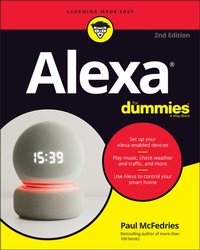
Alexa For Dummies
1st Edition
Published on 28. July 2021
320 pages
978-1-119-82209-7 (ISBN)
Description

Make your every wish Alexa's command with this in-depth guide to the wildly popular Amazon smart speaker
You might be thinking, "All I have to do is plug in my Echo device and start using it!" And you'd be right. But if you really want to explore what that compact little device can do, then Alexa For Dummies is your go-to resource. This book shows you how to customize your device to respond to your requests and enhance your life.
Alexa For Dummies takes you on a tour of all things Alexa: its capabilities, tools, settings, and skills. Go beyond the basics of playing music, calling friends, reading the news, and checking the weather. You'll learn how to make Alexa private and secure, connect it to your smart home devices, and even make it sound like Samuel L. Jackson, if you feel like it. You can also extend its capabilities by adding new skills.
* Customize your device to respond to your voice
* Troubleshoot when a light is signaling something's wrong
* Add skills to play music and audiobooks
* Create routines to turn on lights, adjust the thermostat, set your security alarm, and lock your doors
* Sync your smart devices throughout your home
* Use Alexa to connect to a Zoom meeting or phone call with your friends or family
No matter which device you have--Echo, Echo Dot, Echo Show, Echo Studio, Echo Flex, Echo Loop, Echo Buds, or Echo Frames--Alexa For Dummies is the perfect companion. Ready to get started? Say "Hey, Alexa, order Alexa For Dummies!"
You might be thinking, "All I have to do is plug in my Echo device and start using it!" And you'd be right. But if you really want to explore what that compact little device can do, then Alexa For Dummies is your go-to resource. This book shows you how to customize your device to respond to your requests and enhance your life.
Alexa For Dummies takes you on a tour of all things Alexa: its capabilities, tools, settings, and skills. Go beyond the basics of playing music, calling friends, reading the news, and checking the weather. You'll learn how to make Alexa private and secure, connect it to your smart home devices, and even make it sound like Samuel L. Jackson, if you feel like it. You can also extend its capabilities by adding new skills.
* Customize your device to respond to your voice
* Troubleshoot when a light is signaling something's wrong
* Add skills to play music and audiobooks
* Create routines to turn on lights, adjust the thermostat, set your security alarm, and lock your doors
* Sync your smart devices throughout your home
* Use Alexa to connect to a Zoom meeting or phone call with your friends or family
No matter which device you have--Echo, Echo Dot, Echo Show, Echo Studio, Echo Flex, Echo Loop, Echo Buds, or Echo Frames--Alexa For Dummies is the perfect companion. Ready to get started? Say "Hey, Alexa, order Alexa For Dummies!"
More details
Other editions
Additional editions
Person
Paul McFedries has been writing about computers and technology for nearly 30 years. He has authored more than 100 books that have sold more than four million copies worldwide.
Content
Introduction 1
Part 1: Getting Started with Alexa 5
Chapter 1: Getting to Know Alexa 7
Chapter 2: Setting Up Alexa and Your Devices 21
Chapter 3: Learning Alexa Basics 43
Part 2: Having Fun with Alexa 59
Chapter 4: Playing Media 61
Chapter 5: Communicating with Alexa 89
Chapter 6: Using Alexa at Home 111
Chapter 7: Being More Productive 131
Part 3: Getting More out of Your Relationship with Alexa 149
Chapter 8: Asking Alexa Questions 151
Chapter 9: Adding Skills to Alexa 161
Chapter 10: Making Alexa Accessible 177
Part 4: Controlling Your Smart Home 191
Chapter 11: Setting Up Your Smart Home 193
Chapter 12: Uncovering Some Smarter Smart-Home Techniques 215
Part 5: The Part of Tens 237
Chapter 13: Ten (Times Ten) Ridiculously Fun Alexa Tricks 239
Chapter 14: Ten Things That Can Go Wrong (and How to Fix Them) 247
Chapter 15: Ten Ways to Beef Up Security and Privacy 263
Index
Part 1: Getting Started with Alexa 5
Chapter 1: Getting to Know Alexa 7
Chapter 2: Setting Up Alexa and Your Devices 21
Chapter 3: Learning Alexa Basics 43
Part 2: Having Fun with Alexa 59
Chapter 4: Playing Media 61
Chapter 5: Communicating with Alexa 89
Chapter 6: Using Alexa at Home 111
Chapter 7: Being More Productive 131
Part 3: Getting More out of Your Relationship with Alexa 149
Chapter 8: Asking Alexa Questions 151
Chapter 9: Adding Skills to Alexa 161
Chapter 10: Making Alexa Accessible 177
Part 4: Controlling Your Smart Home 191
Chapter 11: Setting Up Your Smart Home 193
Chapter 12: Uncovering Some Smarter Smart-Home Techniques 215
Part 5: The Part of Tens 237
Chapter 13: Ten (Times Ten) Ridiculously Fun Alexa Tricks 239
Chapter 14: Ten Things That Can Go Wrong (and How to Fix Them) 247
Chapter 15: Ten Ways to Beef Up Security and Privacy 263
Index
