

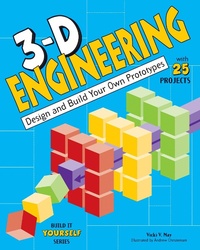
3-D Engineering
Description

How did somebody come up with the idea for bridges, skyscrapers, helicopters, and nightlights? How did people figure out how to build them? In 3D Engineering: Design and Build Your Own Prototypes, young readers tackle real-life engineering problems by figuring out real-life solutions. Kids apply science and math skills to create prototypes for bridges, instruments, alarms, and more. Prototypes are preliminary models used by engineers-and kids-to evaluate ideas and to better understand how things work. Engineering design starts with an idea. How do we get to the other side of the river? How do we travel long distances in short times? Using a structured engineering design process, kids learn how to brainstorm, build a prototype, test a prototype, evaluate, and re-design. Projects include designing a cardboard chair to understand the stiffness of structural systems and designing and building a set of pan pipes to experiment with pitch and volume. Creating prototypes is a key step in the engineering design process and prototyping early in the design process generally results in better processes and products. 3D Engineering gives kids a chance to figure out many different prototypes, empowering them to discover the mechanics of the world we know.
More details
Other editions
Additional editions
Persons
Content
- Cover
- Contents
- Introduction: Engineering Design
- Chapter 1: Stiff, Strong, and Stable
- Chapter 2: Everything is Spinning
- Chapter 3: Staying Afloat and Aloft
- Chapter 4: Quite the Reaction
- Chapter 5: Making Music
- Chapter 6: Electrifying Devices
- Chapter 7: Energy Converters
- Chapter 8: Design and Build Prototypes
- Glossary
- Resources
- Index
- Back Cover
