
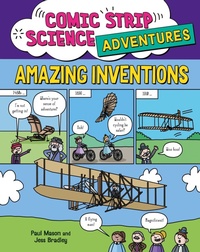
Amazing Inventions
Description
Alles über E-Books | Antworten auf Fragen rund um E-Books, Kopierschutz und Dateiformate finden Sie in unserem Info- & Hilfebereich.
An entertaining collection of comic strip stories uncovering the stories around some incredible inventions.
Discover how the Wright Brothers got into flying planes, the science behind the lightbulb, some incredible child inventors and more. This book is sure to entertain children, while giving them an insight into the many challenges and rivalries behind scientific achievements and how scientists learn from mistakes. It is produced by the same team as Comic Strip Science¿with hilarious comic strips illustrated by award-winning artist Jess Bradley and written by Paul Mason, who is well known for making science learning fun. Key science concepts are pulled out in more depth in feature spreads. The book has a specialist text consulant, science educator Peter Riley.
Comic Strip Science Adventures is a series of comic books that are perfect for young scientists aged 7 plus. Each book has specialist subject consultants. Titles in the series: Digging for Dinosaurs, Exploring Space, Medical Marvels, Amazing Inventions.
More details
Other editions
Additional editions

Persons
System requirements
File format: ePUB
Copy protection: Adobe-DRM (Digital Rights Management)
System requirements:
- Computer (Windows; MacOS X; Linux): Install the free reader Adobe Digital Editions prior to download (see eBook Help).
- Tablet/smartphone (Android; iOS): Install the free app Adobe Digital Editions or the app PocketBook before downloading (see eBook Help).
- E-reader: Bookeen, Kobo, Pocketbook, Sony, Tolino and many more (not Kindle).
The file format ePub works well for novels and non-fiction books – i.e., „flowing” text without complex layout. On an e-reader or smartphone, line and page breaks automatically adjust to fit the small displays.
This eBook uses Adobe-DRM, a „hard” copy protection. If the necessary requirements are not met, unfortunately you will not be able to open the eBook. You will therefore need to prepare your reading hardware before downloading.
Please note: We strongly recommend that you authorise using your personal Adobe ID after installation of any reading software.
For more information, see our ebook Help page.