

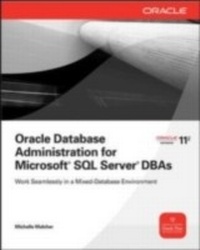
Oracle Database Administration for Microsoft SQL Server DBAs
1st Edition
Published on 1. September 2010
327 pages
978-0-07-174430-0 (ISBN)
Description

Apply Your SQL Server DBA Skills to Oracle Database Administration Use your SQL Server experience to set up and maintain a high-performance Oracle Database environment. Written by a DBA with expertise in both platforms, Oracle Database Administration for Microsoft SQL Server DBAs illustrates each technique with clear explanations, examples, and comparison tables. Get full details on Oracle Database intervals, creation assistants, management techniques, and query tools. High availability, disaster recovery, and security procedures are also extensively covered in this comprehensive Oracle Press guide. Install and configure Oracle Database on Windows or Linux systems Administer and monitor databases from Oracle Enterprise Manager Implement robust security using roles, permissions, and privileges Back up and restore databases with Oracle Recovery Manager Use the Oracle cost-based optimizer to tune performance Write, debug, and execute PL/SQL queries using Oracle SQL Developer Maximize availability with Oracle Real Application Clusters Build standby and failover servers using Oracle Data Guard
More details
Other editions
Additional editions
Michelle Malcher
Oracle Database Administration for Microsoft SQL Server DBAs
Book
11/2010
Osborne/McGraw-Hill
€55.70
Article not available at the moment
Content
- Cover Page
- Oracle Database Administration for Microsoft® SQL Server® DBAs
- Copyright Page
- Dedication
- Contents
- Acknowledgments
- Introduction
- 1 The Database Administrator
- General DBA Skills
- Where Do DBAs Belong in an Organization?
- Database Installation Planning
- Leveraging Skills
- Database Migrations
- Summary
- 2 Oracle Internals
- Memory Structures
- Oracle Memory Parameters
- Sizing the SGA and PGA
- Where Are the master, msdb, and tempdb Databases?
- System-level Information
- Data Dictionary Views
- Jobs and Schedules
- Templates and Temporary Tables
- Services and Processes
- sp_configure Options and Parameters
- Viewing and Setting Parameters
- Getting Started with Some Parameters
- Undo, Redo, and Logs
- Transaction Logs Versus Redo Logs
- Undo and Beyond
- Summary
- 3 Oracle Installation
- Operating Systems
- Windows Setup
- Useful Linux/Unix Commands
- Linux Setup
- Storage Requirements
- Disk Storage
- Storage Management with ASM
- Oracle Files
- Oracle Database Components
- Oracle Software Installation
- Using a Response File
- Removing Software
- Upgrading the Database
- Applying Patches
- Summary
- 4 Database Definitions and Setup
- Servers, Databases, Instances, and Schemas
- SQL Server Setup Versus Oracle Setup
- Creating Databases
- Using the DBCA
- Duplicating Databases with Templates and Scripts
- Creating the Listener
- Choosing a Character Set
- Security
- Permissions for the Server
- Permissions for Schemas
- DBA Roles and Responsibilities Revisited
- Summary
- 5 DBA Tools
- Overview of Tools for Typical Database Tasks
- Oracle Enterprise Manager
- OEM Navigation
- Storage Management
- Database Configuration
- Oracle Scheduler
- Statistics and Resource Management
- Security
- Enterprise Manager Configuration
- SQL*Plus
- SQL Developer
- Client Connections
- Client Connection Configuration
- JDBC Connections
- Aliases
- My Oracle Support
- Summary
- 6 Database Backup, Restore, and Recovery
- Backing Up Databases
- Backup Strategies
- Backup and Restore Commands
- RMAN Configuration for Backups
- Backup Options
- Backup Examples
- OEM Backup Jobs
- Restoring and Recovering Databases
- What Can Go Wrong?
- Restore and Recover Options
- Data Recovery Advisor
- Copying the Database
- Managing Backups
- Viewing Backups
- Purging Obsolete Files
- Backing Up and Restoring Objects
- Copying Objects at the Table and Schema Level
- Using Data Pump
- Protecting Users from Users
- Recycle Bin
- Flashback
- Summary
- 7 Database Maintenance
- Maintenance Tasks
- Consistency Checks
- Health Checks
- Update Statistics
- System Statistics
- Object Statistics
- Object Maintenance
- Index Rebuild
- Table Reorganization
- Invalid Objects
- Grants
- Synonyms
- Job Scheduling
- Creating a Job in Oracle Scheduler
- Using DBMS_SCHEDULER
- Setting Up System and User Jobs
- File Maintenance
- Shrinking and Resizing Files
- Tablespace Monitoring
- Error Logs, Alert Logs, and Trace Files
- Summary
- 8 Performance and Tuning
- Better-Performing Systems
- Indexes
- Index Monitoring
- Index Types
- Locking
- Current Activity Views
- Current Sessions
- Activity Monitors
- Waits
- SQL Plans
- Viewing Explain Plans
- Tuning Using Explain Plans
- Automatic Workload Repository
- AWR Reports
- Active Session History View
- Library Cache for SQL Statements
- Summary
- 9 PL/SQL
- Database Coding Practices
- Packages and Package Bodies
- Triggers
- Updates and Conditions
- Transactions
- Beginning a Transaction
- Defining Commits
- Cursor Processing
- Processing with FORALL
- Functions
- Debugging Procedures and Unit Testing
- Error Handling
- Error Handling Packages
- Standard Error Messages
- Using DBMS Packages
- Summary
- 10 High-Availability Architecture
- Options for High Availability
- Clustering with RAC
- Configuring RAC
- Testing RAC
- Setting Up Client Failover
- Setting Up RAC Listeners
- Patching RAC
- Deploying RAC
- Configuring and Monitoring RAC Instances
- Primary and Standby Databases
- Using Active Standby Databases
- Setting Up a Standby Database
- ASM in an RAC Environment
- Managing ASM Disk Groups
- Viewing ASM Information
- Streams and Advanced Replication
- Oracle Streams
- Advanced Replication
- Summary
- Appendix
- Index
