

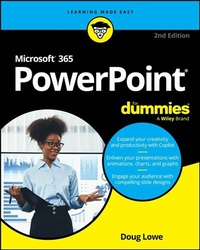
Microsoft 365 PowerPoint For Dummies
Description

Present like a pro, with the top-selling PowerPoint book on the market
Since 1999, PowerPoint For Dummies has been giving readers a jargon-free way to compose compelling presentations. This update covers the latest release of Office and Office 365. Learn the basics of creating a slide deck in PowerPoint, then discover the dynamic features you can use to give your slides a bit of pizazz. Import data from other applications, collaborate in the cloud, and incorporate charts, graphics, and videos into your presentations. Plus, learn how to use Microsoft's new Copilot AI tool-integrated right into the application. Consider this book your first step to making a splash with PowerPoint!
- Create your first PowerPoint slide deck and add presentation notes
- Improve the design of your slides with templates and best-practice tips
- Add animations, change your font style, and insert images and drawings
- Share your presentation with audiences in a virtual setting
New and not-so-new PowerPoint users who need a guide to the basics of building a successful presentation will love this up-to-date, beginner-friendly book.
More details
Other editions
Additional editions
Person
Doug Lowe is the information technology director for a civil engineering firm. He has been managing networks for more than 20 years and is the best-selling author of more than 30 For Dummies books, including Networking For Dummies and Networking All-in-One For Dummies.
Content
Introduction 1
Part 1: Getting Started with PowerPoint 5
Chapter 1: Welcome to PowerPoint 7
Chapter 2: Taking the Backstage Tour 31
Chapter 3: Editing Slides 45
Chapter 4: Working in Outline View 65
Chapter 5: Proofing Your Presentations 73
Chapter 6: Don't Forget Your Notes! 83
Chapter 7: Show Time! 91
Part 2: Creating with Copilot 107
Chapter 8: Getting Started with Copilot 109
Chapter 9: Using Copilot in PowerPoint 123
Chapter 10: Perfecting Your Prompts 131
Part 3: Creating Great-Looking Slides 137
Chapter 11: All about Fonts and Text Formatting 139
Chapter 12: Designing Your Slides 155
Chapter 13: Animating Your Slides 169
Chapter 14: Masters of the Universe Meet the Templates of Doom 189
Part 4: Embellishing Your Slides 211
Chapter 15: Inserting Pictures 213
Chapter 16: Drawing on Your Slides 239
Chapter 17: Charting for Fun and Profit 259
Chapter 18: Working with SmartArt 281
Chapter 19: Lights! Camera! Action! (Adding Sound and Video) 293
Chapter 20: Adding Tables to Your Slides 307
Part 5: Working with Others 317
Chapter 21: Collaborating on Presentations 319
Chapter 22: Exporting Your Presentation to Other Formats 337
Part 6: The Part of Tens 345
Chapter 23: Ten PowerPoint Commandments 347
Chapter 24: Ten (or So) Tips for Creating Readable Slides 351
Chapter 25: Ten Ways to Keep Your Audience Awake 357
Index 361
