

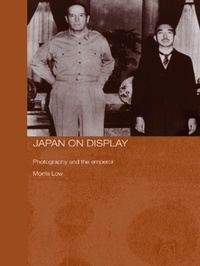
Japan on Display
Photography and the Emperor
Published on 27. September 2006
216 pages
978-1-134-19583-1 (ISBN)
Description

Sixty years on from the end of the Pacific War, Japan on Display examines representations of the Meiji emperor, Mutsuhito (1852-1912) and his grandson the Showa emperor, Hirohito who was regarded as a symbol of the nation, in both war and peacetime. Much of this representation was aided by the phenomenon of photography.
The introduction and development of photography in the nineteenth century coincided with the need to make Hirohito's grandfather, the young Meiji Emperor, more visible. Photo books and albums became a popular format for presenting seemingly objective images of the monarch, reminding the Japanese of their proximity to the Emperor, and the imperial family. In the twentieth century, these 'national albums' provided a visual record of wars fought in the name of the Emperor, while also documenting the reconstruction of Tokyo, scientific expeditions, and imperial tours.
Drawing on archival documents, photographs, and sources in both Japanese and English, this book throws new light on the history of twentieth-century Japan and the central role of Hirohito. With Japan's defeat in the Pacific War, the Emperor was transformed from wartime leader to peace-loving scientist. Japan on Display seeks to understand this reinvention of a more 'human' Emperor and the role that photography played in the process.
The introduction and development of photography in the nineteenth century coincided with the need to make Hirohito's grandfather, the young Meiji Emperor, more visible. Photo books and albums became a popular format for presenting seemingly objective images of the monarch, reminding the Japanese of their proximity to the Emperor, and the imperial family. In the twentieth century, these 'national albums' provided a visual record of wars fought in the name of the Emperor, while also documenting the reconstruction of Tokyo, scientific expeditions, and imperial tours.
Drawing on archival documents, photographs, and sources in both Japanese and English, this book throws new light on the history of twentieth-century Japan and the central role of Hirohito. With Japan's defeat in the Pacific War, the Emperor was transformed from wartime leader to peace-loving scientist. Japan on Display seeks to understand this reinvention of a more 'human' Emperor and the role that photography played in the process.
More details
Series
Language
English
Place of publication
London
United Kingdom
Publishing group
Taylor & Francis Ltd
Target group
College/higher education
Illustrations
25 s/w Abbildungen, 25 s/w Photographien bzw. Rasterbilder
25 Halftones, black and white; 25 Illustrations, black and white
File size
6,94 MB
ISBN-13
978-1-134-19583-1 (9781134195831)
Copyright in bibliographic data and cover images is held by Nielsen Book Services Limited or by the publishers or by their respective licensors: all rights reserved.
Schweitzer Classification
Other editions
Additional editions
Book
11/2012
1st Edition
Routledge
€83.90
Shipment within 15-20 days
Book
03/2006
1st Edition
Routledge
€237.70
Shipment within 15-20 days
Person
Morris Low is professor of East Asian sciences and technology at Johns Hopkins University. His previous publications include Science, Technology and Society in Contemporary Japan (1999); Science, Technology and R&D in Japan (2001); Asian Masculinities (2003); Building a Modern Japan (2005); and Science and the Building of a New Japan (2005).
Content
List of Illustrations. 1. Imagining the Emperor 2. The Death of the Meiji Emperor 3. Hybridity and the Whiteness of the Japanese 4. Collecting Manchuria 5. The Emperor's Sons go to War 6. The Emperor, Imperial Tours and the Tokyo Olympics 7. Techno-Nationalism and the Family 8. The Emperor as Scientist. Epilogue: The Death of the Showa Emperor
