

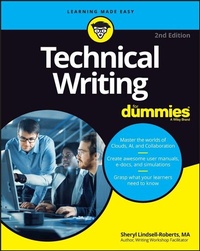
Technical Writing For Dummies
2nd Edition
Published on 15. May 2023
336 pages
978-1-394-17676-2 (ISBN)
Description

Learn to document the technology that makes the world go
Technical Writing For Dummies is a master class on how to build a career writing user manuals, e-learning, streaming, simulations, and more. It even zooms into the metaverse. Whether you're new to the field, a seasoned professional, or a technical person who needs to write, this guide arms you with the skills you need to cash in on this flourishing world of technical writing. This isn't your average how-to. It's a compendium of innovative industry knowledge that will help you set yourself apart with the latest trends and best practices in technical writing. As a tech writer, you'll need a robust skillset that allows you to offer clear and concise documentation for just about anything. This new edition of Technical Writing For Dummies--updated for all of today's tech writing advances--can get you there.
* Uncover the basics of technical writing and master common documentation types
* Get insight into the career paths available to tech writers today
* Discover new remote collaboration options and cloud-based tools for technical writers
* Learn how to elevate your documents for high search engine optimization (SEO) rankings
* Improve your craft to connect with diverse, global audiences
Whether you're a technical writer or technical professional who needs to write--you can learn the best practices of effective technical writing, as well as how to navigate its various formats and platforms, thanks to this handy Dummies guide.
Technical Writing For Dummies is a master class on how to build a career writing user manuals, e-learning, streaming, simulations, and more. It even zooms into the metaverse. Whether you're new to the field, a seasoned professional, or a technical person who needs to write, this guide arms you with the skills you need to cash in on this flourishing world of technical writing. This isn't your average how-to. It's a compendium of innovative industry knowledge that will help you set yourself apart with the latest trends and best practices in technical writing. As a tech writer, you'll need a robust skillset that allows you to offer clear and concise documentation for just about anything. This new edition of Technical Writing For Dummies--updated for all of today's tech writing advances--can get you there.
* Uncover the basics of technical writing and master common documentation types
* Get insight into the career paths available to tech writers today
* Discover new remote collaboration options and cloud-based tools for technical writers
* Learn how to elevate your documents for high search engine optimization (SEO) rankings
* Improve your craft to connect with diverse, global audiences
Whether you're a technical writer or technical professional who needs to write--you can learn the best practices of effective technical writing, as well as how to navigate its various formats and platforms, thanks to this handy Dummies guide.
More details
Other editions
Additional editions
Sheryl Lindsell-Roberts
Technical Writing For Dummies
Book
05/2023
2nd Edition
Wiley
€28.50
Shipment within 15-20 days
Person
Sheryl Lindsell-Roberts leads business-writing seminars throughout the country and is the author of over 25 books, including 135 Tips for Writing Successful Business Documents. She has appeared on television and radio networks throughout the United States and has been featured and quoted in The New York Times.
Content
Introduction 1
Part 1: What It Takes to Write Technical Docs 5
Chapter 1: Working as a Technical Writer 7
Chapter 2: Putting Together a Team and a Plan 25
Part 2: The Write Stuff 37
Chapter 3: Completing a Technical Writing Brief 39
Chapter 4: Crafting a Draft 51
Chapter 5: Designing Documents to Enhance the User Experience 57
Chapter 6: Honing the Tone 85
Chapter 7: Fine-Tuning toward the Ideal 97
Part 3: Frequently Written Docs 107
Chapter 8: Writing User Manuals and More 109
Chapter 9: Preparing Abstracts 127
Chapter 10: Creating Spec Sheets 133
Chapter 11: Generating Questionnaires 141
Chapter 12: Preparing for Technical Presentations 149
Chapter 13: Abridging for Executive Summaries 159
Part 4: Tech Tools 167
Chapter 14: Collaborating with Others 169
Chapter 15: Videoconferencing 183
Chapter 16: Offering eLearning 195
Chapter 17: Surfing the Net 211
Chapter 18: Protecting Intellectual Property 221
Part 5: The Part of Tens 233
Chapter 19: Ten Tips for Writing a Whitepaper 235
Chapter 20: Ten Tips for Publishing in a Technical Journal 241
Chapter 21: Ten Frustrations of Technical Writers 247
Appendix A: Punctuation Made Easy 253
Appendix B: Grammar's Not Grueling 265
Appendix C: Abbreviations and Metric Equivalents 275
Appendix D: Tech Talk: Glossary of Terms 285
Appendix E: Technical Writing Brief 289
Index 293
Part 1: What It Takes to Write Technical Docs 5
Chapter 1: Working as a Technical Writer 7
Chapter 2: Putting Together a Team and a Plan 25
Part 2: The Write Stuff 37
Chapter 3: Completing a Technical Writing Brief 39
Chapter 4: Crafting a Draft 51
Chapter 5: Designing Documents to Enhance the User Experience 57
Chapter 6: Honing the Tone 85
Chapter 7: Fine-Tuning toward the Ideal 97
Part 3: Frequently Written Docs 107
Chapter 8: Writing User Manuals and More 109
Chapter 9: Preparing Abstracts 127
Chapter 10: Creating Spec Sheets 133
Chapter 11: Generating Questionnaires 141
Chapter 12: Preparing for Technical Presentations 149
Chapter 13: Abridging for Executive Summaries 159
Part 4: Tech Tools 167
Chapter 14: Collaborating with Others 169
Chapter 15: Videoconferencing 183
Chapter 16: Offering eLearning 195
Chapter 17: Surfing the Net 211
Chapter 18: Protecting Intellectual Property 221
Part 5: The Part of Tens 233
Chapter 19: Ten Tips for Writing a Whitepaper 235
Chapter 20: Ten Tips for Publishing in a Technical Journal 241
Chapter 21: Ten Frustrations of Technical Writers 247
Appendix A: Punctuation Made Easy 253
Appendix B: Grammar's Not Grueling 265
Appendix C: Abbreviations and Metric Equivalents 275
Appendix D: Tech Talk: Glossary of Terms 285
Appendix E: Technical Writing Brief 289
Index 293
