

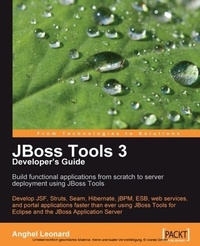
JBoss Tools 3 Developers Guide
Develop JSF, Struts, Seam, Hibernate, jBPM, ESB, web services, and portal applications faster than ever using JBoss Tools for Eclipse and the JBoss Application Server
Published on 13. January 2025
408 pages
978-1-84719-615-6 (ISBN)
Description

Develop JSF, Struts, Seam, Hibernate, jBPM, ESB, web services, and portal applications faster than ever using JBoss Tools for Eclipse and the JBoss Application Server
Key Features
Develop complete JSF, Struts, Seam, Hibernate, jBPM, ESB, web service, and portlet applications using JBoss Tools
Tools covered in separate chapters so you can dive into the one you want to learn
Manage JBoss Application Server through JBoss AS Tools
Explore Hibernate Tools including reverse engineering and code generation techniques
Book DescriptionJBoss Tools consist of the best Java frameworks and technologies placed together under the same "roof". Discovering JBoss Tools is like exploring a cave; at first everything seems unknown and complicated, but once you become familiar with the main features of the Tools, you will start to feel at home. This is the first book in the market on JBoss Tools, waiting to assist you to throw away all the tiny, dedicated tools you have used earlier, thus helping you to reduce the time you spend on developing a Java application. This book will explore the tools that will help you to build Hibernate, Seam, JSF, Struts, Web Services, jBPM, ESB, and so on and show you how to use them through screenshots, examples, and source code. JBoss Tools comes with a set of dedicated wizards, generators, editors, reverse engineering capabilities, configuration files, templates, syntax highlighting, and more for each of these technologies. Just choose the technologies, and JBoss Tools will glue them together in amazing Java web applications. This book will show you how to develop a set of Java projects using a variety of technologies and scenarios. Everything is described through JBoss Tools "eyes". After we settle the project (or scenario) that will be developed, we configure the proper environment for the current tool (the selected projects cover the main components of a web application, with regard to the backstage technology). We continue by exploring the tool to accomplish our tasks and develop the project's components. A cocktail of images, theoretical aspects, source code, and step-by-step examples will offer you a complete insight into every tool. At the end, we deploy and test the project. In addition, every chapter is rich with pure notions about the underlying technology, which will initiate into you or remind you of the basic aspects of it. It will also show you complete and functional applications, and get you familiar with the main aspects of every tool. By the end you will have enough information to successfully handle your own projects with JBoss Tools.What you will learn
Develop Java web applications through JBoss Tools perspective, using powerful technologies, like JSF, Seam, Struts, jBPM ,and so on
Configure different JBoss AS distributions under Eclipse Ganymede
Download and install Eclipse Ganymede
Learn how to use the JBoss AS Tools to configure, start, stop, and monitor the JBoss AS directly from Eclipse IDE.
Customize JBoss Tools Palette and learn how to use it to develop text files that contain tags
Explore Web Services Tools for writing WSDLs, generating web services, and publishing web services based on UDDI (jUDDI) and WSIL
Create projects with Portlet Facets, Java Portlet wizard, and JSF/Seam Portlet wizard using the Portal Tools wizard
Learn to develop JBossESB Services using ESB Tools
Generate a complete web service from a WSDL document and from a Java bean using WS Tools wizards
Who this book is forThis book is recommended for Java developers who use at least one of the covered technologies (JSF, Struts, Hibernate, Seam, and so on). It is for all Java developers who are looking for a powerful, unitary tool, especially designed to increase the speed of development and quality of Java web applications. No matter how much (or how little) experience they have, developers of all levels will benefit as their use of JBoss Tools is directly proportional to the complexity of their application. Since JBoss Tools covers all levels of experience, you can use it at your own level for your own applications, without involving unnecessary features. All you need is to be familiar with the Eclipse environment and Java core, and to have some expertise in the technology for which you want to use the JBoss Tools. Basic expertise for each technology is provided in the book, but for more complete and detailed aspects you should read dedicated specifications, tutorials, and articles.
Key Features
Develop complete JSF, Struts, Seam, Hibernate, jBPM, ESB, web service, and portlet applications using JBoss Tools
Tools covered in separate chapters so you can dive into the one you want to learn
Manage JBoss Application Server through JBoss AS Tools
Explore Hibernate Tools including reverse engineering and code generation techniques
Book DescriptionJBoss Tools consist of the best Java frameworks and technologies placed together under the same "roof". Discovering JBoss Tools is like exploring a cave; at first everything seems unknown and complicated, but once you become familiar with the main features of the Tools, you will start to feel at home. This is the first book in the market on JBoss Tools, waiting to assist you to throw away all the tiny, dedicated tools you have used earlier, thus helping you to reduce the time you spend on developing a Java application. This book will explore the tools that will help you to build Hibernate, Seam, JSF, Struts, Web Services, jBPM, ESB, and so on and show you how to use them through screenshots, examples, and source code. JBoss Tools comes with a set of dedicated wizards, generators, editors, reverse engineering capabilities, configuration files, templates, syntax highlighting, and more for each of these technologies. Just choose the technologies, and JBoss Tools will glue them together in amazing Java web applications. This book will show you how to develop a set of Java projects using a variety of technologies and scenarios. Everything is described through JBoss Tools "eyes". After we settle the project (or scenario) that will be developed, we configure the proper environment for the current tool (the selected projects cover the main components of a web application, with regard to the backstage technology). We continue by exploring the tool to accomplish our tasks and develop the project's components. A cocktail of images, theoretical aspects, source code, and step-by-step examples will offer you a complete insight into every tool. At the end, we deploy and test the project. In addition, every chapter is rich with pure notions about the underlying technology, which will initiate into you or remind you of the basic aspects of it. It will also show you complete and functional applications, and get you familiar with the main aspects of every tool. By the end you will have enough information to successfully handle your own projects with JBoss Tools.What you will learn
Develop Java web applications through JBoss Tools perspective, using powerful technologies, like JSF, Seam, Struts, jBPM ,and so on
Configure different JBoss AS distributions under Eclipse Ganymede
Download and install Eclipse Ganymede
Learn how to use the JBoss AS Tools to configure, start, stop, and monitor the JBoss AS directly from Eclipse IDE.
Customize JBoss Tools Palette and learn how to use it to develop text files that contain tags
Explore Web Services Tools for writing WSDLs, generating web services, and publishing web services based on UDDI (jUDDI) and WSIL
Create projects with Portlet Facets, Java Portlet wizard, and JSF/Seam Portlet wizard using the Portal Tools wizard
Learn to develop JBossESB Services using ESB Tools
Generate a complete web service from a WSDL document and from a Java bean using WS Tools wizards
Who this book is forThis book is recommended for Java developers who use at least one of the covered technologies (JSF, Struts, Hibernate, Seam, and so on). It is for all Java developers who are looking for a powerful, unitary tool, especially designed to increase the speed of development and quality of Java web applications. No matter how much (or how little) experience they have, developers of all levels will benefit as their use of JBoss Tools is directly proportional to the complexity of their application. Since JBoss Tools covers all levels of experience, you can use it at your own level for your own applications, without involving unnecessary features. All you need is to be familiar with the Eclipse environment and Java core, and to have some expertise in the technology for which you want to use the JBoss Tools. Basic expertise for each technology is provided in the book, but for more complete and detailed aspects you should read dedicated specifications, tutorials, and articles.
More details
Edition
Digital original
Language
English
Place of publication
Birmingham
United Kingdom
Edition type
Digital original
File size
7,63 MB
ISBN-13
978-1-84719-615-6 (9781847196156)
Copyright in bibliographic data and cover images is held by Nielsen Book Services Limited or by the publishers or by their respective licensors: all rights reserved.
Schweitzer Classification
Other editions
Additional editions
Anghel Leonard
JBoss Tools 3 Developers Guide
Book
04/2009
Packt Publishing
€51.90
Shipment within 3-4 weeks
Person
Anghel Leonard is a Chief Technology Strategist and independent consultant with over 20 years of experience in the Java ecosystem. He architects and develops distributed applications that emphasize clean code, robust performance, and scalable architectures. A prolific author and respected technical mentor, Anghel brings deep expertise and clarity to one of Java's most important and complex topics.
Content
Table of Contents
