
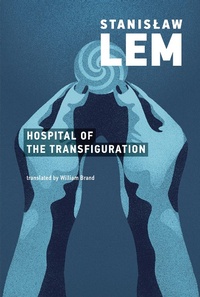
Hospital of the Transfiguration
Description
Alles über E-Books | Antworten auf Fragen rund um E-Books, Kopierschutz und Dateiformate finden Sie in unserem Info- & Hilfebereich.
Taking place within the confines of a psychiatric hospital, Stanislaw Lem's The Hospital of the Transfiguration tells the story of a young doctor working in a Polish asylum during World War II. At first the asylum seems like a bucolic refuge, but a series of sinister encounters and incidents reveal an underlying brutality. The doctor begins to seek relief in the strange conversation of the poet Sekulowski, who is posing as a patient in a bid for safety from the occupying German forces. Meanwhile, Resistance fighters stockpile weapons in the surrounding woods.
A very early work by Lem, The Hospital of the Transfiguration is partly autobiographical, drawing on the author's experiences as a medical student. Written in 1948, it was suppressed by Polish censors and not published until 1955. The censorship of this realist novel is partly what led Lem to focus on science fiction and nonfiction for the rest of his career.
More details
Other editions
Additional editions

Persons
System requirements
File format: ePUB
Copy protection: Adobe-DRM (Digital Rights Management)
System requirements:
- Computer (Windows; MacOS X; Linux): Install the free reader Adobe Digital Editions prior to download (see eBook Help).
- Tablet/smartphone (Android; iOS): Install the free app Adobe Digital Editions or the app PocketBook before downloading (see eBook Help).
- E-reader: Bookeen, Kobo, Pocketbook, Sony, Tolino and many more (not Kindle).
The file format ePub works well for novels and non-fiction books – i.e., „flowing” text without complex layout. On an e-reader or smartphone, line and page breaks automatically adjust to fit the small displays.
This eBook uses Adobe-DRM, a „hard” copy protection. If the necessary requirements are not met, unfortunately you will not be able to open the eBook. You will therefore need to prepare your reading hardware before downloading.
Please note: We strongly recommend that you authorise using your personal Adobe ID after installation of any reading software.
For more information, see our ebook Help page.