

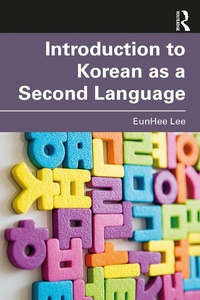
Introduction to Korean as a Second Language
1st Edition
Published on 31. July 2024
172 pages
978-1-040-08568-4 (ISBN)
Description

Introduction to Korean as a Second Language introduces the basic linguistic make-up of Korean and provides basic knowledge of second language acquisition and up-to-date research on how Korean is learned by adult second language learners (L2 Korean learners).
The book synthesizes the existing research and suggests future directions for this relatively new but rapidly growing field. The book covers topics such as the Korean sound system, word and phrase structures of Korean, and meaning in Korean, making it a great resource for those who want to deepen their understanding of the Korean language.
This textbook is ideal for use in Korean linguistics courses, and teaching and learning Korean as a foreign language courses. The book would also be good supplementary material for Korean language classes.
The book synthesizes the existing research and suggests future directions for this relatively new but rapidly growing field. The book covers topics such as the Korean sound system, word and phrase structures of Korean, and meaning in Korean, making it a great resource for those who want to deepen their understanding of the Korean language.
This textbook is ideal for use in Korean linguistics courses, and teaching and learning Korean as a foreign language courses. The book would also be good supplementary material for Korean language classes.
More details
Edition
1. Auflage
Language
English
Place of publication
London
United Kingdom
Publishing group
Taylor & Francis Ltd
Target group
College/higher education
Illustrations
7 Tables, black and white; 13 Line drawings, black and white; 13 Illustrations, black and white
ISBN-13
978-1-040-08568-4 (9781040085684)
Copyright in bibliographic data and cover images is held by Nielsen Book Services Limited or by the publishers or by their respective licensors: all rights reserved.
Schweitzer Classification
Other editions
Additional editions
Eunhee Lee
Introduction to Korean as a Second Language
Book
07/2024
1st Edition
Routledge
€59.70
Shipment within 10-20 days
Eunhee Lee
Introduction to Korean as a Second Language
Book
07/2024
1st Edition
Routledge
€207.20
Shipment within 10-20 days
Person
EunHee Lee is Professor in the Department of Linguistics at University at Buffalo, The SUNY.
Content
List of Tables and Figures
List of Abbreviations
Chapter 1 Introduction
Chapter 2 The Sound System of Korean
Chapter 3 Acquisition of the Korean Sound System
Chapter 4 The Structure of Korean
Chapter 5 Acquisition of the Structure of Korean
Chapter 6 The Meaning in Korean
Chapter 7 Acquisition of Meaning in Korean
Epilogue
References
Index
List of Abbreviations
Chapter 1 Introduction
Chapter 2 The Sound System of Korean
Chapter 3 Acquisition of the Korean Sound System
Chapter 4 The Structure of Korean
Chapter 5 Acquisition of the Structure of Korean
Chapter 6 The Meaning in Korean
Chapter 7 Acquisition of Meaning in Korean
Epilogue
References
Index
