

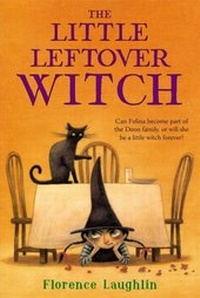
The Little Leftover Witch
1st Edition
Published on 27. August 2013
96 pages
978-1-4424-8678-2 (ISBN)
Description

A little lost witch undergoes a magical transformation when she's loved by a human family in this heartwarming story.
When Felina, a little witch, breaks her broom on Halloween and can't fly home, she is stuck with the Doon family and their black cat, Itchabody, for an entire year. Although she's homesick and unhappy, the Doon parents and their daughter, Lucinda, do their best to make Felina feel welcome. (And she has no trouble with Itchabody at all!) As time passes, the mischievous Felina learns what it means to be part of a family?and how, with love, she will always belong.
This timeless tale, originally published in 1971 and cherished ever since, brims with witchy whimsy and will find a home in the hearts of a new generation of readers.
When Felina, a little witch, breaks her broom on Halloween and can't fly home, she is stuck with the Doon family and their black cat, Itchabody, for an entire year. Although she's homesick and unhappy, the Doon parents and their daughter, Lucinda, do their best to make Felina feel welcome. (And she has no trouble with Itchabody at all!) As time passes, the mischievous Felina learns what it means to be part of a family?and how, with love, she will always belong.
This timeless tale, originally published in 1971 and cherished ever since, brims with witchy whimsy and will find a home in the hearts of a new generation of readers.
More details
Other editions
Additional editions
Florence Laughlin
The Little Leftover Witch
Book
08/2013
Simon & Schuster Books for Young Readers
€7.50
Shipment within 10-20 days
Florence Laughlin
The Little Leftover Witch
Book
08/2013
Simon & Schuster Books for Young Readers
€15.50
Shipment within 10-20 days
Person
Florence Laughlin is the author of several books for children, including The Little Leftover Witch and The Seventh Cousin.
Content
- Intro
- Dedication
- 1 The Broken Broom
- 2 The Witch Takes a Bath
- 3 How to Trick a Witch
- 4 Felina Goes to the Store
- 5 A Permit to Keep a Witch
- 6 Felina Learns to Read
- 7 Grandfather Gives Felina a Gift
- 8 Christmas Is Coming!
- 9 A Visit to Dr. Perriwinkle
- 10 In a Witch's Sock
- 11 The Snow Witch
- 12 Halloween and Happy Birthday
- About Florence Laughlin
- Copyright
