

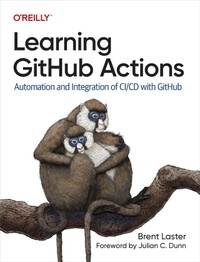
Learning GitHub Actions
Description

Automate your software development processes with GitHub Actions, the continuous integration and continuous delivery platform that integrates seamlessly with GitHub. With this practical book, open source author, trainer, and DevOps director Brent Laster explains everything you need to know about using and getting value from GitHub Actions. You''ll learn what actions and workflows are and how they can be used, created, and incorporated into your processes to simplify, standardize, and automate your work in GitHub.
This book explains the platform, components, use cases, implementation, and integration points of actions, so you can leverage them to provide the functionality and features needed in today''s complex pipelines and software development processes. You''ll learn how to design and implement automated workflows that respond to common events like pushes, pull requests, and review updates. You''ll understand how to use the components of the GitHub Actions platform to gain maximum automation and benefit.
With this book, you will:
- Learn what GitHub Actions are, the various use cases for them, and how to incorporate them into your processes
- Understand GitHub Actions'' structure, syntax, and semantics
- Automate processes and implement functionality
- Create your own custom actions with Docker, JavaScript, or shell approaches
- Troubleshoot and debug workflows that use actions
- Combine actions with GitHub APIs and other integration options
- Identify ways to securely implement workflows with GitHub Actions
- Understand how GitHub Actions compares to other options
More details
Other editions
Additional editions
Content
- Cover
- Copyright
- Table of Contents
- Foreword
- Preface
- The Structure of This Book
- Part I: Foundations
- Part II: Building Blocks
- Part III: Security and Monitoring
- Part IV: Advanced Topics
- Intended Audience
- Continuing with GitHub Actions
- Conventions Used in This Book
- Using Code Examples
- O'Reilly Online Learning
- How to Contact Us
- Acknowledgments
- Part I. Foundations
- Chapter 1. The Basics
- What Is GitHub Actions?
- Automation Platform
- Framework
- What Are the Use Cases for GitHub Actions?
- Starter Workflows
- Actions Marketplace
- What Costs Are Involved?
- The Free Model
- The Paid Model
- When Does Moving to GitHub Actions Make Sense?
- Investment in GitHub
- Use of Public Actions
- Creating Your Own Actions
- Artifact Management
- Action Management
- Conclusion
- Chapter 2. How Does Actions Work?
- An Overview
- Triggering Workflows
- Components
- Steps
- Runners
- Jobs
- Workflow
- Workflow Execution
- Conclusion
- Chapter 3. What's in an action?
- The Structure of an action
- Interfacing with actions
- Using actions
- Public actions and the Marketplace
- Conclusion
- Chapter 4. Working with Workflows
- Creating the First Workflow in a Repository
- Committing the Initial Workflow
- Using the VS Code GitHub Actions Extension
- Conclusion
- Chapter 5. Runners
- GitHub-Hosted Runners
- What's in the Runner Images?
- Adding Additional Software on Runners
- Self-Hosted Runners
- Requirements for Self-Hosted Runners
- Limits for Self-Hosted Runners
- Security Considerations for Using Self-Hosted Runners
- Setting Up a Self-Hosted Runner
- Using a Self-Hosted Runner
- Using Labels with Self-Hosted Runners
- Troubleshooting Self-Hosted Runners
- Removing a Self-Hosted Runner
- Autoscaling Self-Hosted Runners
- Just-in-Time Runners
- Conclusion
- Part II. Building Blocks
- Chapter 6. Managing Your Workflow Environments
- Naming Your Workflow and Workflow Runs
- Contexts
- Environment Variables
- Default Environment Variables
- Secrets and Configuration Variables
- Managing Permissions for Your Workflow
- Deployment Environments
- Conclusion
- Chapter 7. Managing Data Within Workflows
- Working with Inputs and Outputs in Workflows
- Defining and Referencing Workflow Inputs
- Capturing Output from a Step
- Capturing Output from a Job
- Capturing Output from an Action Used in a Step
- Defining Artifacts
- Uploading and Downloading Artifacts
- Adding Parameters
- Using Caches in GitHub Actions
- Using the Explicit Cache Action
- Monitoring Caches
- Activating a Cache with a Setup Action
- Conclusion
- Chapter 8. Managing Workflow Execution
- Advanced Triggering from Changes
- Triggering Based on Activity Types
- Using Filters to Refine Triggers
- Triggering Workflows Without a Change
- Dealing with Concurrency
- Running a Workflow with a Matrix
- Workflow Functions
- Conditionals and Status Functions
- Conclusion
- Part III. Security and Monitoring
- Chapter 9. Actions and Security
- Security by Configuration
- Managing Execution of Workflows from Pull Requests
- Workflow Permissions
- The CODEOWNERS File
- Protected Tags
- Protected Branches
- Repository Rules
- Security by Design
- Secrets
- Securing Secrets
- Tokens
- Dealing with Untrusted Input
- Securing Your Dependencies
- Security by Monitoring
- Scanning
- Processing Pull Requests Securely
- Vulnerabilities with Workflows in Pull Requests
- Vulnerabilities with Source Code in Pull Requests
- Adding a Pull Request Validation Script
- Safely Handling Pull Requests
- Conclusion
- Chapter 10. Monitoring, Logging, and Debugging
- Gaining More Observability
- Understanding Status at a High Level
- Creating Status Badges for Workflows
- Working with Past States
- Mapping Workflow Versions to Runs
- Re-running Jobs in a Workflow
- Debugging Workflows
- Step Debug Logging
- Debugging the Runner Environment
- Activating Debugging
- Augmenting and Customizing Logging
- Adding Your Own Messages in Logs
- Additional Log Customizations
- Creating a Customized Job Summary
- Conclusion
- Part IV. Advanced Topics
- Chapter 11. Creating Custom actions
- Anatomy of an action
- Types of Actions
- Composite Action
- Docker Container Action
- Creating a JavaScript Action
- Completing Your Action Creation
- Publishing Actions on the GitHub Marketplace
- Updating Actions on the Marketplace
- Removing an Action from the Marketplace
- The Actions Toolkit
- Using Workflow Commands from the Toolkit
- Local actions
- Conclusion
- Chapter 12. Advanced Workflows
- Creating Your Own Starter Workflows
- Creating a Starter Workflow Area
- Creating a Starter Workflow File
- Adding Supporting Pieces
- Using the New Starter Workflow
- Reusable Workflows
- Inputs and Secrets
- Outputs
- Limitations
- Required Workflows
- Constraints
- Example
- Execution
- Conclusion
- Chapter 13. Advanced Workflow Techniques
- Driving GitHub from Your Workflow
- Using the GitHub CLI
- Creating Scripts
- Invoking GitHub APIs
- Using a Matrix Strategy to Automatically Create Jobs
- One-Dimensional Matrices
- Multi-dimensional Matrices
- Including Extra Values
- Excluding Values
- Handling Failure Cases
- Defining Max Concurrent Jobs
- Using Containers in Your Workflow
- Using a Container as the Environment for a Job
- Using a Container with a Step
- Running Containers as Services in a Job
- Conclusion
- Chapter 14. Migrating to GitHub Actions
- Prep
- Source Code
- Automation
- Infrastructure
- Users
- Azure Pipelines
- CircleCI
- GitLab CI/CD
- Jenkins
- Travis CI
- GitHub Actions Importer
- Authentication
- Planning
- Build Steps and Related
- Manual Tasks
- File Manifest
- Forecasting
- Doing a Dry Run
- Creating Custom Transformers for the Importer
- Doing the Actual Migration
- Conclusion
- Index
- About the Author
- Colophon
