

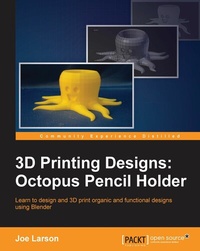
3D Printing Designs: Octopus Pencil Holder
A fast paced guide to designing and printing organic 3D shapes.
Published on 8. July 2025
104 pages
978-1-78588-743-7 (ISBN)
Description

Learn to design and 3D print organic and functional designs using Blender
Key Features
* Learn how to make complex shapes by editing basic ones
* Make printable objects from multiple shapes and parts
* Learn how to design from scratch, without a reference to physical objects
Book DescriptionThis book will cover the very basic but essential techniques you need to model an organic and functional object for 3D printing using Blender. Starting with pen and paper and then moving on to the computer, you will create your first project in Blender, add basic geometric shapes, and use techniques such as extruding and subdividing to transform these shapes into complex meshes. You will learn how modifiers can automatically refine the shape further and combine multiple shapes into a single 3D printable model. By the end of the book, you will have gained enough practical hands-on experience to be able to create a 3D printable object of your choice, which in this case is a 3D print-ready octopus pencil holder. What you will learn
-- Get to know the guiding principles required to create 3D printer-friendly models
-- Understand material characteristics, printing specifications, tolerances, and design tips
-- Master the art of modifying basic shapes with Blender s powerful editing tools: extrude, loop cuts, and other transformations
-- Learn techniques of editing complex meshes, smoothing, combining shapes, and exporting them into STL files for printing
Who this book is forYou should have basic knowledge of Blender and 3D printing and be interested in printing your first object.
Key Features
* Learn how to make complex shapes by editing basic ones
* Make printable objects from multiple shapes and parts
* Learn how to design from scratch, without a reference to physical objects
Book DescriptionThis book will cover the very basic but essential techniques you need to model an organic and functional object for 3D printing using Blender. Starting with pen and paper and then moving on to the computer, you will create your first project in Blender, add basic geometric shapes, and use techniques such as extruding and subdividing to transform these shapes into complex meshes. You will learn how modifiers can automatically refine the shape further and combine multiple shapes into a single 3D printable model. By the end of the book, you will have gained enough practical hands-on experience to be able to create a 3D printable object of your choice, which in this case is a 3D print-ready octopus pencil holder. What you will learn
-- Get to know the guiding principles required to create 3D printer-friendly models
-- Understand material characteristics, printing specifications, tolerances, and design tips
-- Master the art of modifying basic shapes with Blender s powerful editing tools: extrude, loop cuts, and other transformations
-- Learn techniques of editing complex meshes, smoothing, combining shapes, and exporting them into STL files for printing
Who this book is forYou should have basic knowledge of Blender and 3D printing and be interested in printing your first object.
All prices
More details
Edition
Digital original
Language
English
Place of publication
Birmingham
United Kingdom
Target group
US School Grade: College Graduate Student
Edition type
Digital original
File size
13,57 MB
ISBN-13
978-1-78588-743-7 (9781785887437)
Copyright in bibliographic data and cover images is held by Nielsen Book Services Limited or by the publishers or by their respective licensors: all rights reserved.
Schweitzer Classification
Other editions
Additional editions
Book
02/2016
Packt Publishing
€26.60
Shipment within 3-4 weeks
Person
Larson Joe :
Joe Larson, known online as "the 3D Printing Professor," is one part artist, one part mathematician, one part teacher, and one part technologist. It all started in his youth, doing BASIC programming and low-resolution digital art on a Commodore 64. As technology progressed, so did Joe's dabbling, eventually taking him to 3D modeling while in high school and college, and he momentarily pursued a degree in computer animation. He abandoned that and instead became a math teacher, and then moved to software development for 10 years before returning to education, teaching technology in college. When Joe first heard about 3D printing, it took root in his mind, and he went back to dust off his 3D modeling skills. In 2012, he won a Makerbot Replicator 3D printer in the Tinkercad/Makerbot Chess Challenge, with a chess set that assembles into a robot. Since then, his designs on Thingiverse have been featured on Thingiverse, Gizmodo, Shapeways, Makezine, and other places. He currently produces weekly videos about design for 3D printing on his YouTube channel, http://www.youtube.com/user/mrjoesays.
Joe Larson, known online as "the 3D Printing Professor," is one part artist, one part mathematician, one part teacher, and one part technologist. It all started in his youth, doing BASIC programming and low-resolution digital art on a Commodore 64. As technology progressed, so did Joe's dabbling, eventually taking him to 3D modeling while in high school and college, and he momentarily pursued a degree in computer animation. He abandoned that and instead became a math teacher, and then moved to software development for 10 years before returning to education, teaching technology in college. When Joe first heard about 3D printing, it took root in his mind, and he went back to dust off his 3D modeling skills. In 2012, he won a Makerbot Replicator 3D printer in the Tinkercad/Makerbot Chess Challenge, with a chess set that assembles into a robot. Since then, his designs on Thingiverse have been featured on Thingiverse, Gizmodo, Shapeways, Makezine, and other places. He currently produces weekly videos about design for 3D printing on his YouTube channel, http://www.youtube.com/user/mrjoesays.
Content
Table of Contents
Octopus Pencil Holder
Prologue
Octopus Pencil Holder
Prologue

