

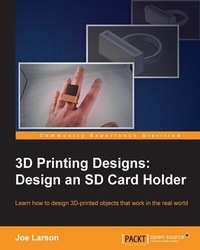
3D Printing Designs: Design an SD Card Holder
Measurement basics to design and build a 3D printed object
Published on 8. July 2025
100 pages
978-1-78588-105-3 (ISBN)
Description

Learn how to design 3D-printed objects that work in the real world
Key Features
[*]This book shows you how to design from a reference to physical objects that can be easily represented by simple basic objects in Blender (cube, cylinder, sphere, and so on) by measuring them
[*]This is the only book on the market that shows you how to take your first steps to create 3D printed objects that are able to interact with existing objects
[*]Learn how to utilize Blender's functionality to make your designs more precise and accurate
Book DescriptionWant to model a 3D printed prototype of an object that needs to be replaced or broken? This book will teach you how to accurately measure objects in the real world with a few basic measuring techniques and how to create an object for 3D printing around the objects measured. In this book, you'll learn to identify basic shapes from a given object, use Vernier and Digital calipers and grid paper tracing techniques to derive measurements for the objects. With the help of measurements, you'll see to model these objects using Blender, organize the parts into layers, and later combine them to create the desired object, which in this book is a 3D printable SD card holder ring that fits your finger. What you will learn
[*]Gain techniques to accurately measure the objects with rules, manual calipers, and digital calipers
[*]Break down complex geometries into multiple simple shapes and model them in layers using Blender
[*]Scale and re-scale a model to fit based on volume or size constraints
[*]See how to multishell geometries and auto-intersections using the Boolean Modifier
Who this book is forReader will have basic knowledge of Blender and 3D Printing, and will have probably already made something simple. They will be interested in printing their first object.
Key Features
[*]This book shows you how to design from a reference to physical objects that can be easily represented by simple basic objects in Blender (cube, cylinder, sphere, and so on) by measuring them
[*]This is the only book on the market that shows you how to take your first steps to create 3D printed objects that are able to interact with existing objects
[*]Learn how to utilize Blender's functionality to make your designs more precise and accurate
Book DescriptionWant to model a 3D printed prototype of an object that needs to be replaced or broken? This book will teach you how to accurately measure objects in the real world with a few basic measuring techniques and how to create an object for 3D printing around the objects measured. In this book, you'll learn to identify basic shapes from a given object, use Vernier and Digital calipers and grid paper tracing techniques to derive measurements for the objects. With the help of measurements, you'll see to model these objects using Blender, organize the parts into layers, and later combine them to create the desired object, which in this book is a 3D printable SD card holder ring that fits your finger. What you will learn
[*]Gain techniques to accurately measure the objects with rules, manual calipers, and digital calipers
[*]Break down complex geometries into multiple simple shapes and model them in layers using Blender
[*]Scale and re-scale a model to fit based on volume or size constraints
[*]See how to multishell geometries and auto-intersections using the Boolean Modifier
Who this book is forReader will have basic knowledge of Blender and 3D Printing, and will have probably already made something simple. They will be interested in printing their first object.
All prices
More details
Edition
Digital original
Language
English
Place of publication
Birmingham
United Kingdom
Target group
US School Grade: College Graduate Student
Edition type
Digital original
File size
12,78 MB
ISBN-13
978-1-78588-105-3 (9781785881053)
Copyright in bibliographic data and cover images is held by Nielsen Book Services Limited or by the publishers or by their respective licensors: all rights reserved.
Schweitzer Classification
Other editions
Additional editions
Book
04/2016
Packt Publishing
€26.50
Shipment within 3-4 weeks
Person
Larson Joe :
Joe Larson, known online as "the 3D Printing Professor," is one part artist, one part mathematician, one part teacher, and one part technologist. It all started in his youth, doing BASIC programming and low-resolution digital art on a Commodore 64. As technology progressed, so did Joe's dabbling, eventually taking him to 3D modeling while in high school and college, and he momentarily pursued a degree in computer animation. He abandoned that and instead became a math teacher, and then moved to software development for 10 years before returning to education, teaching technology in college. When Joe first heard about 3D printing, it took root in his mind, and he went back to dust off his 3D modeling skills. In 2012, he won a Makerbot Replicator 3D printer in the Tinkercad/Makerbot Chess Challenge, with a chess set that assembles into a robot. Since then, his designs on Thingiverse have been featured on Thingiverse, Gizmodo, Shapeways, Makezine, and other places. He currently produces weekly videos about design for 3D printing on his YouTube channel, http://www.youtube.com/user/mrjoesays.
Joe Larson, known online as "the 3D Printing Professor," is one part artist, one part mathematician, one part teacher, and one part technologist. It all started in his youth, doing BASIC programming and low-resolution digital art on a Commodore 64. As technology progressed, so did Joe's dabbling, eventually taking him to 3D modeling while in high school and college, and he momentarily pursued a degree in computer animation. He abandoned that and instead became a math teacher, and then moved to software development for 10 years before returning to education, teaching technology in college. When Joe first heard about 3D printing, it took root in his mind, and he went back to dust off his 3D modeling skills. In 2012, he won a Makerbot Replicator 3D printer in the Tinkercad/Makerbot Chess Challenge, with a chess set that assembles into a robot. Since then, his designs on Thingiverse have been featured on Thingiverse, Gizmodo, Shapeways, Makezine, and other places. He currently produces weekly videos about design for 3D printing on his YouTube channel, http://www.youtube.com/user/mrjoesays.
Content
Table of Contents
3D Printing Basics
Blender Basics
Measuring Basics
Useful and Fun 3D printed Tech Ring
3D Printing Basics
Blender Basics
Measuring Basics
Useful and Fun 3D printed Tech Ring

