

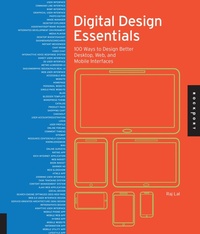
Digital Design Essentials
100 ways to design better desktop, web, and mobile interfaces
Published on 1. July 2013
208 pages
978-1-61058-786-0 (ISBN)
Description

Digital Design Essentials takes a practical, highly accessible approach to creating graphical user interface designs for desktop, mobile, and touch screen devices. Written by an expert in the realm of digital design, this comprehensive, step-by-step guide demonstrates how to apply design principles in a variety of desktops, web pages, mobile devices and other touchscreens. Filled with straightforward strategies in a visual format, it's an essential volume for any designer working in the digital realm.
Reviews / Votes
"This reference work illustrates 100 usability design tips for websites and other applications across devices, not only for aesthetics but also for functionality and ease of use. Lal, a digital product designer, addresses advanced website functions, including the creation of a shopping cart, reviews and ratings, mobile commerce, touch screen interfaces, infographics, APIs , and other current technologies. Each topic features a short instructional page with bullet-point recommendations and tips on what to include. A facing page shows real-world examples and/or case studies. Some of the text instructions refer reasers to other entries with related design concepts. The content, organized into sections titled "Desktop," "Web," "Mobile," and "Miscellaneous," is well indexed. Rather than being a technical manual on how to create websites, widgets or other applications, this volume presents best practices from and ease-of-use perspective. The examples undoubtedly will become outdated soon, but they represent some of the best illustrations of contemporary usability design. The rapid evolution of technology means that few books are available to compare with this one. It will be useful to those interested and/or active in web development or mobile app development. Summing Up: Recommended. ** Lower- and upper- level undergraduates, general readers, professionals/practitioners." -ChoiceMore details
Series
Language
English
Place of publication
Beverly
United States
Publishing group
Quarto Publishing Group USA Inc
Illustrations
200 color photos
ISBN-13
978-1-61058-786-0 (9781610587860)
Copyright in bibliographic data and cover images is held by Nielsen Book Services Limited or by the publishers or by their respective licensors: all rights reserved.
Schweitzer Classification
Other editions
Additional editions
Book
06/2013
Rockport Publishers
€54.05
Article exhausted; check different version
Person
Rajesh Lal is an expert photographer, inventor, designer and a web developer. He has multiple patents on innovative user interfaces for mobile devices and has presented worldwide on mobile and web technologies. He currently resides in Mountain View, CA. Visit his design blog at http://www.abcofdesign.com.
Content
- Cover
- Title
- Dedication
- Contents
- Introduction
- DESKTOP
- 1. User Interface (Human-Computer Interface)
- 2. Command Line Interface
- 3. WIMP Interface
- 4. Graphical User Interface (GUI)
- 5. Photo Editor
- 6. Image Manager
- 7. Desktop Explorer
- 8. Assistant/Software Wizard
- 9. Integrated Development Environment (IDE)
- 10. Media Player
- 11. Desktop Widget/Gadget
- 12. Dashboard/Scorecards
- 13. Instant Messenger (IM)
- 14. Chat Room
- 15. Video Chat
- 16. Interactive Voice Response (IVR) System
- 17. Direct User Interface
- 18. 3-D User Interface
- 19. Metro UI/Modern UI
- 20. Skeuomorphic Design/Faux Real UI
- WEB
- 21. Web User Interface (WUI)
- 22. Accessible Web
- 23. Website
- 24. Homepage
- 25. Personal Website
- 26. Single-Page Website
- 27. Blog
- 28. Blogger Template
- 29. WordPress Theme
- 30. Catalog
- 31. Product Page
- 32. Shopping Cart
- 33. Checkout
- 34. User Account/Registration
- 35. Login
- 36. User Profile
- 37. Online Forums
- 38. Comment Thread
- 39. Sitemap
- 40. Resource Center/Help Center
- 41. Knowledgebase (KB)
- 42. Wiki
- 43. Online Surveys
- 44. Rating App
- 45. Rich Internet Application (RIA)
- 46. Web Widget
- 47. Book Widget
- 48. Banner Ad
- 49. Web Slideshow
- 50. HTML5 App
- 51. Zooming User Interface (ZUI)
- 52. Task Tracking System
- 53. Content Management System (CMS)
- 54. Ajax Web Application
- 55. Social Design
- 56. Search Engine Optimized (SEO) Web Page
- 57. Web 2.0 User Interface Design
- 58. Service-Oriented Architecture (SOA) Design
- 59. Infographics Design
- 60. Adaptive User Interface
- MOBILE
- 61. Mobile Phone App
- 62. Mobile Web App
- 63. Hybrid App
- 64. Mobile Website
- 65. Information App
- 66. Mobile Utility App
- 67. Lifestyle App
- 68. Address Book
- 69. Camera App
- 70. Photo App
- 71. Mobile Game App
- 72. Location Aware App
- 73. Branded App
- 74. Consumer Service App
- 75. Augmented Reality App
- 76. Bluetooth App
- 77. Near Field Communication (NFC) App
- 78. Mobile Ads
- 79. Mobile Commerce
- 80. Mobile Search
- 81. Mobile Home Screen
- 82. Touch User Interface
- 83. Multi-Touch User Interface
- 84. Accessible Touch User Interface
- 85. Gesture-Based User Interface
- 86. Pen-Based Interface
- 87. Mobile Clock App
- 88. World Clock App
- 89. Mashup App
- 90. Voice User Interface
- MISCELLANEOUS
- 91. 10-Foot User Interface
- 92. Games UI
- 93. Welcome Email
- 94. Email Marketing Campaign
- 95. Email Newsletter
- 96. E-zine
- 97. Natural User Interface
- 98. Natural Language Interface
- 99. Intelligent User Interface
- 100. Organic User Interface
- Contributors
- About the Author
- Index
- A
- B
- C
- D
- E
- F
- G
- H
- I
- J
- K
- L
- M
- N
- O
- P
- Q
- R
- S
- T
- U
- V
- W
- X
- Y
- Z
