
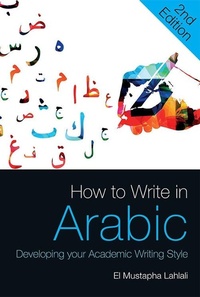
How to Write in Arabic
Description
Alles über E-Books | Antworten auf Fragen rund um E-Books, Kopierschutz und Dateiformate finden Sie in unserem Info- & Hilfebereich.
How to Write in Arabic teaches intermediate and advanced learners how to use the Arabic linguistic features that are key to achieving written fluency. Each unit contains carefully selected exercises where students practise their vocabulary and grammar in a wide range of registers and contexts - such as writing a CV, a short story, a love letter, an essay and many more. In addition to brand-new drills and vocabularies, this second edition also features three new units. The unit on Arabic expressions and vocabulary provides learners with a variety of phrases in context. The unit on media writing focuses on themes such as diplomacy, elections, the economy, the environment and revolutions, amongst others. And the unit on writing errors helps learners spot and correct common mistakes, especially in punctuation and tense.
More details
Other editions
Additional editions
Content
- Intro
- Title page
- Contents
- Acknowledgements
- Introduction
- UNIT 1 CONNECTORS
- UNIT 2 LETTER WRITING
- UNIT 3 STYLISTIC EXPRESSIONS AND VOCABULARY
- UNIT 4 FREE WRITING
- UNIT 5 CREATIVE WRITING
- UNIT 6 ARABIC EXPRESSIONS AND VOCABULARY IN CONTEXT
- UNIT 7 ARABIC MEDIA WRITING
- UNIT 8 MY WRITING ERRORS
- Answers
- References

System requirements
File format: PDF
Copy-Protection: Adobe-DRM (Digital Rights Management)
System requirements:
- Computer (Windows; MacOS X; Linux): Install the free reader Adobe Digital Editions prior to download (see eBook Help).
- Tablet/smartphone (Android; iOS): Install the free app Adobe Digital Editions or the app PocketBook before downloading (see eBook Help).
- E-reader: Bookeen, Kobo, Pocketbook, Sony, Tolino and many more (only limited: Kindle).
The file format PDF always displays a book page identically on any hardware. This makes PDF suitable for complex layouts such as those used in textbooks and reference books (images, tables, columns, footnotes). Unfortunately, on the small screens of e-readers or smartphones, PDFs are rather annoying, requiring too much scrolling.
This eBook uses Adobe-DRM, a „hard” copy protection. If the necessary requirements are not met, unfortunately you will not be able to open the eBook. You will therefore need to prepare your reading hardware before downloading.
Please note: We strongly recommend that you authorise using your personal Adobe ID after installation of any reading software.
For more information, see our eBook Help page.