

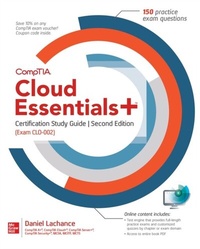
CompTIA Cloud Essentials+ Certification Study Guide, Second Edition (Exam CLO-002)
1st Edition
Published on 28. February 2020
304 pages
978-1-260-46179-4 (ISBN)
Available for download
Description

Publisher's Note: Products purchased from Third Party sellers are not guaranteed by the publisher for quality, authenticity, or access to any online entitlements included with the product.The best IT certification exam study system availableFilled with hands-on exercises and practice exam questions, CompTIA Cloud Essentials+ Certification Study Guide, Second Edition (Exam CLO-002) covers what you need to know and shows you how to prepare for this challenging exam.100% complete coverage of all official objectives for exam CLO-002Exam Readiness checklist you re ready for the exam when all objectives on the list are checked offExam Watch notes call attention to information about, and potential pitfalls in, the examTwo-Minute Drills for quick review at the end of every chapterSimulated exam questions match the format, tone, topics, and difficulty of the real examCovers all the exam topics, including: The Principles of Cloud Computing The Business Side of Cloud Computing Cloud Planning Compliance and the Cloud Cloud Storage Infrastructure Cloud Network Infrastructure Cloud Computing Infrastructure Applications and Big Data in the Cloud Cloud DevOps Security and the Cloud Managing Cloud RiskOnline content includes:Test engine that provides full-length practice exams and customized quizzes by chapter or by exam domainAccess to entire book PDF
More details
Other editions
Additional editions
Book
03/2020
2nd Edition
McGraw-Hill Education
€43.32
Article exhausted; check different version
Content
- Cover
- About the Author
- Title Page
- Copyright Page
- Dedication
- Contents at a Glance
- Contents
- Preface
- Acknowledgments
- Introduction
- Part I Cloud Computing Introduction
- 1 The Principles of Cloud Computing
- Identifying Cloud Computing Characteristics
- Elasticity and Scalability
- Self-service
- Broad Network Access
- Pay-as-You-Go
- Availability
- Identifying Cloud Service Models
- Software as a Service (SaaS)
- Infrastructure as a Service (IaaS)
- Platform as a Service (PaaS)
- Other Cloud Service Models
- Identifying Cloud Deployment Models
- Understanding Cloud Shared Responsibility
- Shared Responsibility Examples
- Exercise 1-1: Sign Up for a Free Microsoft Azure Cloud Subscription
- Certification Summary
- Two-Minute Drill
- Q&A Self Test
- Self Test Answers
- 2 The Business Side of Cloud Computing
- The Business Case for Cloud Computing
- Ongoing Operating Expenses (OPEX)
- Information Technology Infrastructure Library (ITIL) and the Cloud
- Service Level Agreements
- Chargeback
- Managing Cloud Costs
- Reserved and Spot Instances
- Cloud Subscription Types
- Licensing
- Exercise 2-1: Microsoft Azure Pricing Calculator
- Exercise 2-2: Microsoft Azure Budgets and Alerts
- Certification Summary
- Two-Minute Drill
- Q&A Self Test
- Self Test Answers
- Part II Cloud Design Requirements
- 3 Cloud Planning
- Cloud Feasibility
- Feasibility Study
- Cloud Pilot Program
- Solving Business Problems with the Cloud
- Map Computing Requirements to Cloud Services
- Data Sovereignty and Privacy
- Cloud Migration Strategies
- Lift and Shift
- Rip and Replace
- Exercise 3-1: Run an On-Premises Cloud Migration Assessment for Microsoft SQL Server
- Certification Summary
- Two-Minute Drill
- Q&A Self Test
- Self Test Answers
- 4 Compliance and the Cloud
- Laws, Regulations, and Security Standards
- Legal and Regulatory Compliance
- Cloud Service Provider Compliance
- NIST SP 800-53
- ISO/IEC 27017:2015
- FedRAMP
- Sarbanes-Oxley Act
- Business Requirements and Cloud Solutions
- Data Artifacts
- Cloud Service Provider Security Control Implementation
- Exercise 4-1: Review Amazon Web Services Regulatory Compliance
- Certification Summary
- Two-Minute Drill
- Q&A Self Test
- Self Test Answers
- Part III Cloud Infrastructure
- 5 Cloud Storage Infrastructure
- Storage Media
- Drive Types
- IOPS
- Cloud Storage Configuration
- File and Object Storage
- Hot and Cold Storage
- Replication and Encryption
- Databases in the Cloud
- Database Types
- Content Delivery Networks
- Exercise 5-1: Create a Microsoft Azure Storage Account
- Exercise 5-2: Upload Content to a Microsoft Azure Storage Account
- Certification Summary
- Two-Minute Drill
- Q&A Self Test
- Self Test Answers
- 6 Cloud Network Infrastructure
- Cloud Network Components
- Connecting to Cloud Environments
- Site-to-Site VPNs
- Client-to-Site VPNs
- Cloud Virtual Networks
- Network Protocols
- Cloud Load Balancing
- Exercise 6-1: Create a Microsoft Azure Virtual Network
- Exercise 6-2: Configure a Microsoft Azure ExpressRoute Circuit
- Certification Summary
- Two-Minute Drill
- Q&A Self Test
- Self Test Answers
- 7 Cloud Compute Infrastructure
- Virtualization in the Cloud
- Virtual Machine Sizing
- Cloud Virtual Machine Components
- Operating System Selection
- Virtual Network Interface Cards
- Routing Table Entries
- High-Performance Computing
- Exercise 7-1: Deploy a Windows-Based Virtual Machine in the Cloud
- Exercise 7-2: Remotely Manage a Cloud Windows Virtual Machine
- Certification Summary
- Two-Minute Drill
- Q&A Self Test
- Self Test Answers
- 8 Applications and Big Data in the Cloud
- Service-Oriented Architecture
- Microservices
- Content Management Systems
- Blockchain
- Cryptocurrency Miners
- Cryptocurrency Implementations
- Application Containers
- Container Images
- Containers
- Big Data Analytics
- Internet of Things
- Machine Learning
- Exercise 8-1: Create a Microsoft Azure Queue
- Exercise 8-2: Create a Microsoft Azure Container Registry
- Certification Summary
- Two-Minute Drill
- Q&A Self Test
- Self Test Answers
- 9 Cloud DevOps
- Software Development in the Cloud
- Application Programming Interfaces
- Data Exchange Formats
- Software Testing
- Sandboxing
- Testing Types
- Continuous Integration and Delivery
- Code Repositories
- How CI/CD Works
- Cloud Resource Deployment
- Cloud Automation
- Cloud Orchestration
- Exercise 9-1: Deploy Cloud Virtual Machines Using Templates
- Certification Summary
- Two-Minute Drill
- Q&A Self Test
- Self Test Answers
- Part IV Securing the Cloud
- 10 Security and the Cloud
- Confidentiality
- Encryption
- Transport Layer Security
- Data Integrity and Message Authentication
- Hashing
- Digital Signatures
- Availability
- Identity and Access Management
- Identity Providers
- Single Sign-On
- Multifactor Authentication
- Exercise 10-1: Check Virtual Machine Disk Encryption Compliance
- Exercise 10-2: Create a Microsoft Azure Active Directory Tenant
- Certification Summary
- Two-Minute Drill
- Q&A Self Test
- Self Test Answers
- 11 Managing Cloud Risk
- Risk Management
- Risk Assessments
- Risk Treatments
- Assets and Threats
- Asset Inventory
- Threat Prioritization
- Threat Mitigation
- Security Policies
- Control Objectives and Security Controls
- Disaster Recovery
- Continuous Monitoring
- Security Testing and Auditing
- Vulnerability Scanning
- Penetration Testing
- Exercise 11-1: Secure Data at Rest
- Certification Summary
- Two-Minute Drill
- Q&A Self Test
- Self Test Answers
- Part V Appendix and Glossary
- A About the Online Content
- System Requirements
- Your Total Seminars Training Hub Account
- Privacy Notice
- Single User License Terms and Conditions
- TotalTester Online
- Ebook PDF
- Technical Support
- Glossary
- Index

