

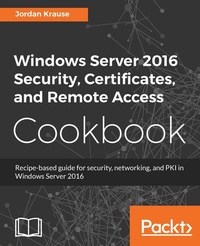
Windows Server 2016 Security, Certificates, and Remote Access Cookbook
Recipe-based guide for security, networking and PKI in Windows Server 2016
Published on 23. September 2024
138 pages
978-1-78913-522-0 (ISBN)
Description

This book contains more than 25 hands-on recipes that will equip you to build a PKI and roll out remote access capabilities via Microsoft DirectAccess and VPN. This book also contains tips and tricks for increasing the security footprint of your Windows Server infrastructure.
Key Features
[*]Identify and mitigate security risks in your Windows Server 2016 infrastructure
[*] Learn how to build a PKI and use it to issue certificates within your network
[*]In-depth information for setting up Microsoft DirectAccess
Book DescriptionWindows Server 2016 is an operating system designed to run on today's highly performant servers, both on-premise and in the cloud. It supports enterprise-level data storage, communications, management, and applications. This book builds off a basic knowledge of the Windows Server operating system, and assists administrators with taking the security of their systems one step further.
You will learn tips for configuring proper networking, especially on multi-homed systems, and tricks for locking down access to your servers.
Then you will move onto one of the hottest security topics of the year - certificates. You will learn how to build your own PKI, or how to better administer one that you already have. You will publish templates, issue certificates, and even configure autoenrollment in your network.
When we say "networking" we don't only mean inside the LAN. To deal safely with mobile devices, you will learn about the capabilities of Windows Server 2016 for connecting these assets securely back into the corporate network, with information about DirectAccess and VPN.
The material in the book has been selected from the content of Packt's Windows Server 2016 Cookbook by Jordan Krause to provide a specific focus on these key Windows Server tasks.
What you will learn
[*] Implement solid networking and security practices into your Windows Server environment
[*] Design your own PKI and start issuing certificates today
[*] Connect your remote laptops back to the corporate network using Microsoft s own remote access technologies, including DirectAccess
[*] Learn to use commands that will help you with monitoring network traffic.
[*] Build and explore your first Server Core instance today!
Who this book is forIf you are a Windows Server administrator interested in learning the key security and networking functions available in Windows Server 2016, keep this book close at hand. If you are a server administrator setting up certificate services for the first time you will also benefit from the step-by-step instructions on implementation of a PKI.
Key Features
[*]Identify and mitigate security risks in your Windows Server 2016 infrastructure
[*] Learn how to build a PKI and use it to issue certificates within your network
[*]In-depth information for setting up Microsoft DirectAccess
Book DescriptionWindows Server 2016 is an operating system designed to run on today's highly performant servers, both on-premise and in the cloud. It supports enterprise-level data storage, communications, management, and applications. This book builds off a basic knowledge of the Windows Server operating system, and assists administrators with taking the security of their systems one step further.
You will learn tips for configuring proper networking, especially on multi-homed systems, and tricks for locking down access to your servers.
Then you will move onto one of the hottest security topics of the year - certificates. You will learn how to build your own PKI, or how to better administer one that you already have. You will publish templates, issue certificates, and even configure autoenrollment in your network.
When we say "networking" we don't only mean inside the LAN. To deal safely with mobile devices, you will learn about the capabilities of Windows Server 2016 for connecting these assets securely back into the corporate network, with information about DirectAccess and VPN.
The material in the book has been selected from the content of Packt's Windows Server 2016 Cookbook by Jordan Krause to provide a specific focus on these key Windows Server tasks.
What you will learn
[*] Implement solid networking and security practices into your Windows Server environment
[*] Design your own PKI and start issuing certificates today
[*] Connect your remote laptops back to the corporate network using Microsoft s own remote access technologies, including DirectAccess
[*] Learn to use commands that will help you with monitoring network traffic.
[*] Build and explore your first Server Core instance today!
Who this book is forIf you are a Windows Server administrator interested in learning the key security and networking functions available in Windows Server 2016, keep this book close at hand. If you are a server administrator setting up certificate services for the first time you will also benefit from the step-by-step instructions on implementation of a PKI.
More details
Edition
Digital original
Language
English
Place of publication
Birmingham
United Kingdom
Target group
Professional and scholarly
US School Grade: College Graduate Student
Edition type
Digital original
File size
4,39 MB
ISBN-13
978-1-78913-522-0 (9781789135220)
Copyright in bibliographic data and cover images is held by Nielsen Book Services Limited or by the publishers or by their respective licensors: all rights reserved.
Schweitzer Classification
Other editions
Additional editions
Book
04/2018
Packt Publishing
€38.90
Shipment within 3-4 weeks
Person
Krause Jordan :
Jordan Krause is an IT professional of more than 20 years and has received 10 Microsoft MVP awards for his work with Microsoft server and networking technologies. As one of the world's first experts on Microsoft DirectAccess, his authorship journey began with a book on remote access technology and has evolved into numerous writings on more extensive topics such as Windows Server, security, and Group Policy. Jordan lives in beautiful West Michigan (USA) and manages a team of IT engineers spread across the country.
Jordan Krause is an IT professional of more than 20 years and has received 10 Microsoft MVP awards for his work with Microsoft server and networking technologies. As one of the world's first experts on Microsoft DirectAccess, his authorship journey began with a book on remote access technology and has evolved into numerous writings on more extensive topics such as Windows Server, security, and Group Policy. Jordan lives in beautiful West Michigan (USA) and manages a team of IT engineers spread across the country.
Content
Table of Contents
Security and Networking
Working with Certificates
Remote Access
Security and Networking
Working with Certificates
Remote Access
