

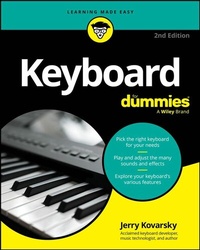
Keyboard For Dummies
Description

Discover the keyboard that's right for you, whatever your budget!
Looking for a fun, challenging, and rewarding new instrument to play? Thinking about the piano but don't necessarily have the room or the budget to put one in your home?
Then grab a copy of the second edition of Keyboard For Dummies! In the book, acclaimed music technologist and keyboardist Jerry Kovarsky explores the wide variety of keyboards available, their sounds and features, and how to find the one that's right for you.
This book walks you through the basics of keyboard playing, from hand and finger placement, to reading music, understanding rhythm and the basics of chords and harmony. Then, take on the fundamentals of sound editing, using effects, and recording your music. You'll learn how to hook up a keyboard to your computer, iPad or smartphone using both wired and Bluetooth technologies.
Inside the book:
- Tips for choosing the right keyboard for you and keeping it in good condition
- Step-by-step tutorials to teach you keyboard hand placement and basic keyboard technique
- Suggestions for playing the most common keyboard sounds
- Playing along with rhythm patterns and auto-accompaniment
- Help with recording and editing songs
- Recommended online resources and example audio tracks
Whether you're a total keyboard novice or a more experienced piano player seeking to explore electronic keyboards, Keyboard For Dummies is the easy-to-read and fun guide to the instrument that you've been waiting for.
Jerry Kovarsky is a veteran product management professional with Casio, Ensoniq and Korg, and an acclaimed music and technology author.
More details
Other editions
Additional editions
Content
- Intro
- Title Page
- Copyright Page
- Table of Contents
- Introduction
- About This Book
- Foolish Assumptions
- Icons Used in This Book
- Beyond the Book
- Where to Go from Here
- Part 1 Getting Started with Keyboards
- Chapter 1 Living in a Keyboard World
- Distinguishing Basic Keyboard Characteristics
- Examining keyboard designs throughout the years
- Touching on key weight
- Join the family: Grouping keyboards
- Speaking the Musical Language
- Making the Most of Your Keyboard's Basic Features
- Working with sounds
- Exploring effects
- Getting into automatic playing features
- Delving into More-Advanced Digital Features
- Stepping into the virtual recording studio
- Shaping the sounds you play
- Checking out the computer connection
- Practicing with and without Help
- Chapter 2 So Many Keyboards, So Little Time
- Identifying Different Types of Keyboards
- Acoustic keyboards
- Electro-mechanical keyboards
- Electronic keyboards
- Appreciating How Digital Keyboards Make Their Many Sounds
- Considering Key Feel and Response
- Touch sensitivity
- Key weight
- Paying Attention to Polyphony
- Meeting the Major Electronic Keyboard Food Groups
- Digital pianos
- Digital organs
- Stage pianos
- Portable keyboards
- Synthesizers
- Workstations
- Arrangers
- Controller keyboards
- Deciding Whether to Plug In
- When only the real acoustic thing will do
- Advantage, electronics!
- Chapter 3 Choosing the Right Keyboard for You
- Looking at What's Important for the Beginner
- I'm Good
- I Want More! Graduating to More Pro Features
- Getting the piano-centric experience
- Ample polyphony
- Characteristics of the keys
- Improved/expanded piano samples
- Increasing sound nuances
- Going beyond the piano: Sound options and considerations
- Other features to consider
- Determining the Type(s) of Music You Want to Play
- Considering Your Keyboard's Location
- Playing Well with Others and Alone
- Going solo
- Accompanying vocalists
- Performing classical music with others
- Jamming in a pop, rock, or jazz band
- Purchasing a Gift for a Child
- Doing Your Due Diligence
- Visiting various manufacturers' websites
- Reading the manual
- Looking for user groups for the brand(s) or category you're interested in
- Checking out reviews for the model(s) you're interested in
- Chapter 4 Setting Up and Caring For Your Keyboard
- Deciding On the Right Spot
- Locating near needed connections
- Surveying sound considerations
- Avoiding distractions
- Unboxing Your New Toy
- Safety first! Opening the box carefully
- What's inside? Going down the checklist
- Setting Up Your Keyboard
- Hook Me Up: Taking Care of All Sorts of Keyboard Connections
- Making the electrical connection
- Firing up your keyboard
- Music to my ears: Working with headphones
- Breaking down headphone varieties
- Plugging in your headphones to your keyboard
- Doing without onboard speakers and headphones
- Connecting to your home stereo
- Using your computer speakers
- Attaching to musical instrument amplifiers and other ¼-inch jack devices
- Protecting Your Investment: Care and Upkeep
- Avoiding temperature extremes
- Combating dust with a keyboard cover
- Cleaning the keys and case
- Moving from place to place
- Solving Technical Problems
- Part 2 Dipping Your Toes Fingers into Music Basics
- Chapter 5 Musical Notation: Decoding the Musical Language
- Getting Acquainted with Notes on the Keyboard
- Scoring a C-note: Finding C on the keyboard
- Exploring the white keys
- Stepping up or down with the black keys
- Making Sense of Music Notation
- Sizing up the staff: Treble and bass clef
- Starting with the treble clef (your right hand)
- Meeting the bass clef (your left hand)
- Recognizing sharps and flats
- Weighing in on major scales
- Reading key signatures
- Putting both clefs together: The grand staff
- I've Got the Beat: Discovering How to Count
- Getting to know time signatures
- Obeying the measure and bar line
- Understanding quarter notes, half notes, and whole notes
- Playing eighth notes and more
- Dividing the beat
- Applying the divided beat to eighth and sixteenth notes
- Holding notes longer than a measure: Ties
- Knowing when not to play: Rests
- Using a metronome to help your timing
- Chapter 6 Developing Your Fingering and Basic Technique
- Getting in Playing Position
- Assuming the position: Proper playing posture
- Shaping your hand and fingers
- Putting Your Hands in Place
- Numbering your fingers
- Trying out some basic placement exercises
- Playing in one position
- Moving to another position
- Stretching farther than five notes - and coming back
- Making Smooth Crossings
- Crossing a finger over
- Passing the thumb under
- Practicing crossings with a few easy scales
- Using a Pedal to Connect Notes and Sound Fuller
- Practicing Productively
- Chapter 7 Going Chord Crazy
- Getting to Know the Five Basic Chord Types
- The major chord
- The minor chord
- The diminished chord
- The augmented chord
- The suspended chords: Sus2 and sus4
- Relating Chords to a Scale or Key Signature
- Recognizing the major scale chord tones
- Trying a few common chord progressions
- Rearranging the Order of the Notes: Chord Inversions
- The three triad inversions
- Three-note chords in your left hand
- Two-handed chords in a pianistic style
- Part 3 Using Common Keyboard Features
- Chapter 8 Selecting and Playing Sounds
- First Things First: Understanding Some Important Terminology
- A sound by any other name: Recognizing the various terms
- Defining GM/GM2
- I Love a Piano! Focusing on Acoustic Piano
- Just playing piano
- Ensuring that the whole key range is playing one sound
- Selecting Various Sounds
- From labeled names or categories
- Picking specific sounds by name
- Choosing sounds from within categories
- From a bank or numeric locations
- Using a numeric keypad or numbered buttons to select a sound location
- Choosing which bank or group of sounds you want to select from
- From the display screen
- Making Sure Your Selected Sounds Sound Right
- Playing in the right note range
- Sounding one note, or more?
- Understanding the common styles of music for various sounds
- Using More than One Sound at a Time
- Layering sounds
- Placing sounds side by side (splits)
- Chapter 9 Using Effects to Enhance Your Sound
- Categorizing Common Keyboard Effects
- Meeting the Main Types of Effects
- Reverb
- Delay
- Chorus/flanging/phase shifting
- Chorus
- Flanging
- Phase shifting
- EQ
- Distortion
- Rotary speaker
- Filter
- Wah-wah and auto-wah
- Choosing Effects for Each Type of Sound
- Chapter 10 Jamming with the Drummer: Playing Along to Rhythm Patterns
- Getting Your Groove On: Working with Onboard Drum Rhythms
- Selecting a drum pattern
- Portable keyboards
- Arranger keyboards and high-end digital pianos with full auto-accompaniment
- Synths and workstations
- Starting the pattern playing
- Controlling the tempo
- Adding Variety to Your Groove
- Using pattern variations
- Basic options for simple keyboards
- More-advanced options on higher-end models
- Digging into natural drum fills
- Incorporating intros and endings
- Chapter 11 Join The Band! Adding Accompaniment
- Playing with Accompaniment
- Understanding how auto-accompaniment works
- Starting a pattern playing
- Appreciating what you hear: Breaking down an accompaniment pattern
- Feeding the Band the Chord Changes: Chord Triggering
- Using the easy methods
- Casio
- The other guys
- Playing the chords yourself
- Spicing Up Your Performance
- Mixing things up with pattern variations
- Including drum fills
- Trying intros and endings
- Mixing the Sound of the Band
- Adjusting the volume of each section
- Varying the reverb effect
- Changing who plays which part
- Letting the Keyboard Make the Choices for You
- Taking advantage of one-touch settings
- Diving into the music database
- Using Some Fancy Extras
- Adding harmony to your melodies
- Hitting the chord pads
- Chapter 12 Exploring Arpeggiation
- Tracing the Roots of Arpeggiation
- Looking At Some Arp Examples
- Exploring More Arpeggiator Features
- Extending the range
- Changing the timing/speed
- Getting into the swing of things
- Making the notes shorter/longer
- Hearing the notes being held along with the arp
- Keeping the arp playing without holding the keys
- Adding variety with different patterns
- Trying Out Some Different Sounds: Matching Sounds and Arp Patterns
- Adding Fun Sound and Effects Tweaks
- Part 4 Moving into More-Advanced Keyboard Features
- Chapter 13 Laying Down Tracks: Recording Your Playing
- Exploring the Two Basic Forms of Recording
- Addressing audio recording
- Making sense of MIDI recording
- Capturing What You Hear as It Happens: One-Pass Recording
- Tackling audio recording in one pass
- Grabbing a one-pass MIDI recording
- Recording Multitrack MIDI
- Setting up your session
- Recording the first track
- Adding more tracks
- Recording multiple parts at the same time
- Refining Your MIDI Recordings
- Fixing small mistakes
- Adjusting the timing of your playing
- Correcting wrong notes
- Changing the pitch of a note
- Editing notes played too softly or too loudly
- Mixing your MIDI song
- Getting Your Song out of the Keyboard and into the World
- Chapter 14 Editing Sounds
- Meeting the Main Forms of Synthesis
- Surveying sampled sounds
- Digging into digital synthesis
- Perusing physical modeling and virtual analog
- Physical modeling
- Virtual analog
- Relating Sound Characteristics to Synthesis Parameters
- Describing sounds' qualities
- Considering common parameter names
- Oscillator
- Filter
- Amplifier (amp)
- Envelope generator
- LFO (low frequency oscillator)
- Trying Some Common Sound Edits
- Varying the basic timbre (waveform)
- Trying a slight variation of the current sound type
- Using similar amp characteristics to make a different sound
- Changing the brightness (filter)
- Adjusting the amp parameters (volume over time)
- Adding modulation
- Personalizing the touch response of a sound
- Customizing a sound's dynamics
- Matching velocity switch points to your touch
- Chapter 15 Teacher Included: Using Onboard Learning Systems
- Working with Built-In Songs
- Selecting a song
- Slowing down the tempo
- Turning off one of the parts (RH or LH)
- Repeating small sections
- Taking Assisted Lessons
- First, you need to listen
- Finding the right notes
- Working on your timing
- Putting it all together
- Learning via a Dedicated App
- Chapter 16 The Computer Connection: Using Software to Enhance Your Music Making
- Getting Acquainted with MIDI
- How MIDI works: Explaining common MIDI messages
- Examining MIDI ports
- Connecting Your Keyboard to Your Computer
- Using a direct USB connection
- Utilizing a MIDI interface
- Working with drivers and plug-and-play
- On a Mac
- On a PC
- Hooking Up to Your iPad
- Exploring Popular Types of Music Software
- Sequencer/MIDI recorder
- Educational/learning software
- Music notation software
- Digital sheet music
- Additional instruments/sounds
- Part 5 The Part of Tens
- Chapter 17 Ten Tips for Keyboard Shopping
- Know What Type of Keyboard You Want
- Determine Your Price Range
- Do Your Research
- Make the Most of Your Trip to the Store
- Bring Your Own Headphones
- Ask for a Damper/Sustain Pedal
- Listen to the Built-In Demos
- Get Your Hands on the Keyboard
- Compare Models
- Find the Best Deal
- Chapter 18 Ten Ways to Enhance Your Playing Experience
- Set the Right Mood
- Stretch and Warm Up Before You Play
- Watch Your Posture
- Set Up a Practice Routine
- Use a Real Damper Pedal If You Play Piano/Electric Piano
- Find a Music Buddy
- Play Music with Other People
- Listen to Recordings for Inspiration
- Spend Time Studying on YouTube
- Get Yourself a Teacher!
- Appendix Discovering What's on the Audio Tracks
- Index
- EULA
