

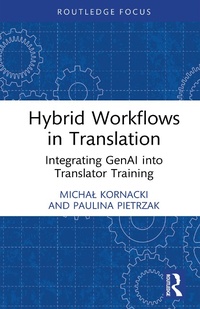
Hybrid Workflows in Translation
Integrating GenAI into Translator Training
1st Edition
Published on 9. September 2024
160 pages
978-1-040-15460-1 (ISBN)
Description

This concise volume serves as a valuable resource on understanding the integration and impact of generative AI (GenAI) and evolving technologies on translation workflows. As translation technologies continue to evolve rapidly, translation scholars and practicing translators need to address the challenges of how best to factor AI-enhanced tools into their practices and in translator training programs.
The book covers a range of AI applications, including AI-powered features within Translation Management Systems, AI-based machine translation, AI-assisted translation, language generation modules and language checking tools. The volume puts the focus on using AI in translation responsibly and effectively, but also on ways to support students and practitioners in their professional development through easing technological anxieties and building digital resilience.
This book will be of interest to students, scholars and practitioners in translation and interpreting studies, as well as key stakeholders in the language services industry.
The book covers a range of AI applications, including AI-powered features within Translation Management Systems, AI-based machine translation, AI-assisted translation, language generation modules and language checking tools. The volume puts the focus on using AI in translation responsibly and effectively, but also on ways to support students and practitioners in their professional development through easing technological anxieties and building digital resilience.
This book will be of interest to students, scholars and practitioners in translation and interpreting studies, as well as key stakeholders in the language services industry.
More details
Series
Edition
1. Auflage
Language
English
Place of publication
London
United Kingdom
Publishing group
Taylor & Francis Ltd
Target group
College/higher education
Professional and scholarly
Illustrations
13 Tables, black and white; 12 Line drawings, black and white; 12 Illustrations, black and white
ISBN-13
978-1-040-15460-1 (9781040154601)
Copyright in bibliographic data and cover images is held by Nielsen Book Services Limited or by the publishers or by their respective licensors: all rights reserved.
Schweitzer Classification
Other editions
Additional editions
Book
11/2024
1st Edition
Taylor & Francis Group
€33.70
Shipment within 10-20 days
Michal Kornacki | Paulina Pietrzak
Hybrid Workflows in Translation
Integrating GenAI into Translator Training
Book
09/2024
1st Edition
Routledge
€78.40
Shipment within 10-20 days
Persons
Michal Kornacki is Assistant Professor at the Institute of English Studies at the University of Lodz, Poland.
Paulina Pietrzak is Associate Professor at the Institute of English Studies at the University of Lodz, Poland.
Paulina Pietrzak is Associate Professor at the Institute of English Studies at the University of Lodz, Poland.
Content
Contents
List of Figures
List of Tables
Introduction
Chapter 1: (R)evolution of translation technology
1.1. History and evolution of translation tools
1.1.1. Machine translation
1.1.2. Computer-assisted translation (CAT) tools
1.1.3. Translation management systems
1.1.4. Writing assistants and checking tools
1.1.5. Generative artificial intelligence in translation
1.2. The current state of translation technology
1.3. Stages of AI development
Chapter 2: Translator-AI interaction
2.1. Augmented translation
2.2. Hybrid workflows in translation
2.3. The impact of technology on translator profession: new avenues and new anxieties
2.4. Ethical considerations in AI-assisted language service provision
Chapter 3: Translators as AI-assisted language specialists
3.1. Translators' new roles and status
3.2. Future translator expertise: what is missing?
3.3. Technical skills for hybrid workflows
3.4. From anxiety to digital resilience
3.5. Personal resources and metacognitive capacity
3.6. The translator's self-concept in AI interactions
Chapter 4: Attitudes towards AI in translation: an academic exploration
4.1. Research design
4.2. Limitations of the study
4.3. Data analysis
4.3.1. Findings on the use of AI technologies in translation
4.3.2. Perspectives on GenAI integration in translator education
4.3.3. Risks associated with using GenAI tools in translator training
4.4. Summary of the findings: challenges and lessons learned
Chapter 5. Implications for translator training
5.1. To teach or not to teach?
5.2. What's in it for translation students?
5.3. Suggested ways of introducing AI-assisted translation practice
5.3.1. Exercises in AI-assisted translation
5.3.2. AI tools for terminology management
5.3.3. AI-assisted quality assessment
5.3.4. AI-generated feedback
5.3.5. Ethical code of conduct in AI use
5.4. Fostering personal resources in translator training
5.4.1. Self-reflection: what am I missing?
5.4.2. Self-efficacy: building digital resilience
5.4.3. Self-concept: reducing technological anxiety
Chapter 6: Final reflections
Appendix
Index
List of Figures
List of Tables
Introduction
Chapter 1: (R)evolution of translation technology
1.1. History and evolution of translation tools
1.1.1. Machine translation
1.1.2. Computer-assisted translation (CAT) tools
1.1.3. Translation management systems
1.1.4. Writing assistants and checking tools
1.1.5. Generative artificial intelligence in translation
1.2. The current state of translation technology
1.3. Stages of AI development
Chapter 2: Translator-AI interaction
2.1. Augmented translation
2.2. Hybrid workflows in translation
2.3. The impact of technology on translator profession: new avenues and new anxieties
2.4. Ethical considerations in AI-assisted language service provision
Chapter 3: Translators as AI-assisted language specialists
3.1. Translators' new roles and status
3.2. Future translator expertise: what is missing?
3.3. Technical skills for hybrid workflows
3.4. From anxiety to digital resilience
3.5. Personal resources and metacognitive capacity
3.6. The translator's self-concept in AI interactions
Chapter 4: Attitudes towards AI in translation: an academic exploration
4.1. Research design
4.2. Limitations of the study
4.3. Data analysis
4.3.1. Findings on the use of AI technologies in translation
4.3.2. Perspectives on GenAI integration in translator education
4.3.3. Risks associated with using GenAI tools in translator training
4.4. Summary of the findings: challenges and lessons learned
Chapter 5. Implications for translator training
5.1. To teach or not to teach?
5.2. What's in it for translation students?
5.3. Suggested ways of introducing AI-assisted translation practice
5.3.1. Exercises in AI-assisted translation
5.3.2. AI tools for terminology management
5.3.3. AI-assisted quality assessment
5.3.4. AI-generated feedback
5.3.5. Ethical code of conduct in AI use
5.4. Fostering personal resources in translator training
5.4.1. Self-reflection: what am I missing?
5.4.2. Self-efficacy: building digital resilience
5.4.3. Self-concept: reducing technological anxiety
Chapter 6: Final reflections
Appendix
Index
