

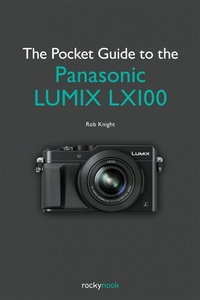
Pocket Guide to the Panasonic LUMIX LX100
Published on 24. November 2015
112 pages
978-1-937538-96-5 (ISBN)
Description

The Panasonic LUMIX LX100 is a compact zoom camera designed with the enthusiast and advanced photographer in mind. For those shooters looking for a very capable camera with a small profile-especially when compared to a DSLR-the LX100 hits the mark, and it does so without compromise in quality. With its Four Thirds sensor, its 24-75mm focal range, and its Leica f/1.7-2.8 lens, the LX100 has received much high praise. In fact, DP Review awarded the camera its highest ever score in its camera class and called it "one of the best photographers' cameras on the market and probably the best zoom compact ever made." In addition, the inclusion of 4k video and 4k photo mode put the LX100 in a class by itself.
The Pocket Guide to the Panasonic LUMIX LX100 is a quick and to-the-point companion guide to help you make the most of this highly capable advanced camera. The basic operation of the LX100 is fairly straightforward for those photographers with an understanding of exposure and composition-adjusting the aperture and shutter speed are simple enough. But there are many next-generation features, functions, and customizable setups that even a seasoned photographer might overlook or not take full advantage of-features that, when implemented, could make all the difference in getting the shot.
In this concise guide, Panasonic LUMIX Luminary Rob Knight shares his real-world experience with the LX100. Rob doesn't spend time rehashing the basics of the exposure triangle; instead, he dives into a curated collection of the LX100's best features and capabilities that he uses regularly. Some of the topics covered include:
- The best focus modes and settings based on the shooting situation
- Customizable Function (Fn) button and Control Dial options
- In-Camera RAW processing
- Shooting in Silent mode
- Multiple exposures and panoramas
- 4k photo mode
- WiFi settings and features
- And much more!
More details
Content
- Cover
- Table of Contents
- INTRODUCTION
- 1 OUT OF THE BOX
- A QUICK TOUR
- Analog Dials and PASM
- Additional Controls on the Lens
- SETTINGS YOU SHOULD KNOW
- Q. Menu Options
- FN Buttons
- Fix the iA Button
- Activate Zoom Resume
- Turn Off the Beep!
- 2 DIVING DEEPER
- CONTROL RING FUNCTIONS
- STEP ZOOM
- EXTENDING THE ZOOM RANGE
- MECHANICAL VS. ELECTRONIC SHUTTER
- INTELLIGENT ISO
- SILENT MODE
- 3 BIG-CAMERA FUNCTIONS
- GET IN FOCUS
- Focus Modes
- SMALL FLASH WITH BIG FEATURES
- High-Speed Sync
- Flash Exposure
- Wireless Flash
- CUSTOM FUNCTIONS
- 4 CREATIVE MODES AND FEATURES
- RAW, JPEG, OR BOTH?
- PRE-PROCESSING OPTIONS
- Photo Styles
- Highlights Shadow Menu
- iDynamic
- i.Resolution
- Picture Effects Filters
- IN-CAMERA RAW PROCESSING
- MULTIPLE EXPOSURES
- PANORAMA MODE
- BENDING TIME WITH TIME LAPSE
- SETTINGS FOR GREAT VIDEO
- 4K PHOTO MODE
- REMOTE CONTROL AND MORE: WI-FI FEATURES
- Getting Connected
- Image App Features
- 5 SUGGESTED SETTINGS FOR VARIOUS SHOOTING SCENARIOS
- HOME BASE
- STREET PHOTOGRAPHY
- TRAVEL PHOTOGRAPHY
- NATURE PHOTOGRAPHY
- MACRO PHOTOGRAPHY
- TIME-LAPSE PROJECT
- MULTIPLE EXPOSURE PROJECT
- WRAPPING UP
- ACKNOWLEDGMENTS
- INDEX
- A
- B
- D
- E
- F
- H
- I
- J
- M
- N
- P
- Q
- R
- S
- T
- V
- W
- Z
