

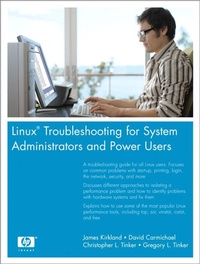
Linux Troubleshooting for System Administrators and Power Users
Linu Trou Syst Admi Powe U
1st Edition
Published on 5. June 2006
624 pages
978-0-13-205523-9 (ISBN)
Description

Linux is a fast-growing operating system with power and appeal, and enterprises worldwide are quickly adopting the system to utilize its benefits. But as with all operating systems, performance problems do occur causing system administrators to scramble into action. Finally, there is a complete reference for troubleshooting Linux-quickly! Linux Troubleshooting for System Administrators and Power Users is THE book for locating and solving problems and maintaining high performance in Red Hat (R) Linux and Novell (R) SUSE (R) Linux systems.
This book not only teaches you how to troubleshoot Linux, it shows you how the system works-so you can attack any problem at its root. Should you reinstall if Linux does not boot? Or can you save time by troubleshooting the problem? Can you enhance performance when Linux hangs or runs slowly? Can you overcome problems with printing or accessing a network? This book provides easy-to-follow examples and an extensive look at the tools, commands, and scripts that make Linux run properly.
A troubleshooting guide for all Linux users: Focuses on common problems with start-up, printing, login, the network, security, and more
Restore Linux when boot, startup, or shutdown fails-and reinstall Linux properly when all troubleshooting fails
Explains how to use some of the most popular Linux performance tools, including top, sar, vmstat, iostat, and free
Handle storage problems and CPU slamming to ensure high Linux performance
Solve hardware device problems by deciphering error messages and using the lspci tool
Use backup/recover commands and tape libraries to create proper backups
Identify and correct remote and network printing problems using spooler commands
Gone are the days of searching online for solutions that are out of date and unreliable. Whether you are a system admin, developer, or user, this book is an invaluable resource for ensuring that Linux runs smoothly, efficiently, and securely.
This book not only teaches you how to troubleshoot Linux, it shows you how the system works-so you can attack any problem at its root. Should you reinstall if Linux does not boot? Or can you save time by troubleshooting the problem? Can you enhance performance when Linux hangs or runs slowly? Can you overcome problems with printing or accessing a network? This book provides easy-to-follow examples and an extensive look at the tools, commands, and scripts that make Linux run properly.
A troubleshooting guide for all Linux users: Focuses on common problems with start-up, printing, login, the network, security, and more
Restore Linux when boot, startup, or shutdown fails-and reinstall Linux properly when all troubleshooting fails
Explains how to use some of the most popular Linux performance tools, including top, sar, vmstat, iostat, and free
Handle storage problems and CPU slamming to ensure high Linux performance
Solve hardware device problems by deciphering error messages and using the lspci tool
Use backup/recover commands and tape libraries to create proper backups
Identify and correct remote and network printing problems using spooler commands
Gone are the days of searching online for solutions that are out of date and unreliable. Whether you are a system admin, developer, or user, this book is an invaluable resource for ensuring that Linux runs smoothly, efficiently, and securely.
More details
Edition
1. Auflage
Language
English
Place of publication
United States
Publishing group
Pearson Education (US)
Target group
Professional and scholarly
Adult: General
ISBN-13
978-0-13-205523-9 (9780132055239)
Copyright in bibliographic data and cover images is held by Nielsen Book Services Limited or by the publishers or by their respective licensors: all rights reserved.
Schweitzer Classification
Other editions
Additional editions
James Kirkland | David Carmichael | Christopher L. Tinker
Linux Troubleshooting for System Administrators and Power Users
Book
05/2006
Prentice Hall
€55.07
Article exhausted; check different version
Persons
James Kirkland is a Senior Consultant for Racemi. He was previously a Senior Systems Administrator at Hewlett-Packard. He has been working with UNIX variants for more than ten years. James is a Red Hat Certified engineer, Linux LPIC level one certified, and an HP-UX certified System Administrator. He has been working with Linux for seven years and HP-UX for eight years. He has been a participant at HP World, Linux World, and numerous internal HP forums.
David Carmichael works for Hewlett-Packard as a Technical Problem Manager in Alpharetta, Georgia. He earned a bachelors degree in computer science from West Virginia University in 1987 and has been helping customers resolve their IT problems ever since. David has written articles for HP's IT Resource Center (http://itrc.hp.com) and presented at HP World 2003.
Chris Tinker and Greg Tinker are twin brothers originally from LaFayette, Georgia. Chris began his career in computers while working as a UNIX System Administrator for Lockheed Martin in Marietta, Georgia. Greg began his career while at Bellsouth in Atlanta, Georgia. Both Chris and Greg joined Hewlett-Packard in 1999. Chris's primary role at HP is as a Senior Software Business Recovery Specialist and Greg's primary role is as a Storage Business Recovery Specialist. Both Chris and Greg have participated in HP World, taught several classes in UNIX/Linux and Disk Array technology, and obtained various certifications including certifications in Advanced Clusters, SAN, and Linux. Chris resides with his wife, Bonnie, and Greg resides with his wife, Kristen, in Alpharetta, Georgia.
David Carmichael works for Hewlett-Packard as a Technical Problem Manager in Alpharetta, Georgia. He earned a bachelors degree in computer science from West Virginia University in 1987 and has been helping customers resolve their IT problems ever since. David has written articles for HP's IT Resource Center (http://itrc.hp.com) and presented at HP World 2003.
Chris Tinker and Greg Tinker are twin brothers originally from LaFayette, Georgia. Chris began his career in computers while working as a UNIX System Administrator for Lockheed Martin in Marietta, Georgia. Greg began his career while at Bellsouth in Atlanta, Georgia. Both Chris and Greg joined Hewlett-Packard in 1999. Chris's primary role at HP is as a Senior Software Business Recovery Specialist and Greg's primary role is as a Storage Business Recovery Specialist. Both Chris and Greg have participated in HP World, taught several classes in UNIX/Linux and Disk Array technology, and obtained various certifications including certifications in Advanced Clusters, SAN, and Linux. Chris resides with his wife, Bonnie, and Greg resides with his wife, Kristen, in Alpharetta, Georgia.
Content
Preface xvii
Chapter 1 System Boot, Startup, and Shutdown Issues 1
Chapter 2 System Hangs and Panics 51
Chapter 3 Performance Tools 79
Chapter 4 Performance 107
Chapter 5 Adding New Storage via SAN with Reference to PCMCIA and USB 159
Chapter 6 Disk Partitions and Filesystems 185
Chapter 7 Device Failure and Replacement 229
Chapter 8 Linux Processes: Structures, Hangs, and Core Dumps 253
Chapter 9 Backup/Recovery 285
Chapter 10 cron and at 315
Chapter 11 Printing and Printers 345
Chapter 12 System Security 383
Chapter 13 Network Problems 423
Chapter 14 Login Problems 495
Chapter 15 X Windows Problems 527
Index 551
Chapter 1 System Boot, Startup, and Shutdown Issues 1
Chapter 2 System Hangs and Panics 51
Chapter 3 Performance Tools 79
Chapter 4 Performance 107
Chapter 5 Adding New Storage via SAN with Reference to PCMCIA and USB 159
Chapter 6 Disk Partitions and Filesystems 185
Chapter 7 Device Failure and Replacement 229
Chapter 8 Linux Processes: Structures, Hangs, and Core Dumps 253
Chapter 9 Backup/Recovery 285
Chapter 10 cron and at 315
Chapter 11 Printing and Printers 345
Chapter 12 System Security 383
Chapter 13 Network Problems 423
Chapter 14 Login Problems 495
Chapter 15 X Windows Problems 527
Index 551
