

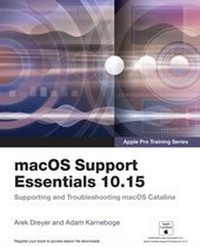
macOS Support Essentials 10.15 - Apple Pro Training Series
Supporting and Troubleshooting macOS Catalina
1st Edition
Published on 10. March 2021
976 pages
978-0-13-655227-7 (ISBN)
Description

macOS Support Essentials 10.15 - Apple Pro Training Series The Apple-Certified Way to Learn
This is the official book for the macOS Support Essentials 10.15course and you can use it to prepare for the Apple Certified Support Professional (ACSP) 10.15 exam. It's a top-notch primer for anyone who needs to support, troubleshoot, or optimize macOS Catalina, such as IT professionals, technicians, help desk specialists, and ardent Mac users. This is the only Apple Pro Training Series book that covers macOS Catalina. You'll find in-depth, step-by-step instructions on everything from upgrading, updating, reinstalling and configuring macOS Catalina to configuring network services like the Content Caching service.
This book covers updated system utilities and new features in macOS Catalina, including Voice Control and other accessibility features, user privacy settings, notarized apps, Startup Security Utility, and the separation of the startup disk into a read-only APFS System volume and a read write APFS Data volume.
This book includes the following content:
Authoritative explanations of underlying technologies, troubleshooting, system administration, and much more
Focused lessons that take you step by step through practical, real-world tasks
A Web Edition that provides the full text of the book online
The Apple Pro Training Series includes self-paced learning tools and is the official curriculum of the Apple Training and Certification program. After you complete this book, take the macOS Support Essentials 10.15 exam as a step towards becoming an Apple Certified Support Professional. Work through this book independently or attend a class at an Apple Authorized Training Provider or both to prepare for the exam.
To learn more, visit training.apple.com.
Also in the Apple Pro Training Series:
Final Cut Pro X
Logic Pro X
This is the official book for the macOS Support Essentials 10.15course and you can use it to prepare for the Apple Certified Support Professional (ACSP) 10.15 exam. It's a top-notch primer for anyone who needs to support, troubleshoot, or optimize macOS Catalina, such as IT professionals, technicians, help desk specialists, and ardent Mac users. This is the only Apple Pro Training Series book that covers macOS Catalina. You'll find in-depth, step-by-step instructions on everything from upgrading, updating, reinstalling and configuring macOS Catalina to configuring network services like the Content Caching service.
This book covers updated system utilities and new features in macOS Catalina, including Voice Control and other accessibility features, user privacy settings, notarized apps, Startup Security Utility, and the separation of the startup disk into a read-only APFS System volume and a read write APFS Data volume.
This book includes the following content:
Authoritative explanations of underlying technologies, troubleshooting, system administration, and much more
Focused lessons that take you step by step through practical, real-world tasks
A Web Edition that provides the full text of the book online
The Apple Pro Training Series includes self-paced learning tools and is the official curriculum of the Apple Training and Certification program. After you complete this book, take the macOS Support Essentials 10.15 exam as a step towards becoming an Apple Certified Support Professional. Work through this book independently or attend a class at an Apple Authorized Training Provider or both to prepare for the exam.
To learn more, visit training.apple.com.
Also in the Apple Pro Training Series:
Final Cut Pro X
Logic Pro X
More details
Language
English
Place of publication
Berkeley
United States
Publishing group
Pearson Education (US)
Target group
Professional and scholarly
ISBN-13
978-0-13-655227-7 (9780136552277)
Copyright in bibliographic data and cover images is held by Nielsen Book Services Limited or by the publishers or by their respective licensors: all rights reserved.
Schweitzer Classification
Other editions
Additional editions
Adam Karneboge | Arek Dreyer
macOS Support Essentials 10.15 - Apple Pro Training Series
Supporting and Troubleshooting macOS Catalina
Book
03/2020
Peachpit Press Publications
€64.36
Shipment within 15-20 days
Persons
Adam Karneboge has been an Apple Certified Trainer since 2003. Adam conducts technical training courses, and delivers consulting, deployment, and integration services to business, enterprise, and education clients.
Arek Dreyer has been an Apple Certified Trainer since 2002. Originally an expert in Sun Systems, Dreyer shifted his professional focus to Mac OS X shortly after it came out. President of Dreyer Network Consultants Inc., Arek has been delivering courses and providing training around the world, both in the classroom and at events like the Apple Channel Camp and the Macworld Conference and Expo. Dreyer also provides integration and troubleshooting services for his own customers and for Apple.
Arek Dreyer has been an Apple Certified Trainer since 2002. Originally an expert in Sun Systems, Dreyer shifted his professional focus to Mac OS X shortly after it came out. President of Dreyer Network Consultants Inc., Arek has been delivering courses and providing training around the world, both in the classroom and at events like the Apple Channel Camp and the Macworld Conference and Expo. Dreyer also provides integration and troubleshooting services for his own customers and for Apple.
Content
Installation and Configuration Lesson 1 Introduction to macOS Lesson 2 Update, Upgrade, or Reinstall macOS Lesson 3 Set Up and Configure macOS Lesson 4 Use the Command-Line Interface Lesson 5 Use macOS Recovery Lesson 6 Update macOS
User Accounts Lesson 7 Manage User Accounts Lesson 8 Manage User Home Folders Lesson 9 Manage Security and Privacy Lesson 10 Manage Password Changes
File Systems Lesson 11 Manage File Systems and Storage Lesson 12 Manage FileVault Lesson 13 Manage Permissions and Sharing Lesson 14 Use Hidden Items, Shortcuts, and File Archives
Data Management Lesson 15 Manage System Resources Lesson 16 Use Metadata, Spotlight, and Siri Lesson 17 Manage Time Machine
Apps and Processes Lesson 18 Install Apps Lesson 19 Manage Files Lesson 20 Manage and Troubleshoot Apps
Network Configuration Lesson 21 Manage Basic Network Settings Lesson 22 Manage Advanced Network Settings Lesson 23 Troubleshoot Network Issues
Network Services Lesson 24 Manage Network Services Lesson 25 Manage Host Sharing and Personal Firewall
System Management Lesson 26 Troubleshoot Peripherals Lesson 27 Manage Printers and Scanners Lesson 28 Troubleshoot Startup and System Issues
User Accounts Lesson 7 Manage User Accounts Lesson 8 Manage User Home Folders Lesson 9 Manage Security and Privacy Lesson 10 Manage Password Changes
File Systems Lesson 11 Manage File Systems and Storage Lesson 12 Manage FileVault Lesson 13 Manage Permissions and Sharing Lesson 14 Use Hidden Items, Shortcuts, and File Archives
Data Management Lesson 15 Manage System Resources Lesson 16 Use Metadata, Spotlight, and Siri Lesson 17 Manage Time Machine
Apps and Processes Lesson 18 Install Apps Lesson 19 Manage Files Lesson 20 Manage and Troubleshoot Apps
Network Configuration Lesson 21 Manage Basic Network Settings Lesson 22 Manage Advanced Network Settings Lesson 23 Troubleshoot Network Issues
Network Services Lesson 24 Manage Network Services Lesson 25 Manage Host Sharing and Personal Firewall
System Management Lesson 26 Troubleshoot Peripherals Lesson 27 Manage Printers and Scanners Lesson 28 Troubleshoot Startup and System Issues
