

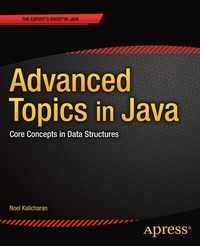
Advanced Topics in Java
Core Concepts in Data Structures
Published on 28. February 2014
XIV, 322 pages
978-1-4302-6620-4 (ISBN)
Description

Java is one of the most widely used programming languages today. It was first released by Sun Microsystems in 1995. Over the years, its popularity has grown to the point where it plays an important role in most of our lives. From laptops to data centers, game consoles to scientific supercomputers, cell phones to the Internet, Java is everywhere! There are tons of applications and heaps of websites that will not work unless you have Java installed, and more are created every day. And, of course, Java is used to power what has become the world's most dominant mobile platform, Android. Advanced Topics In Java teaches the algorithms and concepts that any budding software developer should know. You'll delve into topics such as sorting, searching, merging, recursion, random numbers and simulation, among others. You will increase the range of problems you can solve when you learn how to create and manipulate versatile and popular data structures such as binary trees and hash tables. This book assumes you have a working knowledge of basic programming concepts such as variables, constants, assignment, selection (if..else) and looping (while, for). It also assumes you are comfortable with writing functions and working with arrays. If you study this book carefully and do the exercises conscientiously, you would become a better and more agile software developer, more prepared to code today's applications - no matter the language.
More details
Other editions
Additional editions
Book
12/2013
APress
€64.19
Shipment within 15-20 days
Person
Dr. Noel Kalicharan is a Senior Lecturer in Computer Science at the University of the West Indies, St. Augustine, Trinidad. For more than 30 years, he has taught programming courses to people at all levels. He has been teaching programming, among other things, at the University since 1976. In 1988, he developed and hosted a 26-programme television series entitled Computers - Bit by Bit. Among other things, this series taught programming to the general public. He is always looking for innovative ways to teach logical thinking skills which go hand in hand with programming skills. His efforts resulted in two games - BrainStorm! and Not Just Luck - which won him the Prime Minister's Award for Invention and Innovation in 2000 and 2002. He is a Computer Science author for Cambridge University Press which published his international successes, Introduction to Computer Studies and C By Example. The C book is ranked among the best in the world for learning the C programming language. It has received glowing reviews from readers as far away as Australia, Canada, India and Scotland. This book is written in a more leisurely style. Born in Lengua Village, Princes Town, Trinidad, he received his primary education at the Lengua Presbyterian School and his secondary education at Naparima College. He is a graduate of The University of the West Indies, Jamaica, the University of British Columbia, Canada and The University of the West Indies, Trinidad.
Content
- Intro
- Contents at a Glance
- Contents
- About the Author
- About the Technical Reviewers
- Preface
- Chapter 1: Sorting, Searching, and Merging
- 1.1 Sorting an Array: Selection Sort
- 1.1.1 Analysis of Selection Sort
- 1.2 Sorting an Array: Insertion Sort
- 1.2.1 Analysis of Insertion Sort
- 1.3 Inserting an Element in Place
- 1.4 Sorting a String Array
- 1.5 Sorting Parallel Arrays
- 1.6 Binary Search
- 1.7 Searching an Array of Strings
- 1.8 Example: Word Frequency Count
- 1.9 Merging Ordered Lists
- 1.9.1 Implementing the Merge
- Chapter 2: Introduction to Objects
- 2.1 Objects
- 2.2 Defining Classes and Creating Objects
- 2.2.1 Access to Class and Instance Variables
- 2.2.2 Initializing Class and Instance Variables
- 2.3 Constructors
- 2.3.1 Overloading a Constructor
- 2.4 Data Encapsulation, Accessor, and Mutator Methods
- 2.4.1 An Improved Constructor
- 2.4.2 Accessor Methods
- 2.5 Printing an Object's Data
- 2.5.3 Using the toString() Method
- 2.6.1 Testing the Class Part
- 2.7 How to Name Your Java Files
- 2.8 Working with Objects
- 2.8.1 Assigning an Object Variable to Another
- 2.8.2 Losing Access to an Object
- 2.8.3 Comparing Object Variables
- 2.10 Passing an Object as an Argument
- 2.11 Array of Objects
- 2.11.1 Finding the Part with the Lowest Price
- 2.12 Searching an Array of Objects
- 2.13 Sorting an Array of Objects
- 2.15 How to Return More Than One Value: Voting
- Chapter 3: Linked Lists
- 3.1 Defining Linked Lists
- 3.2 Basic Operations on a Linked List
- 3.2.1 Counting the Nodes in a Linked List
- 3.2.2 Searching a Linked List
- 3.2.3 Finding the Last Node in a Linked List
- 3.3 Building a Linked List: Adding a New Item at the Tail
- 3.4 Insertion Into a Linked List
- 3.5 Building a Linked List: Adding a New Item at the Head
- 3.6 Deletion from a Linked List
- 3.7 Building a Sorted Linked List
- 3.8 A Linked List Class
- 3.9 How to Organize Java Files
- 3.10 Expanding the LinkedList Class
- 3.11 Example: Palindrome
- 3.12 Saving a Linked List
- 3.13 Arrays vs. Linked Lists
- 3.14 Storing a Linked List Using Arrays
- 3.15 Merging Two Sorted Linked Lists
- 3.16 Circular and Two-Way Linked Lists
- 3.16.1 Circular Lists
- 3.16.2 Two-Way (Doubly Linked) Lists
- Chapter 4: Stacks and Queues
- 4.1 Abstract Data Types
- 4.2 Stacks
- 4.2.1 Implementing a Stack Using an Array
- 4.2.2 Implementing a Stack Using a Linked List
- 4.3 A General Stack Type
- 4.3.1 Example: Convert from Decimal to Binary
- 4.4 How to Convert from Infix to Postfix
- 4.4.1 Evaluating an Arithmetic Expression
- 4.5 Queues
- 4.5.1 Implementing a Queue Using an Array
- Chapter 5: Recursion
- 5.1 Recursive Definition
- 5.2 Writing Recursive Functions in Java
- 5.3 Converting a Decimal Number to Binary Using Recursion
- 5.4 Printing a Linked List in Reverse Order
- 5.5 Towers of Hanoi
- 5.6 Writing Power Functions
- 5.7 Merge Sort
- 5.8 Counting Organisms
- 5.9 Finding a Path Through a Maze
- 5.9.1 Writing the Program
- Chapter 6: Random Numbers, Games, and Simulation
- 6.1 Random Numbers
- 6.2 Random and Pseudorandom Numbers
- 6.3 Generating Random Numbers by Computer
- 6.4 A Guessing Game
- 6.5 Drills in Addition
- 6.6 Nim
- 6.7 Nonuniform Distributions
- 6.7.1 Collecting Bottle Caps
- 6.8 Simulation of Real-Life Problems
- 6.9 Simulating a Queue
- 6.9.1 Programming the Simulation
- 6.10 Estimating Numerical Values Using Random Numbers
- 6.10.1 Estimating
- 6.10.2 Estimating p
- Chapter 7: Working with Files
- 7.1 Input/Output in Java
- 7.2 Text and Binary Files
- 7.3 Internal vs. External File Name
- 7.4 Example: Comparing Two Files
- 7.5 The try . . . catch Construct
- 7.6 Input/Output for Binary File
- 7.6.1 DataOutputStream and DataInputStream
- 7.6.2 Binary File of Records
- 7.7 Random Access Files
- 7.8 Indexed Files
- 7.9 Updating a Random Access File
- Chapter 8: Introduction to Binary Trees
- 8.1 Trees
- 8.2 Binary Trees
- 8.3 Traversing a Binary Tree
- 8.4 Representing a Binary Tree
- 8.5 Building a Binary Tree
- 8.6 Binary Search Trees
- 8.7 Building a Binary Search Tree
- 8.7.1 Example: Word Frequency Count
- 8.8 Building a Binary Tree with Parent Pointers
- 8.8.1 Building a Binary Search Tree with Parent Pointers
- 8.9 Level-Order Traversal
- 8.10 Some Useful Binary Tree Function s
- 8.11 Binary Search Tree Deletion
- 8.12 An Array as a Binary Tree Representation
- Chapter 9: Advanced Sorting
- 9.1 Heapsort
- 9.1.1 Converting a Binary Tree into a Max-Heap
- 9.1.2 The Sorting Process
- 9.2 Building a Heap Using siftUp
- 9.3 Analysis of Heapsort
- 9.4 Heaps and Priority Queues
- 9.5 Sorting a List of Items with Quicksort
- 9.5.1 Another Way to Partition
- 9.5.2 Nonrecursive Quicksort
- 9.5.3 Finding the k th Smallest Number
- 9.6 Shell (Diminishing Increment) Sort
- Chapter 10: Hashing
- 10.1 Hashing Fundamentals
- 10.1.1 The Search and Insert Problem
- 10.2 Solving the Search and Insert Problem by Hashing
- 10.2.1 The Hash Function
- 10.2.2 Deleting an Item from a Hash Table
- 10.3 Resolving Collisions
- 10.3.1 Linear Probing
- 10.3.2 Quadratic Probing
- 10.3.3 Chaining
- 10.3.4 Linear Probing with Double Hashing 1
- 10.4 Example: Word Frequency Count
- Index
