

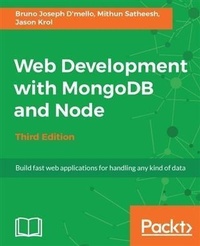
Web Development with MongoDB and Node
Build fast web applications for handling any kind of data
3rd Edition
Published on 13. January 2025
330 pages
978-1-78839-477-2 (ISBN)
Description

No detailed description available for "Web Development with MongoDB and Node".
More details
Edition
3rd Revised edition
Language
English
Place of publication
Birmingham
United Kingdom
Target group
Professional and scholarly
US School Grade: College Graduate Student
Edition type
Revised edition
File size
9,33 MB
ISBN-13
978-1-78839-477-2 (9781788394772)
Copyright in bibliographic data and cover images is held by Nielsen Book Services Limited or by the publishers or by their respective licensors: all rights reserved.
Schweitzer Classification
Other editions
Additional editions
Mithun Satheesh | Bruno Joseph D'mello | Jason Krol
Web Development with MongoDB and Node - Third Edition
Book
09/2017
Packt Publishing
€51.20
Shipment within 3-4 weeks
Person
Bruno Joseph D'mello works at Yapsody as a software engineer. He has possesses almost 5 years of experience in web application development, serving industries such as entertainment, social media, enterprise, and IT services. He is a JavaScript enthusiast and dedicatedly worked on it for the past 4 years. Apart from rare commits, he believes in contributing to open source by actually mentoring new technologies to beginners and involving them in open source communities. Bruno follows Kaizen and enjoys the freedom of architecting new things on the web. He also contributed his knowledge by authoring books such as Web Development in Node.js and Mongodb second edition, What You Need to Know About Node.js (Free ebook), and by being a reviewer. Mithun Satheesh is an open source enthusiast and a web developer from India. He has over five years' web development experience and specializes in JavaScript, Ruby, PHP, and other frontend engineering technologies. He is the author of a couple of libraries on Node.js, which are available open-source via npm. One of these, called node-rules, is a forward-chaining rule engine implementation written initially to handle transaction risks on bookmyshow, one of his former employers. Node rules have a considerable user following both on npm and GitHub. Apart from this, he has also served as an individual contributor to many open source projects on GitHub.
He is a regular on programming sites such as Stack Overflow and loves contributing to the open-source world. Apart from programming, he is also interested in experimenting with various cloud platform solutions. He has a number of applications listed in the developer spotlight of Platform-as-a-Service providers such as RedHat's OpenShift. Jason Krol is a passionate web developer with over 15 years of professional experience creating highly interactive web applications using the latest in both client and server technologies.
Over the past few years, Jason has been focusing on developing Single-Page Applications using JavaScript in the full stack with Node.js, MongoDB, and Backbone.js. After co-owning and running a successful web development agency for a number of years, Jason recently joined AWeber Communications, an e-mail marketing service provider in the suburbs of Philadelphia.
He is a regular on programming sites such as Stack Overflow and loves contributing to the open-source world. Apart from programming, he is also interested in experimenting with various cloud platform solutions. He has a number of applications listed in the developer spotlight of Platform-as-a-Service providers such as RedHat's OpenShift. Jason Krol is a passionate web developer with over 15 years of professional experience creating highly interactive web applications using the latest in both client and server technologies.
Over the past few years, Jason has been focusing on developing Single-Page Applications using JavaScript in the full stack with Node.js, MongoDB, and Backbone.js. After co-owning and running a successful web development agency for a number of years, Jason recently joined AWeber Communications, an e-mail marketing service provider in the suburbs of Philadelphia.
Content
- Cover
- Title Page
- Copyright
- Credits
- About the Authors
- About the Reviewer
- www.PacktPub.com
- Customer Feedback
- Table of Contents
- Preface
- Chapter 1: Welcome to JavaScript in the Full Stack
- A short introduction to Node.js
- The advantage that the V8 engine brings in
- Node.js is single-threaded!
- Non-blocking asynchronous execution
- npm - the Node Package Manager
- Sharing and reusing JavaScript
- Not just for building web servers!
- Real-time web application with Socket.io
- Networking and file IO
- Microservices
- Internet of things (IoT)
- A simple server with Node.js
- When to use Node.js
- The NoSQL movement
- A short introduction to MongoDB
- JSON-friendly database
- Schema-less design
- Various performance facets
- Node.js and MongoDB in the wild
- What to expect from this book
- Summary
- Chapter 2: Getting Up and Running
- Installing Node.js
- Mac OS X
- Windows
- Linux
- Testing that Node.js is installed properly
- Online documentation
- Installing MongoDB
- Mac OS X installation instructions
- Windows 7/Windows 8 installation instructions
- Linux installation instructions
- Confirming successful MongoDB installation
- Bookmarking the online documentation
- Writing your first app
- Creating the sample application
- Getting the dependent modules in place
- Adding the application code
- Understanding the code
- Launching the sample app
- Checking the actual database
- Summary
- Chapter 3: Node and MongoDB Basics
- A JavaScript primer
- Introducing es6
- Syntax basics
- Understanding the scope of variables
- Data types
- Operators and flows
- Understanding objects
- Understanding arrays
- Understanding functions
- Anonymous functions and callbacks
- JSON
- The basics of Node.js
- Node.js architecture
- Event-driven
- Asynchronous execution
- The module system
- The Node.js core
- HTTP
- Net
- Streams
- Installing modules using npm
- The basics of MongoDB
- The Mongo shell
- Inserting data
- Querying
- Updating data
- Deleting data
- Additional resources
- Summary
- Chapter 4: Introducing Express
- Web application frameworks
- What is Express.js?
- Building a complete web application
- Designing the web application
- Organizing the files
- Creating the application's entry point
- Booting up the application
- Middlewares
- Creating custom middleware
- Order of middlewares
- The configure module
- Activating the configure module
- Routers and controllers
- Handlebars as View engines
- Summary
- Chapter 5: Templating with Handlebars
- Templating engines
- Server-side and client-side templating
- Client-side templating
- Server-side templating
- The basics of Handlebars
- Binding an object to the template
- Embedding presentation logic
- Views
- Layouts
- Partial views
- Handlebars helpers
- Global helpers
- View-specific helpers
- Rendering the views
- Summary
- Chapter 6: Controllers and View Models
- Controllers
- View models
- Updating the home controller
- Updating the image controller
- Displaying an image
- Uploading an image
- Helpers for reusable code
- The sidebar module
- The stats module
- The images module
- The comments module
- Testing the sidebar implementation
- Iterating on the UI
- Summary
- Chapter 7: Persisting Data with MongoDB
- Using MongoDB with Node.js
- Connecting to MongoDB
- Inserting a document
- Retrieving a document
- Introducing Mongoose
- Schemas
- Models
- Built-in validation
- Static methods
- Virtual properties
- Context of method (this)
- Connecting with Mongoose
- Defining the schemas and models
- The models index file
- Adding CRUD to the controllers
- The home controller
- The image controller
- Index - retrieving an image model
- Create - inserting an image model
- Testing everything out so far
- The like button and updating an image model
- Comment - inserting a comment model
- Wrapping it up
- Helpers
- Introducing the async module
- The comments helper
- The sidebar helper
- Troubleshooting
- The stats helper
- The popular images helper
- Iterating by adding an image removal capability
- Adding a route
- Adding a controller handler
- Updating the Handlebars image page template
- Updating jQuery
- Refactoring and improvements
- Summary
- Chapter 8: Creating a RESTful API
- What is an API?
- What is a RESTful API?
- Introducing Postman REST Client
- Installation instructions
- A quick tour of Postman REST Client
- Using the JSONView Chrome extension
- Creating a basic API server
- Creating sample JSON data
- Responding to GET requests
- Receiving data - POST and PUT requests
- Removing data - DELETE
- Consuming external APIs from Node.js
- Consuming an API endpoint using request
- Summary
- Chapter 9: Testing Your Code
- The tools of the trade
- Running tests with the Mocha framework
- Asserting tests with Chai.js
- Getting started with Chai
- Spies and stubs with Sinon.js
- Stubbing node modules with Proxyquire
- Writing and running your first test
- Writing a test helper
- Testing the application
- Testing the routes
- Testing the server
- Testing a model
- Testing a controller
- Spy and stub everything!
- Automating everything
- Summary
- Chapter 10: Deploying with Cloud-Based Services
- Cloud versus traditional hosting
- Infrastructure as a Service versus Platform as a Service
- An introduction to Git
- Deploying your application
- Nodejitsu
- Heroku
- Amazon Web Services
- Creating a MongoLab account and database
- Create and configure the AWS environment
- Microsoft Azure
- Digital Ocean
- Summary
- Chapter 11: Popular Node.js Web Frameworks
- Koa
- Meteor
- Sails
- Flatiron
- total.js
- LoopBack
- Hapi
- Kick starting Hapi.js
- Scaffolding the Hapi app
- Setting up a server
- Creating APIs
- Creating a configuration-based architecture
- Summary
- Chapter 12: Single Page Applications with Popular Frontend Frameworks
- Why use a frontend framework?
- What is a single page application?
- The TodoMVC project
- Backbone.js
- Ember.js
- React.js
- Angular
- Scaffolding the Angular app
- Understanding TypeScript and es6
- Modules and components
- Angular data flow architecture
- Services
- Forms
- Component communication
- Frontend development tools
- Automated build task managers
- Dependency management
- Modularity
- HTML template-rendering engines
- CSS transpiling
- Testing and test-driven development
- PhantomJS headless browser
- Summary
- Index
