

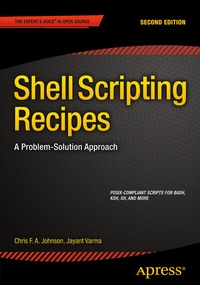
Shell Scripting Recipes
A Problem-Solution Approach
2nd Edition
Published on 23. October 2015
XXIII, 351 pages
978-1-4842-0220-3 (ISBN)
Description

Filled with over 150 essential, practical recipes that empower Unix users to regain lost timespent creating and testing shell scripts. The majority of scripts included are POSIX-compliantand supported by many of the major shell variants, including Bash, ksh, and sh.Each real-world example recipe follows the same problem-solution structure, meaningcross-referencing is easy and fast. Recipe topics include file conversion (DOS, UNIX, andMac), system administration, resource monitoring, filename management, complex datecalculations, screen control capabilities, and much more.Completely updated for this second edition and taking all the changes of the past tenyears into account, every recipe in this book is now relevant for a modern audience. AuthorsChris Johnson's and Jayant Varma's code is clear, direct, and applicable. Add this excellentreference to your library today.
More details
Other editions
Additional editions
Book
10/2015
2nd Edition
APress
€53.49
Shipment within 15-20 days
Previous edition
E-Book
11/2006
APress
€35.30
Available for download
Persons
Chris F.A. Johnson was introduced to Unix in 1990 and learned shell scripting because there was no C compiler on the system. His first major project was a menu-driven, user-extensible database system with report generator. Chris uses the shell as his primary, general-purpose programming language, and his projects have included a member database, menuing system, and POP3 mail filtering and retrieval. Chris is the author of Shell Scripting Recipes: A Problem-Solution Approach (Apress, 2005). When not pushing shell scripting to the limit, he designs and codes web sites, teaches chess, and composes cryptic crosswords.
Content
- Intro
- Contents at a Glance
- Contents
- About the Authors
- Acknowledgments
- Chapter 1: The POSIX Shell and Command-Line Utilities
- Shell Commands
- echo
- printf
- set
- shift
- type
- getopts
- case
- eval
- local
- Parameters and Variables
- Positional Parameters
- Special Parameters
- Shell Variables
- standard-vars-A Collection of Useful Variables
- Patterns
- Pathname Expansion
- Regular Expressions
- Parameter Expansion
- The Bourne Shell Expansions
- ${var:-DEFAULT}
- ${var:=DEFAULT}
- ${var:+VALUE}
- ${var:?MESSAGE}
- POSIX Parameter Expansions
- ${#var}-Length of Variable's Contents
- ${var%PATTERN}-Remove the Shortest Match from the End
- ${var%%PATTERN}-Remove the Longest Match from the End
- ${var#PATTERN}-Remove the Shortest Match from the Beginning
- ${var##PATTERN}-Remove the Longest Match from the Beginning
- Combining Expansions
- Shell-Specific Expansions, bash2, and ksh93
- ${var//PATTERN/STRING}-Replace All Instances of PATTERN with STRING
- ${var:OFFSET:LENGTH}-Return a Substring of $var
- Shell Arithmetic
- Aliases
- Sourcing a File
- Functions
- Functions Are Fast
- Command Substitution Is Slow
- Using the Functions in This Book
- standard-funcs: A Collection of Useful Commands
- 1.1 get_key-Get a Single Keystroke from the User
- How It Works
- Usage
- The Script
- Notes
- 1.2 getline-Prompt User to Enter a Line
- How It Works
- Usage
- The Script
- 1.3 press_any_key-Prompt for a Single Keypress
- How It Works
- Usage
- The Script
- 1.4 menu1-Print a Menu and Execute a Selected Command
- How It Works
- Usage
- The Script
- 1.5 arg-Prompt for Required Argument If None Supplied
- How It Works
- Usage
- The Script
- 1.6 die-Print Error Message and Exit with Error Status
- How It Works
- Usage
- The Script
- 1.7 show_date-Display Date in D[D] MMM YYYY Format
- How It Works
- Usage
- The Script
- 1.8 date_vars-Set Date and Time Variables
- How It Works
- Usage
- The Script
- 1.9 is_num-Is This a Positive Integer?
- How It Works
- Usage
- The Script
- Notes
- 1.10 abbrev_num-Abbreviate Large Numbers
- How It Works
- Usage
- The Script
- Notes
- 1.11 commas-Add Thousands Separators to a Number
- How It Works
- Usage
- The Script
- 1.12 pr1-Print Arguments, One to a Line
- How It Works
- Usage
- The Script
- 1.13 checkdirs-Check for Directories
- Create If Necessary
- How It Works
- Usage
- The Script
- 1.14 checkfiles -Check That a Directory Contains Certain Files
- How It Works
- Usage
- The Script
- 1.15 zpad-Pad a Number with Leading Zeroes
- How It Works
- Usage
- The Script
- 1.16 cleanup-Remove Temporary Files and Reset Terminal on Exit
- How It Works
- Usage
- The Script
- The Unix Utilities
- cat: Concatenate Files to the Standard Output
- sed: A Text Stream Editor
- awk: Pattern Scanning and Processing Language
- grep: Print Lines Matching a Regular Expression
- date: Show or Set the System Date
- tr: A Character Translation Utility
- wc: Count Characters,Words, and Lines in a File
- file: Determine the File Type
- ls: Sort and Provide Details About Files
- uniq: Remove Consecutive Duplicate Lines
- sudo: Execute Commands as the Superuser
- split: Divide a File into Equal-Sized Pieces
- which: Show the Full Path to a Command
- gs, gv: Render, Convert, or View PostScript and PDF Files
- Summary
- Chapter 2: Playing with Files: Viewing, Manipulating, and Editing Text Files
- End of the Line for OS Differences: Converting Text Files
- 2.1 dos2unix-Convert Windows Text Files to Unix
- How It Works
- Usage
- The Script
- 2.2 unix2dos-Convert a Unix File to Windows
- How It Works
- Usage
- The Script
- 2.3 mac2unix-Convert Macintosh Files to Unix
- How It Works
- Usage
- The Script
- 2.4 unix2mac-Convert Unix Files to Mac Format
- How It Works
- Usage
- The Script
- 2.5 dos2mac-Convert Windows Files to Macintosh
- How It Works
- Usage
- The Script
- 2.6 mac2dos-Convert Macintosh Files to Windows
- How It Works
- Usage
- The Script
- Displaying Files
- 2.7 prn-Print File with Line Numbers
- How It Works
- Usage
- The Script
- 2.8 prw-Print One Word per Line
- How It Works
- Usage
- The Script
- 2.9 wbl-Sort Words by Length
- How It Works
- Usage
- The Script
- Formatting File Facts
- 2.10 finfo-File Information Display
- How It Works
- Usage
- The Script
- 2.11 wfreq-Word Frequency
- How It Works
- Usage
- The Script
- 2.12 lfreq-Letter Frequency
- How It Works
- Usage
- The Script
- Notes
- 2.13 fed-A Simple Batch File Editor
- How It Works
- Usage
- The Script
- Summary
- Chapter 3: String Briefs
- Character Actions: The char-funcs Library
- 3.1 chr-Convert a Decimal Number to an ASCII Character
- How It Works
- Usage
- The Script
- 3.2 asc-Convert a Character to Its Decimal Equivalent
- How It Works
- Usage
- The Script
- Notes
- 3.3 nxt-Get the Next Character in ASCII Sequence
- How It Works
- Usage
- The Script
- 3.4 upr-Convert Character(s) to Uppercase
- How It Works
- Usage
- The Script
- Notes
- 3.5 lwr-Convert Character(s) to Lowercase
- How It Works
- Usage
- The Script
- Notes
- String Cleaning: The string-funcs Library
- 3.6 sub-Replace First Occurrence of a Pattern
- How It Works
- Usage
- The Script
- Notes
- 3.7 gsub-Globally Replace a Pattern in a String
- How It Works
- Usage
- The Script
- Notes
- 3.8 repeat-Build a String of a Specified Length
- How It Works
- Usage
- The Script
- Notes
- 3.9 index, rindex-Find Position of One String Within Another
- How It Works
- Usage
- The Script
- 3.10 substr-Extract a Portion of a String
- How It Works
- Usage
- The Script
- Notes
- 3.11 insert_str-Place One String Inside Another
- How It Works
- Usage
- The Script
- Notes
- Summary
- Chapter 4: What's in a Word?
- Finding and Massaging Word Lists
- wf-funcs: WordFinder Function Library
- 4.1 write_config-Write User's Information to the Configuration File
- How It Works
- Usage
- The Script
- 4.2 do_config-Check For and Source Default Configuration File
- How It Works
- Usage
- The Script
- 4.3 set_sysdict-Select the Dictionary Directory
- How It Works
- Usage
- The Script
- 4.4 mkwsig- Sort Letters in a Word
- How It Works
- Usage
- The Script
- 4.5 wf-clean-Remove Carriage Returns and Accents
- How It Works
- Usage
- The Script
- 4.6 wf-compounds-Squish Compound Words and Save with Lengths
- How It Works
- Usage
- The Script
- 4.7 wf-setup- Prepare Word and Anagram Lists
- Usage
- The Script
- Playing with Matches
- 4.8 wf-Find Words That Match a Pattern
- Usage
- The Script
- 4.9 wfb-Find Words That Begin with a Given Pattern
- How It Works
- Usage
- The Script
- 4.10 wfe-Find Words That End with a Given Pattern
- How It Works
- Usage
- The Script
- 4.11 wfc-Find Words That Contain a Given Pattern
- How It Works
- Usage
- The Script
- Notes
- 4.12 wfit-Find Words That Fit Together in a Grid
- How It Works
- Usage
- The Script
- Notes
- 4.13 anagram-Find Words That Are Anagrams of a Given Word
- How It Works
- Usage
- The Script
- 4.14 aplus-Find Anagrams of a Word with a Letter Added
- How It Works
- Usage
- The Script
- 4.15 aminus-Remove Each Letter in Turn and Anagram What's Left
- How It Works
- Usage
- The Script
- Summary
- Chapter 5: Scripting by Numbers
- The math-funcs Library
- 5.1 fpmul-Multiply Decimal Fractions
- How It Works
- Usage
- The Script
- Notes
- 5.2 int-Return the Integer Portion of a Decimal Fraction
- How It Works
- Usage
- The Script
- 5.3 round-Round the Argument to the Nearest Integer
- How It Works
- Usage
- The Script
- 5.4 pow-Raise a Number to Any Given Power
- How It Works
- Usage
- The Script
- 5.5 square-Raise a Number to the Second Power
- 5.6 cube-Raise a Number to the Third Power
- How It Works
- Usage
- The Script
- 5.7 calc-A Simple Command-Line Calculator
- How It Works
- Usage
- The Script
- Adding and Averaging
- 5.8 total-Add a List of Numbers
- How It Works
- Usage
- The Script
- Notes
- 5.9 mean-Find the Arithmetic Mean of a List of Numbers
- How It Works
- Usage
- The Script
- 5.10 median-Find the Median of a List of Numbers
- How It Works
- Usage
- The Script
- 5.11 mode-Find the Number That Appears Most in a List
- How It Works
- Usage
- The Script
- 5.12 range-Find the Range of a Set of Numbers
- How It Works
- Usage
- The Script
- 5.13 stdev-Finding the Standard Deviation
- How It Works
- Usage
- The Script
- Converting Between Unit Systems
- 5.14 conversion-funcs-Converting Metric Units
- How It Works
- Usage
- The Script
- 1. Convert Degrees Fahrenheit to Celsius
- 2. Convert Degrees Fahrenheit to Kelvins
- 3. Convert Degrees Celsius to Fahrenheit
- 4. Convert Kelvins to Degrees Fahrenheit
- 5. Convert Miles to Kilometers
- 6. Convert Kilometers to Miles
- 7. Convert Yards to Meters
- 8. Convert Meters to Yards
- 9. Convert Inches to Centimeters
- 10. Convert Inches to Millimeters
- 11. Convert Centimeters to Inches
- 12. Convert Millimeters to Inches
- 13. Convert Pounds to Kilograms
- 14. Convert Kilograms to Pounds
- 15. Convert Ounces to Grams
- 16. Convert Grams to Ounces
- 5.15 conversion-A Menu System for Metric Conversion
- How It Works
- Usage
- The Script
- The Main Menu
- The Lengths and Distances Menu
- The Weights Menu
- The Temperature Conversion Menu
- Summary
- Chapter 6: Loose Names Sink Scripts: Bringing Sanity to Filenames
- What's in a Name?
- POSIX Portable Filenames
- OK Filenames
- Functioning Filenames: The filename-funcs Library
- 6.1 basename-Extract the Last Element of a Pathname
- How It Works
- Usage
- The Script
- 6.2 dirname-Return All but the Last Element of a Pathname
- How It Works
- Usage
- The Script
- 6.3 is_pfname-Check for POSIX Portable Filename
- How It Works
- Usage
- The Script
- 6.4 is_OKfname-Check Whether a Filename Is Acceptable
- How It Works
- Usage
- The Script
- 6.5 pfname-Convert Nonportable Characters in Filename
- How It Works
- Usage
- The Script
- 6.6 OKfname-Make a Filename Acceptable
- How It Works
- Usage
- The Script
- 6.7 is_whitespc-Does the Filename Contain Whitespace Characters?
- How It Works
- Usage
- The Script
- 6.8 whitespc-Fix Filenames Containing Whitespace Characters
- How It Works
- Usage
- The Script
- 6.9 is_dir-Is This a Directory I See Before Me?
- How It Works
- Usage
- The Script
- Notes
- 6.10 nodoublechar-Remove Duplicate Characters from a String
- How It Works
- Usage
- The Script
- 6.11 new_filename-Change Filename to Desired Character Set
- How It Works
- Usage
- The Script
- 6.12 fix_pwd-Fix All the Filenames in the Current Directory
- How It Works
- Usage
- The Script
- 6.13 fixfname-Convert Filenames to Sensible Names
- How It Works
- Usage
- The Script
- Summary
- Chapter 7: Treading a Righteous PATH
- The path-funcs Library
- 7.1 path-Display a User's PATH
- How It Works
- Usage
- The Script
- 7.2 unslash-Remove Extraneous Slashes
- How It Works
- Usage
- The Script
- 7.3 checkpath-Clean Up the PATH Variable
- How It Works
- Usage
- The Script
- 7.4 addpath-Add Directories to the PATH Variable
- How It Works
- Usage
- The Script
- 7.5 rmpath-Remove One or More Directories from $PATH
- How It Works
- Usage
- The Script
- Summary
- Chapter 8: The Dating Game
- The date-funcs Library
- 8.1 split_date-Divide a Date into Day, Month, and Year
- How It Works
- Usage
- The Script
- 8.2 is_leap_year-Is There an Extra Day This Year?
- How It Works
- Usage
- The Script
- Notes
- 8.3 days_in_month-How Many Days Hath September?
- How It Works
- Usage
- The Script
- 8.4 Julian Dates
- How It Works
- Usage
- The Script
- 8.5 dateshift-Add or Subtract a Number of Days
- How It Works
- Usage
- The Script
- Notes
- 8.6 diffdate-Find the Number of Days Between Two Dates
- How It Works
- Usage
- The Script
- 8.7 day_of_week-Find the Day of the Week for Any Date
- How It Works
- Usage
- The Script
- 8.8 display_date-Show a Date in Text Format
- How It Works
- Usage
- The Script
- 8.9 parse_date-Decipher Various Forms of Date String
- How It Works
- Usage
- The Script
- 8.10 valid_date-Where Was I on November 31st?
- How It Works
- Usage
- The Script
- Summary
- Chapter 9: Good Housekeeping: Monitoring and Tidying Up File Systems
- 9.1 dfcmp -Notify User of Major Changes in Disk Usage
- How It Works
- Usage
- The Script
- 9.2 symfix -Remove Broken Symbolic Links
- How It Works
- Usage
- The Script
- 9.3 sym2file -Converts Symbolic Links to Regular Files
- How It Works
- Usage
- The Script
- 9.4 zrm-Remove Empty Files
- How It Works
- Usage
- The Script
- 9.5 undup -Remove Duplicate Files
- How It Works
- Usage
- The Script
- 9.6 lsr-List the Most Recent (or Oldest) Files in a Directory
- How It Works
- Usage
- The Script
- Summary
- Chapter 10: Screenplay: The screen-funcs Library
- 10.1 screen-vars-Variables for Screen Manipulation
- How It Works
- Usage
- The Script
- 10.2 set_attr-Set Screen-Printing Attributes
- How It Works
- Usage
- The Script
- 10.3 set_fg, set_bg, set_fgbg-Set Colors for Printing to the Screen
- How It Works
- Usage
- The Script
- 10.4 cls-Clear the Screen
- How It Works
- Usage
- The Script
- Notes
- 10.5 printat-Position Cursor by Row and Column
- How It Works
- Usage
- The Script
- Notes
- 10.6 put_block_ at -Print Lines in a Column Anywhere on the Screen
- How It Works
- Usage
- The Script -
- 10.7 get_size-Set LINES and COLUMNS Variables
- How It Works
- Usage
- The Script
- 10.8 max_length -Find the Length of the Longest Argument
- How It Works
- Usage
- The Script
- 10.9 print_block_at-Print a Block of Lines Anywhere on the Screen
- How It Works
- Usage
- The Script
- 10.10 vbar, hbar -Print a Vertical or Horizontal Bar
- How It Works
- Usage
- The Script
- 10.11 center -Center a String on N Columns
- How It Works
- Usage
- The Script
- 10.12 flush_ right -Align String with the Right Margin
- How It Works
- Usage
- The Script
- 10.13 ruler -Draw a Ruler Across the Width and Height of the Window
- How It Works
- Usage
- The Script
- 10.14 box_block, box_block_ at -Print Text Surrounded by a Box
- How It Works
- Usage
- The Script
- 10.15 clear_area, clear_area_at -Clear an Area of the Screen
- How It Works
- Usage
- The Script
- 10.16 box_area, box_area_at -Draw a Box Around an Area
- How It Works
- Usage
- The Script
- 10.17 screen-demo -Saving and Redisplaying Areas of the Screen
- How It Works
- Usage
- The Script
- Summary
- Chapter 11: Aging, Archiving, and Deleting Files
- 11.1 date-file -Add a Datestamp to a Filename
- How It Works
- Usage
- The Script
- Notes
- 11.2 rmold -Remove Old Files
- How It Works
- Usage
- The Script
- 11.3 keepnewest -Remove All but the Newest or Oldest Files
- How It Works
- Usage
- The Script
- Summary
- Chapter 12: Covering All Your Databases
- 12.1 lookup-Find the Corresponding Value for a Key
- How It Works
- Usage
- The Script
- shdb-funcs: Shell Database Function Library
- 12.2 load_db-Import Database into Shell Array
- How It Works
- Usage
- The Script
- Notes
- 12.3 split_record -Split a Record into Fields
- How It Works
- Usage
- The Script
- 12.4 csv_ split -Extract Fields from CSV Records
- How It Works
- Usage
- The Script
- 12.5 put_ record -Assemble a Database Record from an Array
- How It Works
- Usage
- The Script
- 12.6 put_csv-Assemble Fields into a CSV Record
- How It Works
- Usage
- The Script
- 12.7 db-demo -View and Edit a Password File
- How It Works
- Usage
- The Script
- PhoneBase: A Simple Phone Number Database
- How It Works
- 12.8 ph -Look Up a Phone Number
- Usage
- The Script
- 12.9 phadd -Add an Entry to PhoneBase
- Usage
- The Script
- 12.10 phdel -Delete an Entry from PhoneBase
- Usage
- The Script
- 12.11 phx -Show ph Search Results in an X Window
- Usage
- The Script
- Summary
- Chapter 13: Home on the Web
- Playing with Hypertext: The html-funcs Library
- 13.1 get_element -Extract the First Occurrence of an Element
- How It Works
- Usage
- The Script
- Notes
- 13.2 split_tags -Put Each Tag on Its Own Line
- How It Works
- Usage
- The Script
- 13.3 html-title -Get the Title from an HTML File
- How It Works
- Usage
- The Script
- HTML on the Fly: The cgi-funcs Library
- 13.4 x2d2 -Convert a Two-Digit Hexadecimal Number to Decimal
- How It Works
- Usage
- The Script
- 13.5 dehex-Convert Hex Strings (%XX) to Characters
- How It Works
- Usage
- The Script
- 13.6 filedate-Find and Format the Modification Date of a File
- How It Works
- Usage
- The Script
- Creating HTML Files
- 13.7 mk- htmlindex -Create an HTML Index
- How It Works
- Usage
- The Script
- 13.8 pretext-Create a Wrapper Around a Text File
- How It Works
- Usage
- The Script
- 13.9 text2html -Convert a Text File to HTML
- How It Works
- Usage
- The Script
- 13.10 demo.cgi-A CGI Script
- How It Works
- Usage
- The Script
- Summary
- Chapter 14: Taking Care of Business
- 14.1 prcalc-A Printing Calculator
- How It Works
- Usage
- The Script
- 14.2 gle-Keeping Records Without a Shoebox
- How It Works
- Usage
- The Script
- Summary
- Chapter 15: Random Acts of Scripting
- The rand-funcs Library
- 15.1 random-Return One or More Random Integers in a Given Range
- How It Works
- Usage
- The Script
- Notes
- 15.2 toss- Simulate Tossing a Coin
- How It Works
- Usage
- The Script
- 15.3 randstr- Select a String at Random
- How It Works
- Usage
- The Script
- A Random Sampling of Scripts
- 15.4 rand-date-Generate Random Dates in ISO Format
- How It Works
- Usage
- The Script
- Notes
- 15.5 randsort-Print Lines in Random Order
- How It Works
- Usage
- The Script
- 15.6 randomword -Generate Random Words According to Format Specifications
- How It Works
- Usage
- The Script
- 15.7 dice- Roll a Set of Dice
- How It Works
- Usage
- The Script
- 15.8 throw- Throw a Pair of Dice
- How It Works
- Usage
- The Script
- Summary
- Chapter 16: A Smorgasbord of Scripts
- 16.1 topntail -Remove Top and Bottom Lines from a File
- How It Works
- Usage
- The Script
- 16.2 flocate -Locate Files by Filename Alone
- How It Works
- Usage
- The Script
- 16.3 sus-Display a POSIX Man Page
- How It Works
- Usage
- The Script
- 16.4 cwbw -Count Words Beginning With
- How It Works
- Usage
- The Script
- Notes
- 16.5 cci -Configure, Compile, and Install from Tarball
- How It Works
- Usage
- The Script
- Notes
- 16.6 ipaddr -Find a Computer's Network Address
- How It Works
- Usage
- The Script
- 16.7 ipaddr. cgi -Print the Remote Address of an HTTP Connection
- How It Works
- Usage
- The Script
- 16.8 iprev -Reverse the Order of Digits in an IP Address
- How It Works
- Usage
- The Script
- Notes
- 16.9 intersperse -Insert a String Between Doubled Characters
- How It Works
- Usage
- The Script
- 16.10 ll-Use a Pager for a Directory Listing Only If Necessary
- How It Works
- Usage
- The Script
- 16.11 name-split -Divide a Person's Full Name into First, Last, and Middle Names
- How It Works
- Usage
- The Script
- 16.12 rot13-Encode or Decode Text
- How It Works
- Usage
- The Script
- Notes
- 16.13 showfstab -Show Information from /etc/fstab
- How It Works
- Usage
- The Script
- Notes
- 16.14 unique-Remove All Duplicate Lines from a File
- How It Works
- Usage
- The Script
- Summary
- Chapter 17: Script Development Management
- 17.1 script-setup-Prepare the Scripting Environment
- How It Works
- Usage
- The Script
- Notes
- 17.2 cpsh -Install Script and Make Backup Copy
- How It Works
- Usage
- The Script
- 17.3 shgrep -Search Scripts for String or Regular Expression
- How It Works
- Usage
- The Script
- 17.4 shcat -Display a Shell Script
- How It Works
- Usage
- The Script
- Summary
- Appendix A: Internet Scripting Resources
- Introductions to Shell Scripting
- Intermediate and Advanced Scripting
- Collections of Scripts
- Home Pages for Shells
- Regular Expressions, sed, and awk
- Miscellaneous Pages
- History of the Shell
- Index
