

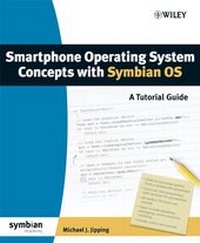
Smartphone Operating System Concepts with Symbian OS
A Tutorial Guide
Published on 30. April 2007
354 pages
978-0-470-06523-5 (ISBN)
Description

Smartphone Operating System Concepts with Symbian OS uses SymbianOS as a vehicle to discuss operating system concepts as they areapplied to mobile operating systems.It is this focus that makesthis tutorial guide both invaluable and extremely relevant fortoday's student.In addition to presenting and discussing operatingsystem concepts, this book also includes exercises that compare andcontrast Symbian OS, Unix/Linux and Microsoft Windows. Theseassignments can be worked on in a classroom laboratory or in astudent's own time.
The book is replete with examples (both conceptual and applied tohandhelds) as well as:
* Summaries at the end of each chapter.
* Problems the students can do as homework.
* Experiment-oriented exercises and questions for students tocomplete on a handheld device
* A reading list, bibliography and a list of sources for handheldsoftware
It also contains a series of on-line laboratories based on thesoftware developed for Symbian OS devices. Students can performthese labs anywhere, and can use printing and e-mail facilities toconstruct lab write-ups and hand in assignments.
Students, for the first time, will be taught Symbian OS concepts sothat they can start developing smartphone applications and becomepart of the mass-market revolution.
The book is replete with examples (both conceptual and applied tohandhelds) as well as:
* Summaries at the end of each chapter.
* Problems the students can do as homework.
* Experiment-oriented exercises and questions for students tocomplete on a handheld device
* A reading list, bibliography and a list of sources for handheldsoftware
It also contains a series of on-line laboratories based on thesoftware developed for Symbian OS devices. Students can performthese labs anywhere, and can use printing and e-mail facilities toconstruct lab write-ups and hand in assignments.
Students, for the first time, will be taught Symbian OS concepts sothat they can start developing smartphone applications and becomepart of the mass-market revolution.
More details
Other editions
Additional editions
Book
04/2007
Wiley
€51.90
Article exhausted; check different version
Person
Michael J. Jipping is Associate Professor of Computer Science at Hope College in Michigan. He is a long-time member of the Symbian Developer Network, and has been developing software for Symbian OS for over seven years. He is actively involved in research on handheld networking and has co-authored several textbooks on programming languages.
Content
Acknowledgements.
Introduction.
Part 1: Operating-System Concepts.
1 Introduction to Mobile Phone Systems.
1.1 What Is an Operating System?
1.2 History of Operating Systems.
1.3 Computer Systems and their Operating Systems.
1.4 Summary.
2 The Character of Operating Systems.
2.1 The Evolution of Operating Systems.
2.2 Computer Structures.
2.3 Different Platforms.
2.4 Summary.
Exercises.
3 Kernel Structure.
3.1 How a Kernel Is Put Together.
3.2 System Calls and the Kernel.
3.3 Interrupt Implementation.
3.4 Completing the Kernel Design in Symbian OS.
3.5 Summary.
Exercises.
4 Processes and Threads.
4.1 An Overview of the Process Model.
4.2 Programming with Processes.
4.3 Summary.
Exercises.
5 Process Scheduling.
5.1 Basic Concepts.
5.2 Scheduling Strategies.
5.3 Scheduling in Linux.
5.4 Scheduling in a Microkernel Architecture.
5.5 Scheduling in Symbian OS.
5.6 Summary.
Exercises.
6 Process Concurrency and Synchronization.
6.1 Concepts and Models for Concurrency.
6.2 Semaphores.
6.3 Locks, Monitors and Other Abstractions.
6.4 The Dining Philosophers: A Classic Problem.
6.5 An Example in Unix.
6.6 Concurrency in Symbian OS.
6.7 Interprocess Communication.
6.8 Managing Deadlocks.
6.9 Summary.
Exercises.
7 Memory Management.
7.1 Introduction and Background.
7.2 Swapping and Paging.
7.3 Systems Without Virtual Memory.
7.4 Segmentation.
7.5 Memory in Symbian OS.
7.6 Memory Use in Linux.
7.7 Summary.
Exercises.
8 File Systems and Storage.
8.1 Files and Directories.
8.2 Implementation of a File System.
8.3 File Systems on Mobile Phones.
8.4 Security.
8.5 Summary.
Exercises.
9 Input and Output.
9.1 I/O Components.
9.2 I/O Hardware Issues.
9.3 I/O Software Issues.
9.4 I/O in Symbian OS.
9.5 Summary.
Exercises.
10 Networks.
10.1 Opening a Closed Environment.
10.2 Extending Computers in a Connected Environment.
10.3 Connectivity in Symbian OS.
10.4 Summary.
Exercises.
11 Modeling Communications.
11.1 Communications Models.
11.2 Communications on Symbian OS.
11.3 Communications on Other Operating Systems.
11.4 Summary.
Exercises.
12 Telephony.
12.1 Modeling Telephony Services.
12.2 A Structural Overview.
12.3 Voice over IP Telephony.
12.4 Summary.
Exercises.
13 Messaging.
13.1 The Character of Messaging.
13.2 The Symbian OS Messaging Model.
13.3 Message Handling in Linux.
13.4 Summary.
Exercises.
14 Security.
14.1 Understanding Security Issues.
14.2 Authorization.
14.3 Authentication.
14.4 System Threats.
14.5 Security on Smartphones.
14.6 Summary.
Exercises.
15 Virtual Machines.
15.1 Basic Concepts.
15.2 The Java Virtual Machine and Symbian OS.
15.3 Summary.
Exercises.
Appendix A: Web Resources.
References. Index.
Introduction.
Part 1: Operating-System Concepts.
1 Introduction to Mobile Phone Systems.
1.1 What Is an Operating System?
1.2 History of Operating Systems.
1.3 Computer Systems and their Operating Systems.
1.4 Summary.
2 The Character of Operating Systems.
2.1 The Evolution of Operating Systems.
2.2 Computer Structures.
2.3 Different Platforms.
2.4 Summary.
Exercises.
3 Kernel Structure.
3.1 How a Kernel Is Put Together.
3.2 System Calls and the Kernel.
3.3 Interrupt Implementation.
3.4 Completing the Kernel Design in Symbian OS.
3.5 Summary.
Exercises.
4 Processes and Threads.
4.1 An Overview of the Process Model.
4.2 Programming with Processes.
4.3 Summary.
Exercises.
5 Process Scheduling.
5.1 Basic Concepts.
5.2 Scheduling Strategies.
5.3 Scheduling in Linux.
5.4 Scheduling in a Microkernel Architecture.
5.5 Scheduling in Symbian OS.
5.6 Summary.
Exercises.
6 Process Concurrency and Synchronization.
6.1 Concepts and Models for Concurrency.
6.2 Semaphores.
6.3 Locks, Monitors and Other Abstractions.
6.4 The Dining Philosophers: A Classic Problem.
6.5 An Example in Unix.
6.6 Concurrency in Symbian OS.
6.7 Interprocess Communication.
6.8 Managing Deadlocks.
6.9 Summary.
Exercises.
7 Memory Management.
7.1 Introduction and Background.
7.2 Swapping and Paging.
7.3 Systems Without Virtual Memory.
7.4 Segmentation.
7.5 Memory in Symbian OS.
7.6 Memory Use in Linux.
7.7 Summary.
Exercises.
8 File Systems and Storage.
8.1 Files and Directories.
8.2 Implementation of a File System.
8.3 File Systems on Mobile Phones.
8.4 Security.
8.5 Summary.
Exercises.
9 Input and Output.
9.1 I/O Components.
9.2 I/O Hardware Issues.
9.3 I/O Software Issues.
9.4 I/O in Symbian OS.
9.5 Summary.
Exercises.
10 Networks.
10.1 Opening a Closed Environment.
10.2 Extending Computers in a Connected Environment.
10.3 Connectivity in Symbian OS.
10.4 Summary.
Exercises.
11 Modeling Communications.
11.1 Communications Models.
11.2 Communications on Symbian OS.
11.3 Communications on Other Operating Systems.
11.4 Summary.
Exercises.
12 Telephony.
12.1 Modeling Telephony Services.
12.2 A Structural Overview.
12.3 Voice over IP Telephony.
12.4 Summary.
Exercises.
13 Messaging.
13.1 The Character of Messaging.
13.2 The Symbian OS Messaging Model.
13.3 Message Handling in Linux.
13.4 Summary.
Exercises.
14 Security.
14.1 Understanding Security Issues.
14.2 Authorization.
14.3 Authentication.
14.4 System Threats.
14.5 Security on Smartphones.
14.6 Summary.
Exercises.
15 Virtual Machines.
15.1 Basic Concepts.
15.2 The Java Virtual Machine and Symbian OS.
15.3 Summary.
Exercises.
Appendix A: Web Resources.
References. Index.
