

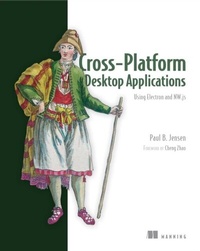
Cross-Platform Desktop Applications
Using Node, Electron, and NW.js
1st Edition
Published on 3. May 2017
312 pages
978-1-63835-392-8 (ISBN)
Description

Summary
Cross-Platform Desktop Applications guides you step-by-step through creating Node.js desktop applications with NW.js and Electron from GitHub. Foreword by Cheng Zhao, creator of Electron.
Purchase of the print book includes a free eBook in PDF, Kindle, and ePub formats from Manning Publications.
About the Technology
Desktop application development has traditionally required high-level programming languages and specialized frameworks. With Electron and NW.js, you can apply your existing web dev skills to create desktop applications using only HTML, CSS, and JavaScript. And those applications will work across Windows, Mac, and Linux, radically reducing development and training time.
About the Book
Cross-Platform Desktop Applications guides you step by step through the development of desktop applications using Electron and NW.js. This example-filled guide shows you how to create your own file explorer, and then steps through some of the APIs provided by the frameworks to work with the camera, access the clipboard, make a game with keyboard controls, and build a Twitter desktop notification tool. You'll then learn how to test your applications, and debug and package them as binaries for various OSs.
What's Inside
About the Reader
Written for developers familiar with HTML, CSS, and JavaScript.
About the Author
Paul Jensen works at Starcount and lives in London, UK.
Table of Contents
Cross-Platform Desktop Applications guides you step-by-step through creating Node.js desktop applications with NW.js and Electron from GitHub. Foreword by Cheng Zhao, creator of Electron.
Purchase of the print book includes a free eBook in PDF, Kindle, and ePub formats from Manning Publications.
About the Technology
Desktop application development has traditionally required high-level programming languages and specialized frameworks. With Electron and NW.js, you can apply your existing web dev skills to create desktop applications using only HTML, CSS, and JavaScript. And those applications will work across Windows, Mac, and Linux, radically reducing development and training time.
About the Book
Cross-Platform Desktop Applications guides you step by step through the development of desktop applications using Electron and NW.js. This example-filled guide shows you how to create your own file explorer, and then steps through some of the APIs provided by the frameworks to work with the camera, access the clipboard, make a game with keyboard controls, and build a Twitter desktop notification tool. You'll then learn how to test your applications, and debug and package them as binaries for various OSs.
What's Inside
- Create a selfie app with the desktop camera
- Learn how to test Electron apps with Devtron
- Learn how to use Node.js with your application
About the Reader
Written for developers familiar with HTML, CSS, and JavaScript.
About the Author
Paul Jensen works at Starcount and lives in London, UK.
Table of Contents
PART 1 - WELCOME TO NODE.JS DESKTOP APPLICATION DEVELOPMENT
- Introducing Electron and NW.js
- Laying the foundation for your first desktop application
- Building your first desktop application
- Shipping your first desktop application
PART 2 - DIVING DEEPER
- Using Node.js within NW.js and Electron
- Exploring NW.js and Electron's internals
PART 3 - MASTERING NODE.JS DESKTOP APPLICATION DEVELOPMENT
- Controlling how your desktop app is displayed
- Creating tray applications
- Creating application and context menus
- Dragging and dropping files and crafting the UI
- Using a webcam in your application
- Storing app data
- Copying and pasting contents from the clipboard
- Binding on keyboard shortcuts
- Making desktop notifications
PART 4 - GETTING READY TO RELEASE
- Testing desktop apps
- Improving app performance with debugging
- Packaging the application for the wider world
More details
Other editions
Additional editions
Book
05/2017
Manning Publications
€47.00
Shipment within 10-20 days
Person
Paul Jensen works at Starcount and lives in London, UK.
Content
- Intro
- Copyright
- Brief Table of Contents
- Table of Contents
- Foreword
- Preface
- Acknowledgments
- About this Book
- About the Author
- About the Cover
- Part 1. Welcome to Node.js desktop application development
- Chapter 1. Introducing Electron and NW.js
- Chapter 2. Laying the foundation for your first desktop application
- Chapter 3. Building your first desktop application
- Chapter 4. Shipping your first desktop application
- Part 2. Diving deeper
- Chapter 5. Using Node.js within NW.js and Electron
- Chapter 6. Exploring NW.js and Electron's internals
- Part 3. Mastering Node.js desktop application development
- Chapter 7. Controlling how your desktop app is displayed
- Chapter 8. Creating tray applications
- Chapter 9. Creating application and context menus
- Chapter 10. Dragging and dropping files and crafting the UI
- Chapter 11. Using a webcam in your application
- Chapter 12. Storing app data
- Chapter 13. Copying and pasting contents from the clipboard
- Chapter 14. Binding on keyboard shortcuts
- Chapter 15. Making desktop notifications
- Part 4. Getting ready to release
- Chapter 16. Testing desktop apps
- Chapter 17. Improving app performance with debugging
- Chapter 18. Packaging the application for the wider world
- Appendix. Installing Node.js
- Index
- List of Figures
- List of Tables
- List of Listings
