

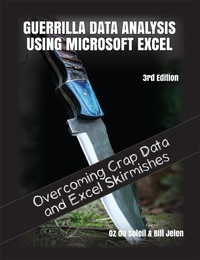
Guerrilla Data Analysis Using Microsoft Excel
Overcoming Crap Data and Excel Skirmishes
3rd Edition
Published on 1. March 2022
277 pages
978-1-61547-160-7 (ISBN)
Description

This book includes step-by-step examples and case studies that teach users the many power tricks for analyzing data in Excel. These are tips honed by Bill Jelen, "MrExcel," and Oz do Soleil during their careers run as a financial analyst charged with taking mainframe data and turning it into useful information quickly. Topics include data quality, validation, perfectly sorting with one click every time, matching lists of data, data consolidation, data subtotals, pivot tables, pivot charts, tables and much more.
More details
Other editions
Previous edition
E-Book
04/2015
2nd Edition
Holy Macro! Books
€12.99
Available for download
Content
- Intro
- Introduction: Welcome to the World of Guerrilla Data Analysis!
- About This Book
- Blindsided by Data
- Small, Stupid Stuff and Big, Complicated Stuff
- Chapter 1: Reviewing the Basics
- Overview of Excel Functions and Formulas
- Relative, Absolute, and Mixed References
- Text Manipulation Functions
- IF Statements
- Developing Dynamic Spreadsheets
- Concatenating Names and Changing Formulas to Values
- Linking Worksheets and Workbooks
- Helper Columns
- Sorting and Filtering
- Chapter 2: Excel Tables: The Glue in Dynamic Spreadsheet Development
- Converting a Data Range to a Table
- Using a Total Row
- Naming a Table
- Using Tables to Make Dynamic Dropdown Lists
- Tables Functions and Cell References
- Some Warnings About Working with Tables
- Excel Tables Conclusion
- Chapter 3: Collaboration Tools
- How to Share a Workbook
- The Awesome Part of Collaboration: Sheet Views
- Chapter 4: Summing and Counting with Criteria
- Chapter 5: VLOOKUP and XLOOKUP
- VLOOKUP: What Does It Do?
- XLOOKUP
- Chapter 6: Pivot Tables: The Turning Point!
- What Is a Pivot Table, and What Can It Do?
- Getting to Know the Pivot Table Interface
- Building a Pivot Table to Sum and Count Values
- Summing and Counting Side-by-Side . and a Filter
- Filtering with the Pivot Table
- Grouping Dates in the Pivot Table
- Using the Pivot Table to Get the Percentage of the Total
- Pivot Table Percentages Without Totals
- Using the Pivot Table to Drill Down for Isolated Details
- Deleting a Pivot Table
- Saving Your Favorite Pivot Table Settings Using Pivot Table Defaults
- Creating a Year-over-Year Report in a Pivot Table
- Counting Distinct Values in a Pivot Table
- Pivot Table Conclusions
- Chapter 7: Power Query
- Power Query: A Little Background
- Filling Down and Splitting Columns by Delimiter
- Splitting Column into Rows, Grouping By, and Duplicating a Query
- Data Types and Power Query
- Sorting in Power Query
- The Query Settings Pane
- Adding More Source Data
- Unpivoting and Filtering
- Blanks, Nulls, and Zeros: They Aren't the Same in Power Query
- Joins and Merges in Power Query
- Appending (aka Stacking Stuff Up)
- Importing from a File or from a Folder
- Transformation Tables
- Fuzzy Matching
- Chapter 8: Conditional Formatting
- Using Conditional Formatting to Find Duplicates
- Using Icons with Conditional Formatting
- Chapter 9: De-duping in Excel
- De-duping with Advanced Filter
- De-duping Gets Ugly!
- Using IF to "LOOK"
- De-duping with an Assembled ID
- Chapter 10: Dynamic Arrays
- SORT
- FILTER
- RANDARRAY
- UNIQUE
- The @ Operator, Briefly Known as SINGLE
- The Spill Indicator
- Chapter 11: Data Is Never 100% Clean (Not for Very Long)
- Chapter 12: Data Validation: Controlling Inputs and Maintaining Data Integrity
- Data Validation Overview
- Implementing Dropdown Lists
- New in 2022: AutoComplete in Validation Dropdown Lists
- Controlling Dates
- Reasonable Numbers
- Data Validation Cautions
- Data Validation Conclusions
- Chapter 13: Protecting Sheets and Cells
- Locking Down an Entire Sheet
- Locking and Unlocking Cells
- Unprotecting a Sheet
- Chapter 14: Octopus Spreadsheets
- Chapter 15: INDIRECT
- Chapter 16: OFFSET
- Using OFFSET to Sum a Range
- Chapter 17: Recognizing Patterns
- Chapter 18: Data Types and Stock History
- Original Release Data Types
- Second Release Data Types: Wolfram
- Data Types: Navigating the Data Card
- Custom Data Types: Features Needed
- Custom Data Types: The Choices Available Today
- Chapter 19: Graphing
- Graphing a Histogram Using the FREQUENCY Function
- Using Chart Features
- Chapter 20: The Dangers of Just Diving In
- Chapter 21: The LET Function
- LET for Reusing Parts of Formulas
- LET for Easier Readability
- Chapter 22: Warnings About Machine Learning-Driven Features in Excel and Power Query
- Chapter 23: Avoid Working on Your Source Data
- Chapter 24: Using Slicers
- Using Slicers with Tables
- Pivot Tables and Slicers
- Chapter 25: Data Models and Relationships
- Foreign and Primary Keys
- Why a Data Model vs. Power Query?
- Chapter 26: People, Processes, and Tools
- Chapter 27: Keeping Your Data in as Few Places as Possible
- Chapter 28: Rough-and-Tumble Tips and Insights
- Unhiding Column A
- Formula Triggers
- Adding Emojis to Cells and Formulas
- Hiding Unnecessary Zeros
- Forcing a Report to Fit on One Page
- Setting the Print Area to Print a Section of a Worksheet
- Alt+Enter for an Extra Line in a Cell
- Handling Dates
- Connecting Cell Values to Shapes or Objects
- Useful Excel Functions
- Integrity Checks and Troubleshooting
- Error-Handling Functions: IFNA vs. IFERROR
- Row Counts
- Chapter 29: Spreadsheet Layout and Development
- A Final Word About Spreadsheet Layout and Development
- Index
