

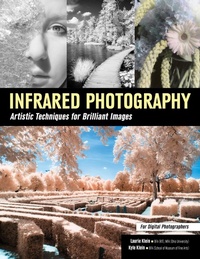
Infrared Photography
Artistic Techniques for Digital Photographers
Amherst Media (Publisher)
Published on 13. January 2016
128 pages
978-1-60895-926-6 (ISBN)
Description

With the introduction of digital photography, unprecedented numbers of people are flocking to the art form, trying their hand at creating effective photographs of people, landscapes, still lifes, and other subjects. As the ranks of photographers swell, it becomes more and more difficult to achieve a standout body of work-something that sets your work apart from the barrage of images we are all inundated with on a daily basis. As Laurie and Kyle Klein prove in their new book, infrared capture may be that magic bullet.
Infrared photographs have a mystical feel. Before the dawn of digital capture, infrared light waves, which are invisible to the naked eye, could only be captured using specialized films that required precise handling and a level of technical proficiency that most photographers lacked. Today, infrared films are largely unavailable; digital infrared is the wave of the future, and most photographers have a retired digital camera (whether an older-model DSLR or an old point & shoot camera) on hand that they can permanently modify for digital-only capture.
So, you're ready to jump in and try your hand at producing wildly different images. Where do you start? In this book, Laurie and Kyle Klein present a brief history of infrared, then move on to discuss all of the nitty-gritty technical information you'll need to understand how those invisible wavelengths will be recorded in your camera and the steps you'll need to take to ensure the best-possible resulting photographs. The authors provide a plethora of sample images that show you how various materials-from skin, hair, and eyes to environmental subjects like the sky, trees, grasses, and clouds-will appear in your images. They also teach you how to previsualize the final image: You will learn to predict the way that the colors and tones you perceive with your naked eyes will be rendered in-camera. You will also learn how to effectively frame your subject(s) and scenes to draw the viewer's gaze into and through the frame in a predictable manner, and keep him or her visually engaged.
With the basic theories of infrared capture and image design deftly handled, the authors discuss further artistic applications. You'll learn how to add selective color to your black & white infrared images and how to create color infrared images that take infrared capture to a whole new level. Finally, the educators detail basic image-editing strategies that will allow you to finesse the tones and contrast in your images.
Armed with the scientific insights and artistic applications in this book, you will be able to easily branch into a new genre of creative capture-whether you're interested in pushing your creative abilities to new levels for self-satisfaction or are looking to offer your studio's clientele a new product line.
More details
Other editions
Additional editions
Book
01/2016
Amherst Media
€35.50
Article exhausted; check different version
Persons
Laurie Klein: Laurie Klein is an award-winning fine art, wedding and portrait photographer. She is the of Photographing the Female Form with Digital Infrared and Hand Coloring Black and White Photography. Her images have appeared in numerous national magazines.
Laurie has a MFA in photography from Ohio University and a BFA from RIT. A gifted photographic educator for over 30 years, Laurie teaches classes and workshops throughout the United States as well as internationally.
Laurie Klein is recognized worldwide for photographing almost exclusively in the arresting infrared spectrum. Her work embodies a soft, passionate style that most often depicts the feminine experience, relationships and landscapes. She began photographing with infrared film as a bio-medical photographer, using the medium for diagnostic and research purposes. After studying with Ansel Adams in the mid-1970s, she realized there were other applications for IR and began her journey into fine art photography.
WWW.LAURIEKLEIN.COM
Kyle Klein: Kyle began assisting wedding photographers during his freshman year of high school, and by the age of 19, he was photographing 10 weddings a year. A graduate of the School of the Museum of Fine Arts in Boston and Tufts University with a BFA in Photographic Processes, Kyle became the Production Manager of a commercial and biomedical photographic studio on Beacon Hill in Boston.
In 2013, Kyle opened his photography business and began photographing events, local and destination weddings, professional and social portraits, wildlife and landscapes. He is a consultant for studio owners, and teaches photography, workflow and Photoshop skills.
Kyle spent two months in the spring of 2014 on a photographic expedition in Africa, capturing wildlife and endangered species with the help of a successfully funded Kickstarter campaign called 'The Warm Heart of Africa”.
Content
- Intro
- Title Page
- About the Authors
- Copyright
- Contents
- Introduction
- Part One: Getting Started
- 1. What Are Near and Far Infrared?
- Light in the Electromagnetic Spectrum
- Mid to Far Infrared Light
- Near Infrared Photography
- 2. Near Infrared, Sensors, Color and Black & White
- Near Infrared
- Sensors
- Color and Black & White
- 3. Infrared Film
- Shooting with Infrared Film
- Types of Infrared Film
- Bracketing Exposures
- 4. Infrared Filters and Converted Cameras
- Filters: Infrared on a Trial Basis
- Filter Considerations
- Converted Cameras
- Conversion Considerations
- 5. Camera Conversion
- How Conversion Works
- How to Convert
- Common Conversions
- 6. Lenses and Calibration
- Lens Considerations
- Calibration
- No Calibration Needed
- Learning with a Fixed Focal Length Lens
- 7. Depth of Field
- Depth of Field
- F-Stops, Focal Length, and Lens
- 8. Metering, Bracketing, ISO, and RAW Files
- Metering
- Bracketing
- ISO
- Photograph in RAW
- Getting Started
- 9. Histograms
- Histogram
- How a Histogram Functions
- Histogram for Setting Exposure
- Referencing the Histogram
- 10. White Balance
- White Balance
- Setting a Custom White Balance
- Custom Profiles and DNG Profile Editor
- 11. Lens Flare and Hot Spots
- Lens Flare
- Creative Use of Lens Flare
- Hot Spots
- Guidelines
- Part Two: Infrared Considerations
- 12. What Things Look Like in Infrared, and Why
- The Look of Infrared
- Surprising Appearance
- Trees and Foliage
- 13. Previsualization and Composition
- Previsualizing
- Compositional Elements
- Tonality
- S Curves and Diagonal Lines
- 14. Sky and Clouds
- Light Dispersion
- Drama in the Sky
- 15. Rocks and Water
- About Rocks
- About Water
- 16. Plants
- Amazing Subjects
- Allium
- Succulents
- Two Tulips
- 17. Trees
- An Iconic Infrared Image
- The Wood Effect
- 18. Seasonal and Weather Conditions
- Winter Mind-Set
- Seasonal Differences
- Seasonal Considerations
- 19. Skin, Veins, and Eyes
- Skin and Veins
- Eyes
- Client Considerations
- Tan Lines
- 20. Hair Color and Complexion
- Hair
- Skin Complexion
- 21. Makeup
- Emphasize Makeup
- About Eye Makeup
- 22. Clothing and Dyes
- Request Plain Clothing and Take Test Shots
- Simple Is Good
- 23. Tattoos
- Tattoos May Change in an Infrared Image
- Reflectivity of Tattoos
- Test Images
- 24. Light Sources
- Learn the Rules
- Fill Flash
- Experimenting with Light
- Part Three: Infrared Capture and Composition
- 25. Composition and Content
- Composition in Depth: Woman by the Water
- Components of Composition
- 26. Bracketing and High Dynamic Range
- Bracketing with Film
- Bracketing with Digital
- High Dynamic Range
- Alternative to Bracketing
- 27. Shutter Speed
- F-Stops and Depth of Field
- Capturing Movement
- Freeze the Action
- 28. Landscape
- Unconverted Digital Cameras with Filters
- Creating Effective Landscape Images
- Time of Day
- Best Time of Year
- 29. Portraits
- Photographing People
- 30. Weddings
- Two Photographers, Two Attitudes
- Photographer: Clay Blackmore
- Photographer: Laurie Klein
- 31. Nudes
- Protocol for Nude Sessions
- Preparing to Shoot
- Ansel Adams Waited for Clouds
- Infrared Nude in Landscape
- Collaborating with the Model
- 32. People in the Landscape
- In the Landscape
- Knowing How Much to Include
- Screaming Rock
- 33. Reflection
- Different Reflective Surfaces
- Reflections Form Two Subjects
- Reflections and the Angle of Infrared Light
- 34. Structures
- Bracket for Shadows and Highlights
- Building Materials
- Framing
- 35. Wildlife and Animals
- Challenges
- Wildlife and the Landscape
- 36. Perspective
- The Point of View
- Infrared Sees More
- Change Your Perspective
- Shifting the Camera Angle
- 37. Breaking the Rules
- First Learn the Rules
- Typical Rules
- Shifting Away from the Expected
- 38. Abstracts
- Paradox
- Elements, Principle, and Infrared
- Part Four: Postproduction and Workflow
- 39. Postproduction
- Necessary Steps
- Processing RAW Files
- Using Presets
- 40. Adobe Camera Raw Adjustments
- Adobe Camera Raw
- Global Image Adjustments
- 41. Pre-Sharpening and Noise Reduction
- Adjustments Prior to Photoshop
- Sharpening
- Noise Reduction
- 42. Removing Artifacts and Veins
- Artifacts
- Veins
- Wrinkles
- 43. Contrast: Levels, Dodge, and Burn
- Contrast and Histogram
- Full Contrast Range
- Balancing the Exposure
- Dodge and Burn
- 44. Sharpening and Adding an Infrared Glow
- High Pass Filter Sharpening
- Steps for Sharpening
- Characteristic Infrared Glow
- 45. HDR Manual
- High Dynamic Range
- Using Nik Software Filters
- Merging Files in Photoshop
- 46. Retouching Eyes
- Challenges
- When to Make the Adjustments
- Lightening the Eyes
- Steps to Adjust Dark Eyes
- 47. Channel Swapping and Hue/Saturation Adjustments
- Channel Swapping
- Steps for Channel Swapping
- Hue and Saturation
- 48. Handcoloring Infrared Photographs
- Infrared Is Perfect for Handcoloring
- One-of-a-Kind Prints
- 49. Plug-In Filters
- Adding Interest
- Creative Overlays
- Filter Sets
- 50. Pulling It All Together in Print
- Perfect Black & White Prints
- Color
- Part Five: Art of Infrared
- 51. Cocoon
- About Cocoon
- 52. Emergence
- About Emergence
- 53. Human Forms in Santa Fe Landscape
- About Human Forms in Santa Fe Landscape
- 54. Pas de Cheval
- About Pas de Cheval
- 55. Slacklining
- About Slacklining
- 56. Soaring
- About Soaring
- 57. The Bridge
- About The Bridge
- 58. The Kiln Nymph
- About The Kiln Nymph
- 59. The Mica Mask
- About The Mica Mask
- 60. The Mink
- About The Mink
- Index
