

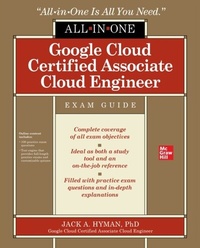
Google Cloud Certified Associate Cloud Engineer All-in-One Exam Guide
1st Edition
Published on 5. November 2020
560 pages
978-1-260-47346-9 (ISBN)
Available for download
Description

This study guide offers 100% coverage of every objective for the Google Cloud Certified Associate Cloud Engineer exam Take the challenging Google Cloud Certified Associate Cloud Engineer exam with confidence using the comprehensive information contained in this effective self-study guide. The book serves as an introduction to Google Cloud Platform (GCP) and shows you how to pass the test. Beyond exam preparation, the guide also serves as a valuable on-the-job reference.Written by a recognized expert in the field, Google Cloud Certified Associate Cloud Engineer All-In-One Exam Guide is based on proven pedagogy and features special elements that teach and reinforce practical skills. The book contains accurate practice questions and detailed explanations. You will discover how to plan set up, and configure GCP, ensure effective operation, and administer access and security.Covers every topic on the exam demonstrated through exercises, sample exams, and practice use casesProvides online access to TotalTester customizable exam engine with additional practice questionsWritten by a cloud computing expert, educator, and experienced author
More details
Other editions
Additional editions
Book
12/2020
McGraw-Hill Education
€49.51
Shipment within 10-20 days
Content
- Cover
- Title Page
- Copyright Page
- Dedication
- About the Author
- Contents at a Glance
- Contents
- Introduction
- Acknowledgments
- Chapter 1 An Introduction to the Google Cloud Platform
- Cloud Architectures
- SaaS
- PaaS
- IaaS
- Public, Private, and Hybrid Cloud
- Comparison of Data Centers vs. Cloud Consumption
- Rent vs. Own
- Pay As You Go
- Resource Allocation
- Specialized Services
- Google Cloud Platform Core Features
- Compute Resources
- Networking Infrastructure
- Storage and Databases
- Identity and Security
- Management and Developer Solutions
- Chapter Review
- Questions
- Answers
- Chapter 2 Setup, Projects, and Billing
- Projects and Accounts
- Organization
- Projects
- Roles and Permissions
- Service Accounts
- Service Account Keys
- Billing Management
- Billing Accounts
- Budget Alerts and Data Exports
- API Functions
- Provisioning Monitoring
- Chapter Review
- Questions
- Answers
- Chapter 3 Compute Engine
- Fundamental Concepts in Compute Engine
- Security Privileges
- Virtual Machines Instances
- Instance Groups
- Instance Templates
- Sole-Tenant Nodes
- Disks
- Snapshots
- Images
- Health Checks
- Settings
- Planning, Managing, and Monitoring Virtual Machines
- Planning Considerations
- Capacity Planning
- Instance Monitoring
- Cost Management
- Exercise 3-1: Creating and Managing Instances
- Chapter Review
- Questions
- Answers
- Chapter 4 Kubernetes Engine
- Fundamentals of Google Kubernetes Engine
- Objects
- Workloads
- Pods
- Services
- ReplicaSet
- Deployments
- StatefulSet
- DaemonSet
- Jobs
- Kubernetes Architecture Principles
- Deployment Approaches
- Deploying Using Cloud Console
- Deploying Using Cloud Shell or Cloud SDK
- Application Pods and Kubernetes
- Monitoring Principles and Kubernetes
- Uptime Checks
- Alerting Policies
- Managing Kubernetes Clusters
- Managing Kubernetes Nodes
- Managing Kubernetes Nodes Using Cloud Console
- Managing Kubernetes Nodes Using Cloud Shell or Cloud SDK
- Managing Kubernetes Pods
- Managing Pods Using Cloud Console
- Managing Pods Using Cloud Shell or Cloud SDK
- Managing Kubernetes Services
- Managing Services Using Cloud Console
- Managing Services Using Cloud Shell or Cloud SDK
- Image Repository Management
- Image Repository and Image Details with Cloud Console
- Image Repository and Image Details Using Cloud Shell or Cloud SDK
- Exercise 4-1: Creating and Managing Kubernetes Engine Clusters
- Chapter Review
- Questions
- Answers
- Chapter 5 App Engine
- Delivery Environment
- Choosing Between Compute Engine, Kubernetes Engine, and App Engine
- App Engine Components
- Deploying App Engine Applications
- Deploying an App Engine Application Using Cloud Shell or Cloud SDK
- Monitoring Deployed App Engine Applications Using Cloud Console
- Scaling and App Engine Applications
- Dynamic Scaling Principles
- Traffic Handling and App Engine
- IP Address Splitting
- HTTP Cookie Splitting
- Chapter Review
- Questions
- Answers
- Chapter 6 Cloud Functions and Cloud Run
- Serverless Compute Options
- Cloud Functions
- Exercise 6-1: Executing a Basic Cloud Function
- Cloud Run
- Exercise 6-2: Deploying an Application in a Container Using Cloud Run
- Cloud Run for Anthos
- Deploying Cloud Events
- Cloud Events and Cloud Storage
- Cloud Events and Cloud Pub/Sub
- Choosing App Engine, Cloud Functions, or Cloud Run
- Chapter Review
- Questions
- Answers
- Chapter 7 Storage and Database Management
- Storage Options in GCP
- Persistent Storage
- Configuring a Persistent Disk
- Cache
- Memorystore
- Object Storage
- Cloud Storage
- Object Storage Classes
- Storage Versioning and Object Lifecycle Management
- Configuring Cloud Storage
- Data Model Options
- Object: Cloud Storage Solutions
- Managing Cloud Storage
- Relational Storage Solutions
- Configuration: Cloud SQL
- Configuration: Cloud Spanner
- Configuration: BigQuery
- Nonrelational Storage Solutions
- Configuration: Cloud Datastore
- Configuration: Cloud Firestore
- Configuration: Bigtable
- Deploying and Managing Data
- Cloud SQL Deployment and Management
- Cloud Spanner Deployment and Management
- BigQuery Deployment and Management
- Cloud Datastore Deployment and Management
- Bigtable Deployment and Management
- Cloud Pub/Sub Deployment and Management
- Dataproc Deployment and Management
- Importing and Exporting Approaches
- Importing/Exporting in Cloud SQL
- Importing/Exporting in Cloud Spanner
- Importing/Exporting in BigQuery
- Importing/Exporting in Cloud Datastore
- Importing/Exporting in Bigtable
- Importing/Exporting in Cloud Dataproc
- Chapter Review
- Questions
- Answers
- Chapter 8 Networking
- IP Address Management
- Static and Ephemeral IP Addresses
- Expanding the CIDR Block Range
- Reserving an IP Address
- Virtual Private Cloud Management
- Creating Virtual Private Clouds
- Creating a Shared Virtual Private Cloud
- Compute Engine and VPC
- Firewall Rules
- Creating Firewall Rules Using Cloud Console
- Creating Firewall Rules Using gcloud
- Virtual Private Networks
- Configuring a VPN Using Cloud Console
- Configuring a VPN Using gcloud
- Load Balancing
- Proxy vs. Passthrough
- Configuring a Load Balancer Using Cloud Console
- Configuring a Load Balancer Using gcloud
- Cloud DNS
- Understanding Zone Types
- Managed Zone Creation Using Cloud Console
- Managed Zone Creation Using gcloud
- Chapter Review
- Questions
- Answers
- Chapter 9 Deployment Management
- Deploying Solutions Using Cloud Marketplace
- Browsing the Cloud Marketplace Catalog
- Deploying a Cloud Marketplace Solution
- Deploying Applications Using the Deployment Manager
- Developing Deployment Manager Templates
- Using and Launching Deployment Manager Template Files
- Chapter Review
- Questions
- Answers
- Chapter 10 Access and Security
- Managing Identity and Access Management
- Cloud Identity Access Management Basics
- Viewing Identity and Access Management Role Assignments
- Predefined Roles
- Assigning IAM Roles
- Validating and Reviewing Added Roles
- Defining Custom IAM Roles
- Service Account Management
- User-Managed and Google-Managed Service Accounts
- Managing Service Accounts with Limited Privileges
- Assigning Service Accounts to VM Instances
- Viewing Audit Logs for Projects and Managed Services
- Chapter Review
- Questions
- Answers
- Chapter 11 Operations and Pricing
- Overview of Google Operations Suite
- Workspaces
- Provisioning a Workspace
- Creating a Workspace
- Enabling Stackdriver APIs for Monitoring and Logging
- Monitoring with Operations Suite
- Configuring Stackdriver for Metrics and Logging
- Configuring Monitoring for Metrics
- Creating Stackdriver Custom Metrics
- Logging with Operations Suite
- Configuring Log Sinks
- Viewing and Filtering Logs
- Viewing Log Messages in Operations Suite
- Cloud Diagnostics
- Cloud Trace
- Cloud Debugger
- Cloud Platform Status
- Planning and Estimating with the Pricing Calculator
- Chapter Review
- Questions
- Answers
- Appendix A Objective Map
- Appendix B About the Online Content
- System Requirements
- Your Total Seminars Training Hub Account
- Privacy Notice
- Single User License Terms and Conditions
- TotalTester Online
- Technical Support
- Glossary
- Index

