

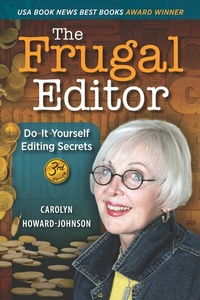
The Frugal Editor
Description

The Frugal Editor: Do-it-Yourself Editing Secrets From your query letter to final manuscript to the marketing of your book Whether you are a new or experienced author, The Frugal Editor helps you present whistle-clean copy from a one-page cover letter to your entire manuscript that will convince those with the power to say "yea" or "nay" to your precious book. The third edition of The Frugal Editor, is the winningest book in Carolyn's multi-award-winning HowToDoItFrugally Series of Books for writers with accolades from Reader Views Literary Award, Dan Poynter's Global Ebook Award, the coveted Irwin Award, and many others. This fully updated edition includes the new help you need from managing gender pronouns to maximizing the usefulness of front and back matter. Altogether, The Frugal Editor now provides 50% more information designed for the success of your title. "Writers and editors have a true friend in Carolyn Howard-Johnson. Her word smarts, her publishing savvy, and her sincere commitment to authors and editors make The Frugal Editor a must-have resource." -- June Casagrande, author of The Best Punctuation Book, Period and Grammar Snobs Are Great Big Meanies (Penguin) and syndicated grammar columnist "Previous editions of The Frugal Editor were excellent. Nothing could be better... except this book which has an additional 50% new content. The publishing world changes quickly, and this text allows writers to keep up with the ever-changing world of editors, publicists, finicky agents, trends, cultural expectations, queries, and media kits... exploding grammar myths, and possible scams. Save yourself time and money by learning from the best, Howard-Johnson. -- Carolyn Wilhelm, BA, MA, MS and author of environmental content "Carolyn Howard-Johnson is a godsend for writers everywhere. Her new book The Frugal Editor, is part reference guide, part do-it-yourself editing manual, part masterclass on the writing and publishing industry... and all with Carolyn's signature humor and encouraging energy! She is a master at simplifying overwhelming tasks into relevant, can-do information. This book is a must for every writer's bookshelf!" --Dallas Woodburn, book coach and best-selling author of Thanks, Cariss, for Ruining my Life "I am using The Frugal Editor to polish my next book. I've used it for the first edit, the beta edit, and...I'm ready to snuff out excess words. Your tip about adding spaces with the search and replace tool is a timely add to my editing skills. It was easy to weed out abbreviations like AR for Arkansas one of my clients used with the (space)AR(space) feature." --Elizabeth Seckman, editor of Insecure Writers Group newsletter "In the third edition of her The Frugal Editor, Carolyn Howard-Johnson helps authors obtain a finished product worthy of Simon and Shuster. The book guides readers through evolving changes in the English language that has no governing academy regulating it." --Helen Dunn Frame shares her secrets for Retiring in Costa Rica or Doctors, Dogs and Pura Vida and other books. "Whether you're writing your first book or tenth, The Frugal Editor is a must-read." --Tim Bete, director, Erma Bombeck Writers' Workshop "Carolyn Howard-Johnson's The Frugal Editor has been my go-to editing bible for many years. The new Third Edition is the best yet with all the clear, easy-to-follow advice on how to edit your work like a pro of the earlier editions and a whole new range of up-to-the-minute advice about such things as using gender pronouns correctly, well-researched insider info on how to avoid agents' and publishers' pet peeves, how to avoid scams, and lots more. This is a must for every author's editing arsenal." --Magdalena Ball, CompulsiveReader From Modern History Press
All prices
More details
Other editions
Additional editions
Content
- frontcover
- 9781615996001_txt.pdf
- backcover
Chapter 2: Organizing Only Feels Like Procrastination
Setting up your surroundings for the editing process is so much fun it might feel as if you're procrastinating. In these post-typewriter days, we might have two or more environments. We think of the place where your desktop computer (or computers!) resides, first. The other could be where you plop yourself with your laptop. You know, your workspaces. Anything from an office of your own complete with desk, desktop computer, filing cabinets, and maybe even a wall of framed award certificates to the comfy ones outdoors or by the hearth. All of them need to accommodate your work habits and your specific needs. Your book deserves it. For this coming edit, I'd like to see everything working at top efficiency-from the innards on your hardware to the new processes and ideas you choose from this Frugal Editor to templates (at least the drafts!) for your own important marketing material. So, let's chat a little about whatever serves as your desktop-virtual or otherwise-in all of your writing spaces. I hope you'll have a little fun with these organizing efforts!
Your Real Old-Fashioned Desk Environment
Clear your desk of piles of stuff so tall you can't see over them, but don't be tempted to take on the tasks you find buried there; they waited this long, they can wait longer. Put the papers, notebooks, and clippings aside or pile them in a box and enjoy feeling naughty. When your environment is about as tidy as needed, you're ready to get your editing tools in shape.
Note: If you choose to balance a laptop in less-than-traditional spaces when you edit-in a shady spot on the patio or in a closet you use so you can enjoy complete quiet and isolation-those spots benefit by adapting chair-side tables or bookshelves to substitute for real desk-type storage. They don't have to be fancy. I salvaged several such office accoutrements curbside where neighbors leave discards with big "Free!" signs attached.
Put your most important reference books on your desk near your computer even if you prefer to use online resources. It's preferable if you can reach them without moving your fanny from your chair. Old references, like some of the ones I recommend in the Appendix of this book, qualify. Even your vintage dictionaries with words in them that gurus at Merriam-Webster have removed from newer editions may turn out to be more useful than you ever imagined. You'll love the affirmation of knowing you are remembering stuff new resources try to convince you never existed. If you lose track of treasures like these, you'll be chastising yourself when you decide to write, say, a historical novel or craft a dialogue using vocabulary that hasn't been used in decades. You'll know instantly what you're missing when you don't find the spelling in a newly purchased reference or go online to find a word lyricist Cole Porter rhymed with such creativity. Some of the new references can't be accessed online without paying for them, so why not have a hardcopy-old or new-readily available, too. I especially like mine when I use it to avoid disturbing my screen to check a reference.
Note: When you go to my Appendix for recommendations, you might be surprised that I do not list Elements of Style by Strunk, White, and Angell among my favorites. Strunk is a stylebook that gets mistaken for a book of grammar rules, and it often confuses writers who aren't trained editors. We'll talk about style choices vs. grammar rules later. If you have a copy of Strunk already, check the copyright date. Strunk has been through many editions over the years and the old ones might lead you astray big time. That doesn't mean you won't find a tidbit in an old edition that is still viable. Just know if it conflicts with something you just learned, there may be a good reason for that.
Getting Your Computer Ready for Editing Projects
If you don't work with Word's Spelling and Grammar Checker all the time, set it up with this moment in mind. You're safe using it for most manuscript-type duties. I even installed a Microsoft word processor especially programmed for Apple iMacs on my computer. If you choose to do that, get help finding the most recent update. And keep reading for mini reviews on other word processors if you are thinking about using something else.
You have checked and installed or bookmarked your important references like the ones mentioned in the section above. If you need a specialized style guide beyond Chicago Manual of Style for writing technical material or other narrowly focused topics, check in with Google or go to Wikipedia's list of style guides. You're ready except for essential details like how to make computers behave more efficiently for the task of editing which is so different from writing itself. You also want to adapt your computer and many of your old habits to what is newer and faster. Old is not necessarily bad. Experience is a good thing. But you're going to be surprised. You are aware that digitization has wrought big changes, but much we think of as staid and reliable has changed radically in the last few decades, too. And we can blame computers for only some of it. Just keep reading!
Revisiting Familiar Computer Aids
File names tend to be a problem for both newbies and experienced computer users. I try to stay in touch with one of my community college instructors who helped move me from the world of the Apple IIs we used for our retail stores to the Microsoft world that the publishing world prefers. He says that when he hears a moan from the back of his classroom, the gremlins who attack file names are usually responsible.
Many writers already have file-name systems in place to avoid computer confusion. Many others use their computers almost like a typewriter. Those whose skills don't go much beyond typing e-mail posts and a little Facebook fun might need to be reminded how to avoid accessing an out-of-date manuscript copy from your computer's memory during the editing process. To do that you:
Save your copies periodically-starting with your rough draft through the different iterations of the revised copies of your manuscript with the title and a code to indicate it is original, something like, "ThisLandDividedFirstDraft [plus the current date]." That way you'll always have a baseline for your book no matter how many times you change it through edits or revisions.
Note: Updated computers don't need underlines to separate words in file names as they once did. New computer programs and operating systems are okay using run-on words, all lower case or with caps as you prefer. You can make all digital hearts happy with underlines as separators as they did maybe two whole years ago, or you can start applying the more relaxed expectations now to prepare yourself for what might lie ahead. Spaces between words are now okay, too.
Dr. Bob Rich says, "A good system to track file names after your original draft is 'title yymmdd,' e.g., year first (two digits), then month, then day. This model keeps the alphabetic order in your electronic filing system."
Because I still don't quite trust computers (or electricity), I also run a hardcopy of my books and file it. Sometimes I e-mail a copy to my daughter for safekeeping on her Mac hard drive. Yes, that's in addition to my backup drive and one or two clouds, too. Crazy, I know. But there is no harm in making yourself feel secure.
Because I travel a lot and use different computers, I also like to label every page in my manuscript with the name of the current file of my book by using the header/footer function in my Word program. That way, I will be less likely to work with an outdated file. It's overkill, too, but you don't have to tell anyone you do it! You'll also find that confirming (and soothing) information in the top bar of your screen. The bar will be blue unless you've customized your screen colors.
Word has a magical Manuscript Page Layout but don't confuse it with their fancy template choices. Also do not confuse a manuscript layout for the template for an entire book; you will not need the likes of gutters to submit to agents or publishers. With one click "Print Layout View" sets your format according to the expectations of most agents and publishers for their submissions. By using this feature, you'll avoid making drastic changes to basic layout later when one of your gatekeepers intervenes. Here are steps to make a basic layout on your own:
Your manuscripts and promotional material will probably be okay with margins one inch all around.
All your possible layout needs will probably be found under the layout heading in the top ribbon of your word processor. Look for words like "manuscripts," "layout," "page layout" or ask your help function for manuscript layout guidance.
Choose double space for manuscripts. Choose single space for query letters and similar business documents.
Put page numbers in the...
