
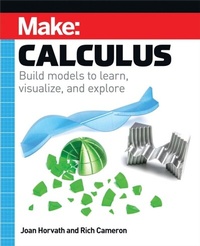
Make: Calculus
Description
Alles über E-Books | Antworten auf Fragen rund um E-Books, Kopierschutz und Dateiformate finden Sie in unserem Info- & Hilfebereich.
When Isaac Newton developed calculus in the 1600s, he was trying to tie together math and physics in an intuitive, geometrical way. But over time math and physics teaching became heavily weighted toward algebra, and less toward geometrical problem solving. However, many practicing mathematicians and physicists will get their intuition geometrically first and do the algebra later.
Make:Calculus imagines how Newton might have used 3D printed models, construction toys, programming, craft materials, and an Arduino or two to teach calculus concepts in an intuitive way. The book uses as little reliance on algebra as possible while still retaining enough to allow comparison with a traditional curriculum.
This book is not a traditional Calculus I textbook. Rather, it will take the reader on a tour of key concepts in calculus that lend themselves to hands-on projects. This book also defines terms and common symbols for them so that self-learners can learn more on their own.
More details
Other editions
Additional editions

System requirements
File format: ePUB
Copy protection: Adobe-DRM (Digital Rights Management)
System requirements:
- Computer (Windows; MacOS X; Linux): Install the free reader Adobe Digital Editions prior to download (see eBook Help).
- Tablet/smartphone (Android; iOS): Install the free app Adobe Digital Editions or the app PocketBook before downloading (see eBook Help).
- E-reader: Bookeen, Kobo, Pocketbook, Sony, Tolino and many more (not Kindle).
The file format ePub works well for novels and non-fiction books – i.e., „flowing” text without complex layout. On an e-reader or smartphone, line and page breaks automatically adjust to fit the small displays.
This eBook uses Adobe-DRM, a „hard” copy protection. If the necessary requirements are not met, unfortunately you will not be able to open the eBook. You will therefore need to prepare your reading hardware before downloading.
Please note: We strongly recommend that you authorise using your personal Adobe ID after installation of any reading software.
For more information, see our ebook Help page.