

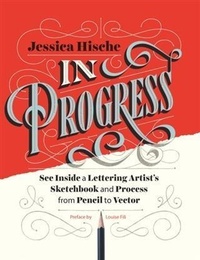
In Progress
See Inside a Lettering Artist's Sketchbook and Process, from Pencil to Vector
Published on 15. September 2015
176 pages
978-1-4521-4668-3 (ISBN)
Description

This show-all romp through design-world darling Jessica Hische's sketchbook reveals the creative and technical process behind making award-winning hand lettering. See everything, from Hische's rough sketches to her polished finals for major clients such as Wes Anderson, NPR, and Starbucks. The result is a well of inspiration and brass tacks information for designers who want to sketch distinctive letterforms and hone their skills. With more than 250 images of her penciled sketches, this highly visual ebook is an essential-and entirely enjoyable-resource for those who practice or simply appreciate the art of hand lettering.
More details
Other editions
Additional editions
Jessica Hische
In Progress
See Inside a Lettering Artist's Sketchbook and Process, from Pencil to Vector
Book
09/2015
Chronicle Books
€43.51
Article exhausted; check different version
Person
Jessica Hische is a letterer and illustrator based in San Francisco. Forbes has twice recognized her in its annual 30 Under 30 list in the art and design category.
Content
- Cover
- Title
- Dedication
- Copyright
- Contents
- Preface
- Introduction
- The Typographic Arts: Lettering, Calligraphy & Type Design
- The Process
- Creating Lettering: From Blank Page to Finished Art
- The Tools: Analog
- 1. A hard-cover sketchbook
- 2. A single sheet of dark cover-weight paper
- 3. Tracing paper
- 4. A Small "Jotting Stuff Down" Notebook
- 5. A Small "Ideas" Notebook
- 6. Pencil Case
- 7. 6-inch Ruler
- 8. Blackwing Pencil
- 9. Pencil Extender
- 10. Eraser
- 11. Technical Pencil
- 12. Black Ballpoint Pen
- 13. Brush Pen
- 14. Pencil Sharpener
- 15. Parallel Pens
- 16. Pointed Pens
- 17. Scotch Tape
- The Tools: Digital
- 1. MacBook Pro + Extra Display
- 2. Apple Wireless Keyboard
- 3. Wacom Intuos Medium
- 4. A Solid-State External Hard Drive
- 5. Smartphone
- 6. Kindle Paperwhite
- 7. Laser Printer
- 8. Inkjet Printer
- 9. Good Camera + Tripod
- Software and Services
- 1. Adobe Creative Cloud
- 2. RoboFont
- 3. Reminders
- 4. Apple Calendar + Google Calendars
- 5. Skype
- 6. Dropbox
- 7. Twitter / Instagram / Facebook
- 8. SignNow or DocuSign
- 9. Pinterest
- 10. Scanner Pro
- Research & Brainstorming
- Thumbnails
- Sketching
- Step 1: Setting Up Guide Lines
- Step 2: Choosing Lettering Styles
- Step 3: Lightly Sketching
- The Skeleton
- General Letterform-Drawing Tips
- The Body
- Pen Influence
- Overall Boldness / Weight
- High or Low Contrast
- The Clothes
- Adding Serifs
- Adding Swashes
- Drop Line, Drop Shade, Drop Shadow
- Spurs and Other Fun Stuff
- Step 4: Refined Drawing
- Vector Drawing
- Draw, Rinse, Repeat
- Step 1: Setting Up Guides
- Step 2: The Skeleton
- Proper Point Placement
- Basic Point Plotting
- Plotting Points on Curved Forms
- Find the Extrema
- Pretty Handles
- Rounded Corner Shapes
- Let the Handles Share the Work
- Never Cross the Streams
- Other Vector Lettering Tips
- Square Off Sharp Points
- Create Overlaps to Ease Editing
- Step 3: The Body
- Step 4: The Clothes
- Step 4.5: Draw It Again (Optional)
- Step 5: Adding Color
- Using Global Color Swatches
- The Work
- Process in Action: Differing Steps for Different Projects
- Editorial
- Books
- Advertising
- Logos
- Miscellaneous
- Acknowledgments
- Index
- A
- B
- C
- D
- E
- F
- G
- H
- I
- K
- L
- M
- N
- O
- P
- R
- S
- T
- V
- W
- About the Author
- Chronicle Ebooks
