

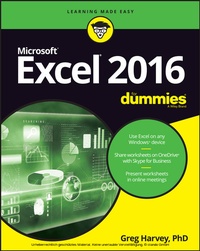
Excel 2016 For Dummies
Description

Updated to reflect the latest changes to the Microsoft Office suite, this new edition of Excel For Dummies quickly and painlessly gets you up to speed on mastering the world's most widely used spreadsheet tool. Written by bestselling author Greg Harvey, it has been completely revised and updated to offer you the freshest and most current information to make using the latest version of Excel easy and stress-free.
If the thought of looking at spreadsheet makes your head swell, you've come to the right place. Whether you've used older versions of this popular program or have never gotten a headache from looking at all those grids, this hands-on guide will get you up and running with the latest installment of the software, Microsoft Excel 2016. In no time, you'll begin creating and editing worksheets, formatting cells, entering formulas, creating and editing charts, inserting graphs, designing database forms, and more. Plus, you'll get easy-to-follow guidance on mastering more advanced skills, like adding hyperlinks to worksheets, saving worksheets as web pages, adding worksheet data to an existing web page, and so much more.
* Save spreadsheets in the Cloud to work on them anywhere
* Use Excel 2016 on a desktop, laptop, or tablet
* Share spreadsheets via email, online meetings, and social media sites
* Analyze data with PivotTables
If you're new to Excel and want to spend more time on your actual work than figuring out how to make it work for you, this new edition of Excel 2016 For Dummies sets you up for success.
More details
Other editions
Additional editions
Person
Content
Part 1: Getting Started with Excel 2016 9
CHAPTER 1: The Excel 2016 User Experience 11
CHAPTER 2: Creating a Spreadsheet from Scratch 41
Part 2: Editing without Tears 93
CHAPTER 3: Making It All Look Pretty 95
CHAPTER 4: Going Through Changes 145
CHAPTER 5: Printing the Masterpiece 177
Part 3: Getting Organized and Staying That Way 203
CHAPTER 6: Maintaining the Worksheet 205
CHAPTER 7: Maintaining Multiple Worksheets 233
Part 4: Digging Data Analysis 255
CHAPTER 8: Doing What-If Analysis 257
CHAPTER 9: Playing with Pivot Tables 271
Part 5: Life beyond the Spreadsheet 293
CHAPTER 10: Charming Charts and Gorgeous Graphics 295
CHAPTER 11: Getting on the Data List 331
CHAPTER 12: Linking, Automating, and Sharing Spreadsheets 355
Part 6: The Part of Tens 379
CHAPTER 13: Top Ten Beginner Basics 381
CHAPTER 14: The Ten Commandments of Excel 2016 385
CHAPTER 15: Top Ten Ways to Manage Your Data 387
CHAPTER 16: Top Ten Ways to Analyze Your Data 393
Index 397
Introduction
I'm very proud to present you with Excel 2016 For Dummies, the latest version of everybody's favorite book on Microsoft Office Excel for readers with no intention whatsoever of becoming spreadsheet gurus.
Excel 2016 For Dummies covers all the fundamental techniques you need to know in order to create, edit, format, and print your own worksheets. In addition to showing you around the worksheet, this book also exposes you to the basics of charting, creating data lists, and performing data analysis. Keep in mind, though, that this book just touches on the easiest ways to get a few things done with these features - I don't attempt to cover charting, data lists, or data analysis in the same definitive way as spreadsheets: This book concentrates on spreadsheets because spreadsheets are what most regular folks create with Excel.
About This Book
This book isn't meant to be read cover to cover. Although its chapters are loosely organized in a logical order (progressing as you might when studying Excel in a classroom situation), each topic covered in a chapter is really meant to stand on its own.
Each discussion of a topic briefly addresses the question of what a particular feature is good for before launching into how to use it. In Excel, as with most other sophisticated programs, you usually have more than one way to do a task. For the sake of your sanity, I have purposely limited the choices by usually giving you only the most efficient ways to do a particular task. Later, if you're so tempted, you can experiment with alternative ways of doing a task. For now, just concentrate on performing the task as I describe.
As much as possible, I've tried to make it unnecessary for you to remember anything covered in another section of the book. From time to time, however, you will come across a cross-reference to another section or chapter in the book. For the most part, such cross-references are meant to help you get more complete information on a subject, should you have the time and interest. If you have neither, no problem. Just ignore the cross-references as if they never existed.
How to Use This Book
This book is similar to a reference book. You can start by looking up the topic you need information about (in either the Table of Contents or the index) and then refer directly to the section of interest. I explain most topics conversationally (as though you were sitting in the back of a classroom where you can safely nap). Sometimes, however, my regiment-commander mentality takes over, and I list the steps you need to take to accomplish a particular task in a particular section.
What You Can Safely Ignore
When you come across a section that contains the steps you take to get something done, you can safely ignore all text accompanying the steps (the text that isn't in bold) if you have neither the time nor the inclination to wade through more material.
Whenever possible, I have also tried to separate background or footnote-type information from the essential facts by exiling this kind of junk to a sidebar (look for blocks of text on a gray background). Often, these sections are flagged with icons that let you know what type of information you will encounter there. You can easily disregard text marked this way. (I'll scoop you on the icons I use in this book a little later.)
Foolish Assumptions
I'm only going to make one foolish assumption about you, and that is that you have some need to use Microsoft Excel 2016 in your work or studies. If pushed, I further guess that you aren't particularly interested in knowing Excel at an expert level but are terribly motivated to find out how to do the stuff you need to get done. If that's the case, this is definitely the book for you. Fortunately, even if you happen to be one of those newcomers who's highly motivated to become the company's resident spreadsheet guru, you've still come to the right place.
As far as your hardware and software goes, I'm assuming that you already have Excel 2016 (usually as part of Microsoft Office 2016) installed on your computing device, using a standard home or business installation running under Windows 7, 8, or 10 (my personal favorite). I'm not assuming, however, that when you're using Excel 2016, you are sitting in front of a large screen monitor and making cell entries and command selections with a physical keyboard or connected mouse. With the introduction of Microsoft's Surface 3 tablets and the support for a whole slew of different Windows tablets, you may well be entering data and selecting commands with your finger or stylus using the Windows Touch keyboard.
To deal with the differences between using Excel 2016 on a standard desktop or laptop computer with access only to a physical keyboard and mouse and a touchscreen tablet or smartphone environment with access only to the virtual Touch keyboard, I've outlined the touchscreen equivalents to common commands you find throughout the text such as "click," "double-click," "drag," and so forth in Chapter 1.
Keep in mind that although most of the figures in this book show Excel 2016 happily running on Windows 10, you will see the occasional figure showing Excel running on Windows 8 in the rare cases (as when opening and saving files) where what operating system you're using does make a difference.
This book is intended only for users of Microsoft Office Excel 2016! Because of the diversity of the devices that Excel 2016 runs on and the places where its files can be saved and used, if you're using Excel 2007 or Excel 2010 for Windows, much of the file-related information in this book may only confuse and confound you. If you're still using a version prior to Excel 2007, which introduced the Ribbon interface, this edition will be of no use to you as your version of the program works nothing like the 2016 version this book describes.
How This Book Is Organized
This book is organized in six parts with each part containing two or more chapters (to keep the editors happy) that more or less go together (to keep you happy). Each chapter is divided further into loosely related sections that cover the basics of the topic at hand. However, don't get hung up on following the structure of the book; ultimately, it doesn't matter whether you find out how to edit the worksheet before you learn how to format it, or whether you figure out printing before you learn editing. The important thing is that you find the information - and understand it when you find it - when you need to perform a particular task.
In case you're interested, a synopsis of what you find in each part follows.
Part 1: Getting Started with Excel 2016
As the name implies, in this part 1 cover such fundamentals as how to start the program, identify the parts of the screen, enter information in the worksheet, save a document, and so on. If you're starting with absolutely no background in using spreadsheets, you definitely want to glance at the information in Chapter 1 to discover the secrets of the Ribbon interface before you move on to how to create new worksheets in Chapter 2.
Part 2: Editing without Tears
In this part, I show you how to edit spreadsheets to make them look good, including how to make major editing changes without courting disaster. Peruse Chapter 3 when you need information on formatting the data to improve the way it appears in the worksheet. See Chapter 4 for rearranging, deleting, or inserting new information in the worksheet. Read Chapter 5 for the skinny on printing your finished product.
Part 3: Getting Organized and Staying That Way
Here I give you all kinds of information on how to stay on top of the data that you've entered into your spreadsheets. Chapter 6 is full of good ideas on how to keep track of and organize the data in a single worksheet. Chapter 7 gives you the ins and outs of working with data in different worksheets in the same workbook and gives you information on transferring data between the sheets of different workbooks.
Part 4: Digging Data Analysis
This part consists of two chapters. Chapter 8 introduces performing various types of what-if analysis in Excel, including setting up data tables with one and two inputs, performing goal seeking, and creating different cases with Scenario Manager. Chapter 9 introduces Excel's vastly improved pivot table and pivot chart capabilities that enable you to summarize and filter vast amounts of data in a worksheet table or data list in a compact tabular or chart format.
Part 5: Life beyond the Spreadsheet
In Part 5, I explore some of the other aspects of Excel besides the spreadsheet. In Chapter 10, you find out just how ridiculously easy it is to create a chart using the data in a worksheet. In Chapter 11, you discover just how useful Excel's data list capabilities can be when you have to track and organize a large amount of information. In Chapter 12, you find out about using add-in programs to enhance Excel's basic features, adding hyperlinks to jump to new places in a worksheet, to new documents, and even to web pages, as well as how to record macros to automate your...
