

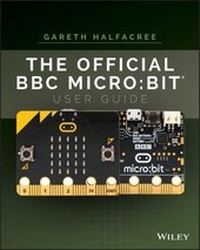
The Official BBC micro
Description

The BBC micro:bit is a pocket-sized electronic development platform built with education in mind. It was developed by the BBC in partnership with major tech companies, communities, and educational organizations to provide kids with a fun, easy, inexpensive way to develop their digital skills. With it, kids (and grownups) can learn basic programming and coding while having fun making virtual pets, developing games, and a whole lot more.
Written by internationally bestselling tech author Gareth Halfacree and endorsed by the Micro:bit Foundation, The Official BBC micro:bit User Guide contains what you need to know to get up and running fast with the BBC micro:bit. Learn everything from taking your first steps with the BBC micro:bit to writing your own programs. You'll also learn how to expand its capabilities with add-ons through easy-to-follow, step-by-step instructions.
* Set up your BBC micro:bit and develop your digital skills
* Write code in JavaScript Blocks, JavaScript, and Python
* Discover the BBC micro:bit's built-in sensors
* Connect the BBC micro:bit to a Raspberry Pi to extend its capabilities
* Build your own circuits and create hardware
The Official BBC micro:bit User Guide is your go-to source for learning all the secrets of the BBC micro:bit. Whether you're just beginning or have some experience, this book allows you to dive right in and experience everything the BBC micro:bit has to offer.
More details
Other editions
Additional editions
Person
Content
Foreword xi
Introduction xiii
Part I
Chapter 1 Meet the BBC micro:bit 3
A Tour of the Board 3
Breaking It Down 5
Display 6
Buttons 7
Processor 8
Radio 9
Accelerometer 10
Compass 11
Input-Output Pins 12
Micro-USB Port 13
Battery Connector 14
Chapter 2 Getting Started with the BBC micro:bit 17
Handling the BBC micro:bit 17
Powering the BBC micro:bit 18
USB Power 18
Battery Power 20
Greetings from the BBC micro:bit 23
Signs of Life 24
Testing the Buttons 24
Motion Gaming 24
Get Coding 25
Resetting the BBC micro:bit 25
Chapter 3 Programming the BBC micro:bit 27
USB Connectivity 27
Drag-and-Drop 29
Automatic Flashing 31
The Code Editor 32
Downloading Your Program 33
About Flash Memory 38
Part II
Chapter 4 Programming Languages 41
About Programming Languages 41
The Three Main BBC micro:bit Languages 42
JavaScript Blocks 43
JavaScript 44
Python 45
Comparing Programming Languages 46
Choosing a Programming Language 48
Other Programming Languages 49
Chapter 5 JavaScript Blocks 51
Introducing the JavaScript Blocks Editor 51
Program 1: 'Hello, World!' 54
Loops 57
Program 2: Button Inputs 58
Multiple Buttons 60
Program 3: Touch Inputs 61
Variables 62
Program 4: The Temperature Sensor 65
Formatting the Output 67
Program 5: The Compass Sensor .67
Program 6: The Accelerometer Sensor 70
Delays 73
Reading Raw Accelerometer Data 74
Program 7: The Fruit Catcher Game 76
The Setup 77
The Main Program Loop 78
Conditional Loops 80
Conditional Statements 82
The Control Events 84
Further Steps 86
Chapter 6 JavaScript 87
Introducing the JavaScript Editor 88
Program 1: 'Hello, World!' 90
Loops 93
Program 2: Button Inputs 94
Multiple Buttons 97
Program 3: Touch Inputs 98
Variables 99
Program 4: The Temperature Sensor 102
Formatting the Output 104
Program 5: The Compass Sensor 104
Program 6: The Accelerometer Sensor 107
Delays 109
Reading Raw Accelerometer Data 110
Program 7: The Fruit Catcher Game 112
The Setup 113
The Main Program Loop 115
The Conditional Loops 116
The Conditional Statements 117
The Control Events 120
Further Steps 123
Chapter 7 Python 125
Introducing the Python Editor 126
Program 1: 'Hello, World!' 128
Loops 132
Program 2: Button Inputs 133
Multiple Buttons 136
Program 3: Touch Inputs 137
Variables 138
Program 4: The Temperature Sensor 141
Formatting the Output 142
Program 5: The Compass Sensor 143
Program 6: The Accelerometer Sensor 145
Delays 147
Reading Raw Accelerometer Data 148
Program 7: The Fruit Catcher Game 150
The Setup 150
The Main Program Loop 153
Conditional Loops 154
Conditional Statements 155
Drawing the Sprites 156
Finishing the Program 157
Further Steps 160
Part III
Chapter 8 The Wireless BBC micro:bit 163
The BBC micro:bit Radio 163
Program 1: One-to-One Communication 164
Program 2: One-to-Many Communication 167
Program 3: Radio Groups 169
Testing the Group Feature 171
Using the BBC micro:bit with a Smartphone or Tablet 173
Chapter 9 The BBC micro:bit and the Raspberry Pi 175
About the Raspberry Pi 176
Connecting the Raspberry Pi to the BBC micro:bit 177
Reading from the BBC micro:bit 180
Using the BBC micro:bit Display 186
Practical Example: A CPU Monitor 189
Chapter 10 Building Circuits 193
Electronic Equipment 194
The Input-Output Pins 196
The Large Pins 197
The Small Pins 199
Serial Peripheral Interface (SPI) 201
Inter-Integrated Circuit (I2C) 201
Universal Asynchronous Receiver/Transmitter (UART) 201
Your First Circuits 202
Reading from a Button Input 202
Reading Resistor Colour Codes 205
Writing to an LED Output 207
Fading an LED via PWM 211
Reading an Analogue Input 213
Chapter 11 Extending the BBC micro:bit 217
Extending via Breakout Boards 217
Kitronik Edge Connector Breakout Board 218
ScienceScope Micro:bit Breakout Board 219
Proto-Pic Bread:Bit 220
Proto-Pic Exhi:Bit 220
Robotics and the BBC micro:bit 222
Kitronik Line-Following Buggy 222
Kitronik Motor Driver Board 223
Technology Will Save Us Micro:Bot 224
4tronix Bit:Bot 225
BinaryBots 226
Other BBC micro:bit Add-Ons 227
Kitronik Mi:Power 227
Proto-Pic Micro:Pixel Board 228
Proto-Pic Simon:Says Board 229
4tronix Bit:2:Pi Board 230
Kitronik Mi:Pro Protector and Mi:Power Cases 231
Chapter 12 The Wearable BBC micro:bit 233
Advantages of the Wearable BBC micro:bit 234
Conductive Thread 235
Using Conductive Thread 237
The Rain-Sensing Hat 241
Building the Hat 242
Mounting the BBC micro:bit 244
The Rain-Sensing Program 245
Battery Power 246
Chapter 13 Additional Resources 249
The Micro:bit Educational Foundation 249
Official Teaching Resources 251
Third-Party Teaching Resources 252
The Institution of Engineering and Technology 252
Computing At School 253
Micro:bit for Primary Schools 253
TES Magazine 255
Code Clubs 256
Part IV
Appendix A JavaScript Blocks Recipes 259
Appendix B JavaScript Recipes 267
Appendix C Python Recipes 275
Appendix D Pin-Out Listing 285
Index 289
Introduction
EDUCATIONAL COMPUTING HAS a long and storied history, beginning with the adoption of mechanical calculators to aid with mathematics classes through to the early days of microcomputing with initiatives like the BBC Computer Literacy Project in the 1980s. As the cost of computers came down and their capabilities increased, schools around the world rapidly went from a single shared computer to entire rooms filled with computers, integrating them into lessons from languages and history to engineering and art.
Today many homes have a computer of their own, or in some cases more than one. While access to computers has increased, actually operating them brings with it a sense of being disconnected from their inner workings. The BBC Micro, the 1980s microcomputer designed by Acorn Computers and at the heart of the BBC Computer Literacy Project, loaded straight into a text-based programming language known as the Beginner's All-Purpose Symbolic Instruction Code (BASIC) and invited experimentation; today, the majority of computers load into a graphical user interface (GUI) which emphasises the use of pre-written programs over creating your own.
The BBC micro:bit is designed to bring back the days of learning to write your own code on a low-cost, easily-understood platform. Designed to sit at the heart of an international computer literacy programme directly inspired by the BBC's original Computer Literacy Project, the BBC micro:bit is an affordable microcontroller on which you can run your own programs to do everything from spell out your name or play a game to turn lights on and off or communicate via radio.
Schools around the world have begun to adopt the BBC micro:bit in their curricula, but it's by no means exclusively for structured educational use. The device's readily accessible nature means it can be used to teach programming and computing concepts to children of any age, its robustness and small size mean it's extremely portable and well-suited to wearable projects, and its surprising power and flexibility mean that you're unlikely to find yourself restricted by its capabilities even when using it at the heart of more complex projects.
Who This Book Is For
This book is written for anyone interested in working with the BBC micro:bit. You don't need pre-existing knowledge of computers, electronics, or programming to be able to pick up a BBC micro:bit and get started.
All you need to get the most from this book is the ability to read and a willingness to learn. If you've used computers before, you'll find that you are able to skim through some of the early chapters on general concepts. If you've used other microcontroller-based development boards, you can skip still more. If you've written your own computer programs, then you'll find programming for the BBC micro:bit immediately familiar. And if you know your way around an electrical circuit, the later chapters should hold few surprises.
Whether you're an existing user of the BBC micro:bit or a complete newcomer, this book aims to get you started on your journey with a minimum of fuss and maximum enjoyment.
What This Book Covers
The march of technology is constant, and the BBC micro:bit is no exception. This book has been written based on the most recent version of the BBC micro:bit hardware, revision 1.3b, but it is entirely applicable to all versions going back to the first prototype versions given to schools for testing purposes. Equally, it will remain applicable to all future revisions thanks to the sterling work of the Micro:bit Educational Foundation, which has been instrumental in the development of this book.
The software for the BBC micro:bit is, as with the hardware, under constant development. References to the software in this book are accurate at the time of writing, and all screenshots and related materials have been captured on the very latest software versions. Over time, small changes may be made to the way the software looks, but the way it works will remain the same.
This is especially important for the programs contained within the book. Although the languages available for the BBC micro:bit will expand over time and gain additional features, the existing features will always be available. A program taken from this book today will still be usable with the BBC micro:bit years down the line.
How This Book Is Structured
Part I, 'An Introduction to the BBC micro:bit', offers a guide to the hardware and how it works, step-by-step instructions on unpacking your first BBC micro:bit and exploring its sample program, and connecting the BBC micro:bit to your computer so you can load a program of your own. This section also contains a number of tips on working with the BBC micro:bit, including how to handle it to protect it against possible damage. Even if you've already worked with a BBC micro:bit, reading this section is well advised.
Part II, 'Coding for the BBC micro:bit', gets you started writing your own programs. You learn the languages available for the BBC micro:bit and how they differ, and you learn to write your own programs from a simple message scrolling across the BBC micro:bit's display and reading from its various built-in sensors to writing a simple game.
There's a chapter dedicated to each of the three main programming languages used with the BBC micro:bit: JavaScript Blocks, JavaScript, and Python. Each chapter is designed to be as close to identical to the others as possible, allowing you to quickly see how the process of writing each program differs between languages. You can use the comparison table at the start of the section to pick a favoured language and read only that language's chapter, or you can work through all three chapters in turn to get a real feel for how each operates.
Part III, 'Advanced BBC micro:bit Projects', goes a step further, introducing the radio module with examples on communicating between individual BBC micro:bits and groups of BBC micro:bits without the need for wires. There's also a chapter dedicated to using the BBC micro:bit with the popular Raspberry Pi educational single-board computer, extending the capabilities of both devices.
In addition, you learn how to add external components like switches and LEDs to the BBC micro:bit, building electronic circuits from basic components to further extend its functionality. There's no soldering involved, and the circuits described are designed to be safe and accessible for even the youngest reader; they require only a small number of affordable electronic components.
You will now have a sound understanding of how the BBC micro:bit works, how to program it, and how to use it with other devices. You still won't have reached the end of its capabilities, though, so the final chapter offers information on additional resources, including add-on hardware which can further increase the BBC micro:bit's flexibility, and websites offering more project ideas and formal lesson plans for use in structured education.
Finally, the appendices have full program listings for every program mentioned in the book in all three languages, making it easy to type them in without getting distracted by comments and explanations of what each part of the program is doing. If you'd rather save your fingers, you can download the same program files from the book's website at www.wiley.com/go/bbcmicrobituserguide. You'll also find a pin-out diagram of the BBC micro:bit with a full list of its capabilities.
What You Need to Use This Book
Technically speaking, you can begin using this book even without a BBC micro:bit of your own; simulators allow you to write programs designed for the BBC micro:bit and see how they run even without loading them onto a physical BBC micro:bit. You'll get the most from the book if you have at least one BBC micro:bit with which to experiment, however, along with a few extras detailed here.
To run the main program samples listed in this book, you need the following:
- A BBC micro:bit
- A fully-wired micro-USB cable
- A computer running Microsoft Windows, Apple macOS, or Linux, with a free USB port
- An up-to-date web browser and working Internet connection
For the radio programs included in Chapter 8, 'The Wireless micro:bit', you also need:
- A total of three BBC micro:bits
To run the programs listed in Chapter 9, 'The BBC micro:bit and the Raspberry Pi', you need:
- A Raspberry Pi Model B+, Raspberry Pi Model 2, Raspberry Pi Model 3, or Raspberry Pi Zero W
- A micro-USB On-The-Go (OTG) adapter cable, if using the Raspberry Pi Zero W
To build the circuits detailed in Chapter 10, 'Building Circuits', you also need the following:
- Wires with crocodile clip or 4mm banana plug connectors
- A button or switch
- An LED
- A current-limiting resistor (see Chapter 10 for an explanation)
- A potentiometer
These parts are readily available via the Internet or in high-street electronics component shops, and they can frequently be supplied by BBC micro:bit resellers alongside the BBC micro:bit itself.
Conventions
To help you get the most from the text and keep track of what's happening, we've used a number of conventions throughout the...
