

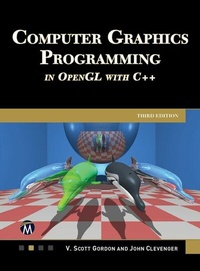
Computer Graphics Programming in OpenGL with C++
1st Edition
Published on 12. March 2024
568 pages
978-1-5015-1956-7 (ISBN)
Description

This updated edition includes step-by-step instruction on modern OpenGL 4.0+ GLSL shader programming with C++, along with the theoretical foundations of 3D computer graphics. Every shader stage is explored, from the basics of modeling, textures, lighting, shadows, etc., through advanced techniques such as tessellation, noise maps, water, and stereoscopy. This new edition includes expanded coverage of camera control, refraction, and a new chapter on ray tracing with bounding volume hierarchies for complex models. The companion files include all the source code, shaders, model files, skyboxes, etc., needed to run every example in the book.
FEATURES:
- Covers modern OpenGL 4.0+ GLSL shader programming with C++, and instructions for both PC/Windows and Macintosh
- Provides complete source code for each example, fully explained along with tips for performance optimization
- Includes step-by-step instruction for using each GLSL programmable pipeline stage (vertex, tessellation, geometry, and fragment)
- Designed in a 4-color, "teach-yourself" format with numerous examples that the reader can run just as presented
- Explores practical examples for modeling, lighting, and shadows (including soft shadows), terrain, water, and 3Dmaterials such as wood and marble
- Expanded coverage of ray tracing, to include complex models and bounding volume hierarchies
- Includes companion files with source code, shaders, OBJ models, textures, skydomes, normal maps, high resolution figures, and more
All prices
More details
Language
English
Place of publication
New York
United States
Target group
Professional and scholarly
US School Grade: College Graduate Student
File size
54,62 MB
ISBN-13
978-1-5015-1956-7 (9781501519567)
Copyright in bibliographic data and cover images is held by Nielsen Book Services Limited or by the publishers or by their respective licensors: all rights reserved.
Schweitzer Classification
Other editions
Additional editions
E-Book
03/2024
1st Edition
Mercury Learning and Information
from
€71.95
Available for download
Book
03/2024
1st Edition
De Gruyter
€74.50
Article not available at the moment
Previous edition
Scott Gordon | John L. Clevenger
Computer Graphics Programming in OpenGL with C++
E-Book
12/2020
2nd Edition
Mercury Learning & Information
€98.49
Available for download
Content
- Cover
- Half Title
- Title
- Copyright
- Contents
- Preface
- What's New in this Edition
- How to Use this Book
- Intended Audience
- Acknowledgments
- About the Authors
- Chapter 1: Getting Started
- 1.1 Languages and Libraries
- 1.1.1 C++
- 1.1.2 OpenGL / GLSL
- 1.1.3 Window Management
- 1.1.4 Extension Library
- 1.1.5 Math Library
- 1.1.6 Texture Management
- 1.1.7 Optional Libraries
- 1.2 Installation and Configuration
- Chapter 2: The OpenGL Pipeline
- 2.1 The OpenGL Pipeline
- 2.1.1 C++/OpenGL Application
- 2.1.2 Vertex and Fragment Shaders
- 2.1.3 Tessellation
- 2.1.4 Geometry Shader
- 2.1.5 Rasterization
- 2.1.6 Fragment Shader
- 2.1.7 Pixel Operations
- 2.2 Detecting OpenGL and GLSL Errors
- 2.3 Reading GLSL Source Code from Files
- 2.4 Building Objects from Vertices
- 2.5 Animating a Scene
- 2.6 Organizing the C++ Code Files
- Chapter 3: Mathematical Foundations
- 3.1 3D Coordinate Systems
- 3.2 Points
- 3.3 Matrices
- 3.4 Transformation Matrices
- 3.4.1 Translation
- 3.4.2 Scaling
- 3.4.3 Rotation
- 3.5 Vectors
- 3.5.1 Uses for Dot Product
- 3.5.2 Uses for Cross Product
- 3.6 Local and World Space
- 3.7 Eye Space and the Synthetic Camera
- 3.8 Projection Matrices
- 3.8.1 The Perspective Projection Matrix
- 3.8.2 The Orthographic Projection Matrix
- 3.9 Look-At Matrix
- 3.10 GLSL Functions for Building Matrix Transforms
- Chapter 4: Managing 3D Graphics Data
- 4.1 Buffers and Vertex Attributes
- 4.2 Uniform Variables
- 4.3 Interpolation of Vertex Attributes
- 4.4 Model-View and Perspective Matrices
- 4.5 Our First 3D Program - a 3D Cube
- 4.6 Rendering Multiple Copies of an Object
- 4.6.1 Instancing
- 4.7 Rendering Multiple Different Models in a Scene
- 4.8 Matrix Stacks
- 4.9 Combating "Z-Fighting" Artifacts
- 4.10 Other Options for Primitives
- 4.11 Coding for Performance
- 4.11.1 Minimizing Dynamic Memory Allocation
- 4.11.2 Pre-Computing the Perspective Matrix
- 4.11.3 Back-Face Culling
- Chapter 5: Texture Mapping
- 5.1 Loading Texture Image Files
- 5.2 Texture Coordinates
- 5.3 Creating a Texture Object
- 5.4 Constructing Texture Coordinates
- 5.5 Loading Texture Coordinates into Buffers
- 5.6 Using the Texture in a Shader: Sampler Variables and Texture Units
- 5.7 Texture Mapping: Example Program
- 5.8 Mipmapping
- 5.9 Anisotropic Filtering
- 5.10 Wrapping and Tiling
- 5.11 Perspective Distortion
- 5.12 Textures - Additional OpenGL Details
- Chapter 6: 3D Models
- 6.1 Procedural Models - Building a Sphere
- 6.2 OpenGL Indexing - Building a Torus
- 6.2.1 The Torus
- 6.2.2 Indexing in OpenGL
- 6.3 Loading Externally Produced Models
- Chapter 7: Lighting
- 7.1 Lighting Models
- 7.2 Lights
- 7.3 Materials
- 7.4 ADS Lighting Computations
- 7.5 Implementing ADS Lighting
- 7.5.1 Gouraud Shading
- 7.5.2 Phong Shading
- 7.6 Combining Lighting and Textures
- Chapter 8: Shadows
- 8.1 The Importance of Shadows
- 8.2 Projective Shadows
- 8.3 Shadow Volumes
- 8.4 Shadow Mapping
- 8.4.1 Shadow Mapping (PASS ONE) - "Draw" Objects from Light Position
- 8.4.2 Shadow Mapping (Intermediate Step) - Copying the Z-Buffer to a Texture
- 8.4.3 Shadow Mapping (PASS TWO) - Rendering the Scene with Shadows
- 8.5 A Shadow Mapping Example
- 8.6 Shadow Mapping Artifacts
- 8.7 Soft Shadows
- 8.7.1 Soft Shadows in the Real World
- 8.7.2 Generating Soft Shadows - Percentage Closer Filtering (PCF)
- 8.7.3 A Soft Shadow/PCF Program
- Chapter 9: Sky and Backgrounds
- 9.1 Skyboxes
- 9.2 Skydomes
- 9.3 Implementing a Skybox
- 9.3.1 Building a Skybox from Scratch
- 9.3.2 Using OpenGL Cube Maps
- 9.4 Environment Mapping
- Chapter 10: Enhancing Surface Detail
- 10.1 Bump Mapping
- 10.2 Normal Mapping
- 10.3 Height Mapping
- Chapter 11 Parametric Surfaces
- 11.1 Quadratic Bézier Curves
- 11.2 Cubic Bézier Curves
- 11.3 Quadratic Bézier Surfaces
- 11.4 Cubic Bézier Surfaces
- Chapter 12: Tessellation
- 12.1 Tessellation in OpenGL
- 12.2 Tessellation for Bézier Surfaces
- 12.3 Tessellation for Terrain / Height Maps
- 12.4 Controlling Level of Detail (LOD)
- Chapter 13: Geometry Shaders
- 13.1 Per-Primitive Processing in OpenGL
- 13.2 Altering Primitives
- 13.3 Deleting Primitives
- 13.4 Adding Primitives
- 13.5 Changing Primitive Types
- Chapter 14: Other Techniques
- 14.1 Fog
- 14.2 Compositing / Blending / Transparency
- 14.3 User-Defined Clipping Planes
- 14.4 3D Textures
- 14.5 Noise
- 14.6 Noise Application - Marble
- 14.7 Noise Application - Wood
- 14.8 Noise Application - Clouds
- 14.9 Noise Application - Special Effects
- Chapter 15: Simulating Water
- 15.1 Pool Surface and Floor Geometry Setup
- 15.2 Adding Surface Reflection and Refraction
- 15.3 Adding Surface Waves
- 15.4 Additional Corrections
- 15.5 Animating the Water Movement
- 15.6 Underwater Caustics
- Chapter 16: Ray Tracing and Compute Shaders
- 16.1 Compute Shaders
- 16.1.1 Compiling and Using Compute Shaders
- 16.1.2 Parallel Computing in Compute Shaders
- 16.1.3 Work Groups
- 16.1.4 Work Group Details
- 16.1.5 Work Group Limitations
- 16.2 Ray Casting
- 16.2.1 Defining the 2D Texture Image
- 16.2.2 Building and Displaying the Ray Cast Image
- 16.2.3 Ray-Sphere Intersection
- 16.2.4 Axis-Aligned Ray-Box Intersection
- 16.2.5 Output of Simple Ray Casting Without Lighting
- 16.2.6 Adding ADS Lighting
- 16.2.7 Adding Shadows
- 16.2.8 Non-Axis-Aligned Ray-Box Intersection
- 16.2.9 Determining Texture Coordinates
- 16.2.10 Plane Intersection and Procedural Textures
- 16.3 Ray Tracing
- 16.3.1 Reflection
- 16.3.2 Refraction
- 16.3.3 Combining Reflection, Refraction, and Textures
- 16.3.4 Increasing the Number of Rays
- 16.3.5 Generalizing the Solution
- 16.3.6 Additional Examples
- 16.3.7 Blending Colors for Transparent Objects
- Chapter 17: Ray Tracing of Complex Models
- 17.1 Ray-Triangle Intersection
- 17.1.1 Mathematics for Ray-Triangle Intersection
- 17.1.2 Implementing Ray-Triangle Intersection
- 17.1.3 Ray Tracing Multiple Triangles
- 17.2 Ray Tracing an OBJ Model
- 17.2.1 OBJ Loading for Ray Tracing C++ side
- 17.2.2 OBJ Loading for Ray Tracing GLSL side
- 17.3 Ray Tracing Multiple OBJ Models
- 17.4 Bounding Volume Hierarchies (BVH)
- 17.4.1 Implementing a BVH - C++ Side
- 17.4.2 Transferring the BVH to the Compute Shader
- 17.4.3 Ray-BVH Collision Testing
- 17.4.4 Performance Comparison
- Chapter 18: Stereoscopy for 3D Glasses and VR Headsets
- 18.1 View and Projection Matrices for Two Eyes
- 18.2 Anaglyph Rendering
- 18.3 Side-by-Side Rendering
- 18.4 Correcting Lens Distortion in Headsets
- 18.5 A Simple Testing Hardware Configuration
- Appendix A Installation and Setup for PC (Windows)
- Appendix B Installation and Setup for Macintosh
- Appendix C Using the Nsight Graphics Debugger
- Appendix D Building a Simple Camera Controller
- Index
