

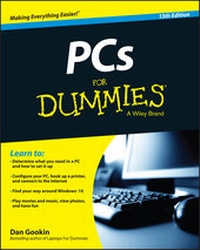
PCs For Dummies
Description

Reviews / Votes
"PCs for Dummies," by Dan Gookin, is your primer for everything there is to know about personal computers." (Graham & Wolf 2016)More details
Other editions
Additional editions
Person
Content
Chapter 1
What Is This Thing, This PC?
In This Chapter
Answering some common PC questions
Understanding basic computer concepts
Knowing about hardware and software
Buying a computer
Realizing that your PC is quite dumb
Iwish that computers were evil. It would be easier to understand the computer if it were upfront about being evil and expressed its malevolent desire to get you. Minus that negative assurance, you end up operating the PC under a constant suspicion. That's not healthy. So instead of fearing, try understanding. Maybe Mr. PC isn't so bad after all?
Some Quick Questions to Get Out of the Way
Doubtless, your mind is abuzz with various questions about computers. I ask myself computer questions often, so don't think that your curiosity is unusual. Trust me: Few people over the age of 26 are comfortable when first encountering anything high-tech.
"What is a PC?"
A PC is a computer - specifically, an acronym for personal computer.
Historically, the beast was known as a microcomputer. That's because back in the 1970s, computers were huge, room-sized things that required legions of bespectacled scientists to operate. Individuals didn't own such computers - well, unless you were eccentric or enjoyed printing your own phone bill. So mere mortals were sold a smaller version, which the Computer Professionals Union insisted be called a microcomputer.
Micro means teensy. The term is preferred by computer scientists because you can't wear a white lab coat and be taken seriously when you use the word "teensy."
Actually, the term micro comes from microprocessor, the main computer chip inside the early personal computers.
When IBM unveiled its first business microcomputer back in 1982, they called it the IBM Personal Computer - or PC, for short. All of today's personal computers are descended from that original model, so they've inherited the term PC. Figure 1-1 displays a timeline of the PC's history, in case you're curious.
Figure 1-1: Timeline of the personal computer.
The only PC that's not called "PC" is Apple's Macintosh computer. Mac users refer to their computers as Macs. That's based on an old IBM-Apple rivalry that no one cares about any more. Still, many Mac users get all huffy when you call their computers PCs. So it's fine by me to tease those crybabies by referring to their expensive toys as PCs.
- The term PC generically refers to any computer that can run the Windows operating system.
- Although your car or sewing machine or the machine that goes "boop" at the hospital may contain computer electronics, those devices are not PCs.
- Curiously, IBM got out of the PC manufacturing business in the early 2000s.
-
The success of the PC is based on its use of off-the-shelf parts that are easily replaced. The PC can also be configured and upgraded with ease, which is the main reason that it's so popular.
"Why not just use a tablet or smartphone instead of a PC?"
Sure, you can get by in today's well-connected, digital world by getting yourself a tablet or smartphone. To hell with computers!
Smartphones and tablets can send and receive email, browse the web, play games, and do all sorts of interesting things. They have several downfalls when compared with PCs:
- Mobile devices are designed for data consumption, not data production. If you're merely passing through this digital life, you can get by with a phone or tablet and never own a PC. If you need to create something, you need a computer.
- PCs offer several input devices - specifically, the keyboard and the mouse. You can even add a touchscreen to a PC, if you're into that touchy-tappy-swipey stuff.
- Mobile devices lack the expandability of a PC. You can upgrade a PC, adding more storage, memory, a better monitor, a mouse with 20,000 buttons, and so on.
- The typical computer lasts for years. A mobile device is usually replaced every other year.
Now, if you've changed your mind about getting a PC, remember that you cannot return this book once you've started reading this material.
"Should I buy a Dell?"
I get this question all the time, though "Dell" might be replaced by some other brand name. See the later section "Buy Yourself a PC!"
"Will my computer explode?"
This question is important, so please skip all the other questions I've placed before this question and read this question first!
If you're a fan of science fiction television or film, you're probably familiar with the concept of the exploding computer. Sparks, smoke, flying debris - it all appears to be a common function of computers in the future. Sure, they could just beep and display error messages when they die, but that's not visually exciting.
The answer is no, your computer will not explode. At least, not spontaneously. If you pour fruit punch into the computer or lightning strikes or the power supply unexplainably fails, the most you may see is a puff of blue smoke, but no explosions.
Basic Computer Concepts in Easily Digestible Chunks
You either use or are about to purchase one of the most advanced pieces of technology ever made available to humans. Why not be a sport about it and take a few moments to not avoid some of the more technical mumbo jumbo surrounding that technology? Don't fret: I'll be gentle.
What a computer does
Computers can do anything and try to do just about everything. At their core, however, computers are simple gizmos. Their advantage is that computers have oodles of potential.
A computer takes input, processes it, and then generates output. That's kind of how a baby works, though to keep you from being utterly befuddled, you can refer to Figure 1-2, which completely illustrates that basic computer concept.
Figure 1-2: What a computer does at its simplest level.
The "input goes into the computer, gets processed, and then produces output" equation is the foundation of these three primary computer concepts:
- I/O
- Processing
- Storage
I/O: I/O stands for input and output. It's pronounced "I owe," like Io, the third-largest moon of Jupiter. I/O is pretty much the only thing a computer does: It receives input from devices - the keyboard, mouse, Internet. It generates output, displayed on the screen, printed, or sent back to the Internet. That's I/O.
Processing: What the computer does between input and output is processing. It's what happens to the input to make the output significant. Otherwise, the computer would simply be a tube, and computer science would be the same as plumbing.
Processing is handled inside the computer by a gizmo known as (logically enough) a processor. See Chapter 5 for more information on the processor.
Storage: The final part of the basic computer equation is storage, which is where the processing takes place. Two types of storage are used: temporary and long-term. Temporary storage is the computer memory, or RAM. Long-term storage is provided by the computer's storage media.
Computer memory is covered in Chapter 6. Long-term storage is covered in Chapter 7.
Hardware and software
The computer universe is divided into two parts. One part is hardware. The other part is software.
Hardware is the physical part of a computer: anything you can touch and anything you can see - or anything that smells like burning plastic. The computer console, the monitor, the keyboard, the mouse. All that physical stuff is hardware.
Software is the computer's brain. Software tells the hardware what to do.
In a way, it helps to think of hardware and software as a symphony orchestra. For hardware, you have the musicians and their instruments. Their software is the music. As with a computer, the music (software) tells the musicians and their instruments (hardware) what to do.
Without software, hardware just sits around and looks pretty. It can't do anything because it has no instructions and nothing telling it what to do next. And, like a symphony orchestra without music, that can be an expensive waste of time, especially at union scale.
To make the computer system work, software must be in charge. In fact, software determines your computer's personality and potential.
- If you can throw it out a window, it's hardware.
- If you can throw it out a window and it comes back, it's a cat.
- Computer software includes all the programs you use on the PC.
- The most important piece of software is the computer's operating system. That's the main program in charge of everything.
- Chapter 13 covers Windows, which is the PC's least popular yet most...
