

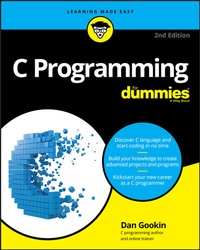
C Programming For Dummies
2nd Edition
Published on 29. September 2020
464 pages
978-1-119-74025-4 (ISBN)
Description

Get an A grade in C
As with any major language, mastery of C can take you to some very interesting new places. Almost 50 years after it first appeared, it's still the world's most popular programming language and is used as the basis of global industry's core systems, including operating systems, high-performance graphics applications, and microcontrollers. This means that fluent C users are in big demand at the sharp end in cutting-edge industries--such as gaming, app development, telecommunications, engineering, and even animation--to translate innovative ideas into a smoothly functioning reality.
To help you get to where you want to go with C, this 2nd edition of C Programming For Dummies covers everything you need to begin writing programs, guiding you logically through the development cycle: from initial design and testing to deployment and live iteration. By the end you'll be au fait with the do's and don'ts of good clean writing and easily able to produce the basic--and not-so-basic--building blocks of an elegant and efficient source code.
* Write and compile source code
* Link code to create the executable program
* Debug and optimize your code
* Avoid common mistakes
Whatever your destination: tech industry, start-up, or just developing for pleasure at home, this easy-to-follow, informative, and entertaining guide to the C programming language is the fastest and friendliest way to get there!
As with any major language, mastery of C can take you to some very interesting new places. Almost 50 years after it first appeared, it's still the world's most popular programming language and is used as the basis of global industry's core systems, including operating systems, high-performance graphics applications, and microcontrollers. This means that fluent C users are in big demand at the sharp end in cutting-edge industries--such as gaming, app development, telecommunications, engineering, and even animation--to translate innovative ideas into a smoothly functioning reality.
To help you get to where you want to go with C, this 2nd edition of C Programming For Dummies covers everything you need to begin writing programs, guiding you logically through the development cycle: from initial design and testing to deployment and live iteration. By the end you'll be au fait with the do's and don'ts of good clean writing and easily able to produce the basic--and not-so-basic--building blocks of an elegant and efficient source code.
* Write and compile source code
* Link code to create the executable program
* Debug and optimize your code
* Avoid common mistakes
Whatever your destination: tech industry, start-up, or just developing for pleasure at home, this easy-to-follow, informative, and entertaining guide to the C programming language is the fastest and friendliest way to get there!
More details
Other editions
Additional editions
Person
Dan Gookin has been writing about technology for more than 30 years--and wrote the very first For Dummies book in 1991! Since then he's written gizmo- and tech innovation-focused bestseller after bestseller, including Word 2019 For Dummies, Android For Dummies, 2nd Edition, and many more!
Content
1 - Title Page [Seite 3]
2 - Copyright Page [Seite 4]
3 - Table of Contents [Seite 7]
4 - Introduction [Seite 17]
4.1 - Why the C Language? [Seite 17]
4.2 - The C Programming For Dummies Approach [Seite 18]
4.3 - How This Book Works [Seite 19]
4.4 - Icons Used in This Book [Seite 20]
4.5 - Parting Thoughts [Seite 21]
5 - Part 1 The ABs of C [Seite 23]
5.1 - Chapter 1 A Quick Start for the Impatient [Seite 25]
5.1.1 - What You Need to Program [Seite 25]
5.1.2 - Command Prompt Programming [Seite 26]
5.1.3 - IDE Programming [Seite 27]
5.1.3.1 - Installing Code::Blocks [Seite 28]
5.1.3.2 - Touring the Code::Blocks workspace [Seite 29]
5.1.4 - Your First Program [Seite 30]
5.1.4.1 - Coding at the command prompt [Seite 31]
5.1.4.2 - Building a new Code::Blocks project [Seite 32]
5.1.4.3 - Building and running [Seite 34]
5.2 - Chapter 2 The Programming Thing [Seite 37]
5.2.1 - The History of Programming [Seite 37]
5.2.1.1 - Reviewing early programming history [Seite 37]
5.2.1.2 - Introducing the C language [Seite 38]
5.2.2 - The Programming Process [Seite 39]
5.2.2.1 - Understanding programming [Seite 39]
5.2.2.2 - Writing source code [Seite 40]
5.2.2.3 - Compiling and linking [Seite 42]
5.2.2.4 - Running and testing [Seite 43]
5.3 - Chapter 3 Anatomy of C [Seite 45]
5.3.1 - Parts of the C Language [Seite 45]
5.3.1.1 - Keywords [Seite 46]
5.3.1.2 - Functions [Seite 47]
5.3.1.3 - Operators [Seite 49]
5.3.1.4 - Variables and values [Seite 49]
5.3.1.5 - Statements and structure [Seite 49]
5.3.1.6 - Comments [Seite 51]
5.3.2 - Behold the Typical C Program [Seite 53]
5.3.2.1 - Understanding C program structure [Seite 53]
5.3.2.2 - Setting the main() function [Seite 54]
5.3.2.3 - Returning something to the operating system [Seite 55]
5.3.2.4 - Adding a function [Seite 56]
6 - Part 2 C Programming 101 [Seite 59]
6.1 - Chapter 4 Trials and Errors [Seite 61]
6.1.1 - Display Stuff on the Screen [Seite 61]
6.1.1.1 - Displaying a humorous message [Seite 61]
6.1.1.2 - Introducing the puts() function [Seite 62]
6.1.1.3 - Adding more text [Seite 63]
6.1.1.4 - Commenting out a statement [Seite 65]
6.1.1.5 - Goofing up on purpose [Seite 65]
6.1.2 - More Text Output Nonsense [Seite 67]
6.1.2.1 - Displaying text with printf() [Seite 68]
6.1.2.2 - Introducing the printf() function [Seite 68]
6.1.2.3 - Understanding the newline [Seite 69]
6.1.2.4 - Employing escape sequences [Seite 70]
6.1.2.5 - Goofing up on purpose again [Seite 71]
6.2 - Chapter 5 Values and Simple Math [Seite 73]
6.2.1 - A Venue for Various Values [Seite 73]
6.2.1.1 - Understanding values [Seite 74]
6.2.1.2 - Displaying values with printf() [Seite 75]
6.2.1.3 - Minding the extra zeros [Seite 77]
6.2.2 - The Computer Does the Math [Seite 77]
6.2.2.1 - Doing simple arithmetic [Seite 77]
6.2.2.2 - Reviewing the float-integer thing [Seite 79]
6.2.2.3 - Pretending integers are floats [Seite 80]
6.3 - Chapter 6 A Place to Put Stuff [Seite 83]
6.3.1 - Values That Vary [Seite 83]
6.3.1.1 - Setting up a quick example [Seite 84]
6.3.1.2 - Introducing data types [Seite 85]
6.3.1.3 - Using variables [Seite 86]
6.3.2 - Variable Madness! [Seite 89]
6.3.2.1 - Using more-specific data types [Seite 89]
6.3.2.2 - Working with several variables [Seite 91]
6.3.2.3 - Assigning a value upon creation [Seite 93]
6.3.2.4 - Reusing variables [Seite 93]
6.3.3 - Constants Always the Same [Seite 95]
6.3.3.1 - Using the same value over and over [Seite 95]
6.3.3.2 - Constants in your code [Seite 96]
6.3.3.3 - Putting constants to use [Seite 97]
6.4 - Chapter 7 Input and Output [Seite 99]
6.4.1 - Character I/O [Seite 99]
6.4.1.1 - Understanding input and output devices [Seite 99]
6.4.1.2 - Fetching characters with getchar() [Seite 100]
6.4.1.3 - Using the putchar() function [Seite 102]
6.4.1.4 - Working with character variables [Seite 103]
6.4.2 - Text I/O, but Mostly I [Seite 104]
6.4.2.1 - Storing strings [Seite 105]
6.4.2.2 - Introducing the scanf() function [Seite 106]
6.4.2.3 - Reading a string with scanf() [Seite 107]
6.4.2.4 - Reading values with scanf() [Seite 109]
6.4.2.5 - Using fgets() for text input [Seite 110]
6.5 - Chapter 8 Decision Making [Seite 113]
6.5.1 - What If? [Seite 113]
6.5.1.1 - Making a simple comparison [Seite 113]
6.5.1.2 - Introducing the if keyword [Seite 115]
6.5.1.3 - Comparing values in various ways [Seite 116]
6.5.1.4 - Knowing the difference between = and == [Seite 118]
6.5.1.5 - Forgetting where to put the semicolon [Seite 119]
6.5.2 - Multiple Decisions [Seite 120]
6.5.2.1 - Making more-complex decisions [Seite 120]
6.5.2.2 - Adding a third option [Seite 121]
6.5.3 - Multiple Comparisons with Logic [Seite 122]
6.5.3.1 - Building a logical comparison [Seite 122]
6.5.3.2 - Adding some logical operators [Seite 123]
6.5.4 - The Old Switch Case Trick [Seite 124]
6.5.4.1 - Making a multiple-choice selection [Seite 124]
6.5.4.2 - Understanding the switch-case structure [Seite 126]
6.5.4.3 - Taking no breaks [Seite 127]
6.5.5 - The Weird ?: Decision Thing [Seite 128]
6.6 - Chapter 9 Loops, Loops, Loops [Seite 131]
6.6.1 - A Little Déjà Vu [Seite 131]
6.6.2 - The Thrill of for Loops [Seite 132]
6.6.2.1 - Doing something x number of times [Seite 132]
6.6.2.2 - Introducing the for loop [Seite 133]
6.6.2.3 - Counting with the for statement [Seite 135]
6.6.2.4 - Looping letters [Seite 136]
6.6.2.5 - Nesting for loops [Seite 137]
6.6.3 - The Joy of the while Loop [Seite 139]
6.6.3.1 - Structuring a while loop [Seite 139]
6.6.3.2 - Using the do while loop [Seite 141]
6.6.4 - Loopy Stuff [Seite 142]
6.6.4.1 - Looping endlessly [Seite 142]
6.6.4.2 - Looping endlessly but on purpose [Seite 143]
6.6.4.3 - Breaking out of a loop [Seite 144]
6.6.4.4 - Adding multiple for loop conditions [Seite 145]
6.6.4.5 - Screwing up a loop [Seite 146]
6.7 - Chapter 10 Fun with Functions [Seite 149]
6.7.1 - Anatomy of a Function [Seite 149]
6.7.1.1 - Constructing a function [Seite 149]
6.7.1.2 - Prototyping (or not) [Seite 152]
6.7.2 - Functions and Variables [Seite 155]
6.7.2.1 - Using variables in functions [Seite 155]
6.7.2.2 - Sending a value to a function [Seite 156]
6.7.2.3 - Sending multiple values to a function [Seite 158]
6.7.2.4 - Creating functions that return values [Seite 159]
6.7.2.5 - Returning early [Seite 161]
6.7.3 - Constants of the Global Kind [Seite 163]
6.7.3.1 - Introducing defined constants [Seite 163]
6.7.3.2 - Putting defined constants to use [Seite 164]
7 - Part 3 Build Upon What You Know [Seite 167]
7.1 - Chapter 11 The Unavoidable Math Chapter [Seite 169]
7.1.1 - Math Operators from Beyond Infinity [Seite 169]
7.1.1.1 - Incrementing and decrementing [Seite 170]
7.1.1.2 - Prefixing the ++ and -- operators [Seite 172]
7.1.1.3 - Discovering the remainder (modulus) [Seite 174]
7.1.1.4 - Saving time with assignment operators [Seite 174]
7.1.2 - Math Function Mania [Seite 176]
7.1.2.1 - Exploring some common math functions [Seite 177]
7.1.2.2 - Suffering through trigonometry [Seite 179]
7.1.3 - It's Totally Random [Seite 182]
7.1.3.1 - Spewing random numbers [Seite 182]
7.1.3.2 - Making the numbers more random [Seite 183]
7.1.4 - The Holy Order of Precedence [Seite 186]
7.1.4.1 - Getting the order correct [Seite 186]
7.1.4.2 - Forcing order with parentheses [Seite 187]
7.2 - Chapter 12 Give Me Arrays [Seite 189]
7.2.1 - Behold the Array [Seite 189]
7.2.1.1 - Avoiding arrays [Seite 189]
7.2.1.2 - Understanding arrays [Seite 190]
7.2.1.3 - Initializing an array [Seite 193]
7.2.1.4 - Playing with character arrays (strings) [Seite 193]
7.2.1.5 - Working with empty char arrays [Seite 195]
7.2.1.6 - Sorting arrays [Seite 197]
7.2.2 - Multidimensional Arrays [Seite 199]
7.2.2.1 - Making a two-dimensional array [Seite 199]
7.2.2.2 - Going crazy with three-dimensional arrays [Seite 202]
7.2.2.3 - Declaring an initialized multidimensional array [Seite 204]
7.2.3 - Arrays and Functions [Seite 205]
7.2.3.1 - Passing an array to a function [Seite 205]
7.2.3.2 - Returning an array from a function [Seite 207]
7.3 - Chapter 13 Fun with Text [Seite 209]
7.3.1 - Character Manipulation Functions [Seite 209]
7.3.1.1 - Introducing the CTYPEs [Seite 209]
7.3.1.2 - Testing characters [Seite 211]
7.3.1.3 - Changing characters [Seite 213]
7.3.2 - String Functions Galore [Seite 214]
7.3.2.1 - Reviewing string functions [Seite 214]
7.3.2.2 - Comparing text [Seite 215]
7.3.2.3 - Building strings [Seite 216]
7.3.3 - Fun with printf() Formatting [Seite 218]
7.3.3.1 - Formatting floating point [Seite 218]
7.3.3.2 - Setting the output width [Seite 220]
7.3.3.3 - Aligning output [Seite 222]
7.3.4 - Gently Down the Stream [Seite 223]
7.3.4.1 - Demonstrating stream input [Seite 223]
7.3.4.2 - Dealing with stream input [Seite 224]
7.4 - Chapter 14 Structures, the Multivariable [Seite 227]
7.4.1 - Hello, Structure [Seite 227]
7.4.1.1 - Introducing the multivariable [Seite 227]
7.4.1.2 - Understanding struct [Seite 229]
7.4.1.3 - Filling a structure [Seite 231]
7.4.1.4 - Making an array of structures [Seite 232]
7.4.2 - Weird Structure Concepts [Seite 234]
7.4.2.1 - Putting structures within structures [Seite 234]
7.4.2.2 - Passing a structure to a function [Seite 235]
7.5 - Chapter 15 Life at the Command Prompt [Seite 237]
7.5.1 - Conjure a Terminal Window [Seite 237]
7.5.1.1 - Starting a terminal window [Seite 238]
7.5.1.2 - Running code in text mode [Seite 239]
7.5.2 - Arguments for the main() Function [Seite 241]
7.5.2.1 - Reading the command line [Seite 241]
7.5.2.2 - Understanding main()'s arguments [Seite 243]
7.5.3 - Time to Bail [Seite 245]
7.5.3.1 - Quitting the program [Seite 245]
7.5.3.2 - Running another program [Seite 246]
7.6 - Chapter 16 Variable Nonsense [Seite 249]
7.6.1 - Variable Control [Seite 249]
7.6.1.1 - Typecasting into disbelief [Seite 249]
7.6.1.2 - Creating new things with typedef [Seite 251]
7.6.1.3 - Making static variables [Seite 254]
7.6.2 - Variables, Variables Everywhere [Seite 257]
7.6.2.1 - Using external variables [Seite 257]
7.6.2.2 - Creating an external structure variable [Seite 259]
7.6.2.3 - Enumerating [Seite 261]
7.7 - Chapter 17 Binary Mania [Seite 265]
7.7.1 - Binary Basics [Seite 265]
7.7.1.1 - Understanding binary [Seite 265]
7.7.1.2 - Outputting binary values [Seite 267]
7.7.2 - Bit Manipulation [Seite 269]
7.7.2.1 - Using the bitwise | operator [Seite 269]
7.7.2.2 - Using bitwise & [Seite 272]
7.7.2.3 - Operating exclusively with XOR [Seite 273]
7.7.2.4 - Understanding the ~ and ! operators [Seite 275]
7.7.2.5 - Shifting binary values [Seite 275]
7.7.2.6 - Explaining the binbin() function [Seite 279]
7.7.3 - The Joy of Hex [Seite 280]
8 - Part 4 The Advanced Part [Seite 283]
8.1 - Chapter 18 Introduction to Pointers [Seite 285]
8.1.1 - The Biggest Problem with Pointers [Seite 285]
8.1.2 - Sizing Up Variable Storage [Seite 286]
8.1.2.1 - Understanding variable storage [Seite 286]
8.1.2.2 - Reading a variable's size [Seite 287]
8.1.2.3 - Checking a variable's location [Seite 291]
8.1.2.4 - Reviewing variable storage info [Seite 294]
8.1.3 - The Hideously Complex Topic of Pointers [Seite 295]
8.1.3.1 - Introducing the pointer [Seite 295]
8.1.3.2 - Working with pointers [Seite 298]
8.2 - Chapter 19 Deep into Pointer Land [Seite 301]
8.2.1 - Pointers and Arrays [Seite 301]
8.2.1.1 - Getting the address of an array [Seite 301]
8.2.1.2 - Working pointer math in an array [Seite 303]
8.2.1.3 - Substituting pointers for array notation [Seite 309]
8.2.2 - Strings Are Pointer-Things [Seite 310]
8.2.2.1 - Using pointers to display a string [Seite 310]
8.2.2.2 - Using a pointer to declare a string [Seite 311]
8.2.2.3 - Building an array of pointers [Seite 312]
8.2.2.4 - Sorting strings [Seite 316]
8.2.3 - Pointers in Functions [Seite 318]
8.2.3.1 - Passing a pointer to a function [Seite 318]
8.2.3.2 - Returning a pointer from a function [Seite 319]
8.3 - Chapter 20 Memory Chunks and Linked Lists [Seite 321]
8.3.1 - Give Me Memory! [Seite 322]
8.3.1.1 - Introducing the malloc() function [Seite 322]
8.3.1.2 - Creating string storage [Seite 324]
8.3.1.3 - Using the calloc() function [Seite 325]
8.3.1.4 - Getting more memory [Seite 327]
8.3.1.5 - Freeing memory [Seite 329]
8.3.2 - Lists That Link [Seite 330]
8.3.2.1 - Allocating space for a structure [Seite 330]
8.3.2.2 - Creating a linked list [Seite 332]
8.3.2.3 - Editing a linked list [Seite 339]
8.3.2.4 - Saving a linked list [Seite 344]
8.4 - Chapter 21 It's About Time [Seite 345]
8.4.1 - What Time Is It? [Seite 345]
8.4.1.1 - Understanding the calendar [Seite 346]
8.4.1.2 - Working with time in C [Seite 346]
8.4.2 - Time to Program [Seite 347]
8.4.2.1 - Checking the clock [Seite 347]
8.4.2.2 - Viewing a timestamp [Seite 349]
8.4.2.3 - Slicing through the time string [Seite 350]
8.4.2.4 - Snoozing [Seite 352]
9 - Part 5 And the Rest of It [Seite 353]
9.1 - Chapter 22 Permanent Storage Functions [Seite 355]
9.1.1 - Sequential File Access [Seite 355]
9.1.1.1 - Understanding C file access [Seite 356]
9.1.1.2 - Writing text to a file [Seite 357]
9.1.1.3 - Reading text from a file [Seite 358]
9.1.1.4 - Appending text to a file [Seite 361]
9.1.1.5 - Writing binary data [Seite 362]
9.1.1.6 - Reading binary data [Seite 364]
9.1.2 - Random File Access [Seite 366]
9.1.2.1 - Writing a structure to a file [Seite 367]
9.1.2.2 - Reading and rewinding [Seite 369]
9.1.2.3 - Finding a specific record [Seite 371]
9.1.2.4 - Saving a linked list to a file [Seite 373]
9.2 - Chapter 23 File Management [Seite 375]
9.2.1 - Directory Madness [Seite 375]
9.2.1.1 - Calling up a directory [Seite 375]
9.2.1.2 - Gathering more file info [Seite 377]
9.2.1.3 - Separating files from directories [Seite 379]
9.2.1.4 - Exploring the directory tree [Seite 380]
9.2.2 - Fun with Files [Seite 381]
9.2.2.1 - Renaming a file [Seite 381]
9.2.2.2 - Copying a file [Seite 383]
9.2.2.3 - Deleting a file [Seite 384]
9.3 - Chapter 24 Beyond Mere Mortal Projects [Seite 385]
9.3.1 - The Multi-Module Monster [Seite 385]
9.3.1.1 - Linking two source code files [Seite 386]
9.3.1.2 - Sharing variables between modules [Seite 388]
9.3.1.3 - Creating a custom header file [Seite 390]
9.3.2 - Other Libraries to Link [Seite 394]
9.4 - Chapter 25 Out, Bugs! [Seite 397]
9.4.1 - Simple Tricks to Resolve Problems [Seite 397]
9.4.1.1 - Documenting the flow [Seite 398]
9.4.1.2 - Talking through your code [Seite 398]
9.4.1.3 - Writing comments for future-you [Seite 398]
9.4.2 - The Debugger [Seite 399]
9.4.2.1 - Debugging setup [Seite 399]
9.4.2.2 - Working the debugger [Seite 401]
9.4.2.3 - Setting a breakpoint [Seite 403]
9.4.2.4 - Watching variables [Seite 404]
9.4.3 - Improved Error Messages [Seite 406]
10 - Part 6 The Part of Tens [Seite 409]
10.1 - Chapter 26 Ten Common Boo-Boos [Seite 411]
10.1.1 - Conditional Foul-Ups [Seite 411]
10.1.2 - == v. = [Seite 412]
10.1.3 - Dangerous Loop Semicolons [Seite 413]
10.1.4 - Commas in for Loops [Seite 414]
10.1.5 - Missing break in a switch Structure [Seite 414]
10.1.6 - Missing Parentheses and Curly Brackets [Seite 415]
10.1.7 - Don't Ignore a Warning [Seite 415]
10.1.8 - Endless Loops [Seite 416]
10.1.9 - scanf() Blunders [Seite 417]
10.1.10 - Streaming Input Restrictions [Seite 418]
10.2 - Chapter 27 Ten Reminders and Suggestions [Seite 419]
10.2.1 - Maintain Good Posture [Seite 420]
10.2.2 - Use Creative Names [Seite 420]
10.2.3 - Write a Function [Seite 421]
10.2.4 - Work on Your Code a Little Bit at a Time [Seite 421]
10.2.5 - Break Apart Larger Projects into Several Modules [Seite 422]
10.2.6 - Know What a Pointer Is [Seite 422]
10.2.7 - Add Whitespace before Condensing [Seite 423]
10.2.8 - Know When if-else Becomes switch-case [Seite 423]
10.2.9 - Remember Assignment Operators [Seite 424]
10.2.10 - When You Get Stuck, Read Your Code Out Loud [Seite 425]
11 - Part 7 Appendices [Seite 427]
11.1 - Appendix A ASCII Codes [Seite 429]
11.2 - Appendix B Keywords [Seite 435]
11.3 - Appendix C Operators [Seite 437]
11.4 - Appendix D Data Types [Seite 439]
11.5 - Appendix E Escape Sequences [Seite 441]
11.6 - Appendix F Conversion Characters [Seite 443]
11.7 - Appendix G Order of Precedence [Seite 445]
12 - Index [Seite 447]
13 - EULA [Seite 467]
2 - Copyright Page [Seite 4]
3 - Table of Contents [Seite 7]
4 - Introduction [Seite 17]
4.1 - Why the C Language? [Seite 17]
4.2 - The C Programming For Dummies Approach [Seite 18]
4.3 - How This Book Works [Seite 19]
4.4 - Icons Used in This Book [Seite 20]
4.5 - Parting Thoughts [Seite 21]
5 - Part 1 The ABs of C [Seite 23]
5.1 - Chapter 1 A Quick Start for the Impatient [Seite 25]
5.1.1 - What You Need to Program [Seite 25]
5.1.2 - Command Prompt Programming [Seite 26]
5.1.3 - IDE Programming [Seite 27]
5.1.3.1 - Installing Code::Blocks [Seite 28]
5.1.3.2 - Touring the Code::Blocks workspace [Seite 29]
5.1.4 - Your First Program [Seite 30]
5.1.4.1 - Coding at the command prompt [Seite 31]
5.1.4.2 - Building a new Code::Blocks project [Seite 32]
5.1.4.3 - Building and running [Seite 34]
5.2 - Chapter 2 The Programming Thing [Seite 37]
5.2.1 - The History of Programming [Seite 37]
5.2.1.1 - Reviewing early programming history [Seite 37]
5.2.1.2 - Introducing the C language [Seite 38]
5.2.2 - The Programming Process [Seite 39]
5.2.2.1 - Understanding programming [Seite 39]
5.2.2.2 - Writing source code [Seite 40]
5.2.2.3 - Compiling and linking [Seite 42]
5.2.2.4 - Running and testing [Seite 43]
5.3 - Chapter 3 Anatomy of C [Seite 45]
5.3.1 - Parts of the C Language [Seite 45]
5.3.1.1 - Keywords [Seite 46]
5.3.1.2 - Functions [Seite 47]
5.3.1.3 - Operators [Seite 49]
5.3.1.4 - Variables and values [Seite 49]
5.3.1.5 - Statements and structure [Seite 49]
5.3.1.6 - Comments [Seite 51]
5.3.2 - Behold the Typical C Program [Seite 53]
5.3.2.1 - Understanding C program structure [Seite 53]
5.3.2.2 - Setting the main() function [Seite 54]
5.3.2.3 - Returning something to the operating system [Seite 55]
5.3.2.4 - Adding a function [Seite 56]
6 - Part 2 C Programming 101 [Seite 59]
6.1 - Chapter 4 Trials and Errors [Seite 61]
6.1.1 - Display Stuff on the Screen [Seite 61]
6.1.1.1 - Displaying a humorous message [Seite 61]
6.1.1.2 - Introducing the puts() function [Seite 62]
6.1.1.3 - Adding more text [Seite 63]
6.1.1.4 - Commenting out a statement [Seite 65]
6.1.1.5 - Goofing up on purpose [Seite 65]
6.1.2 - More Text Output Nonsense [Seite 67]
6.1.2.1 - Displaying text with printf() [Seite 68]
6.1.2.2 - Introducing the printf() function [Seite 68]
6.1.2.3 - Understanding the newline [Seite 69]
6.1.2.4 - Employing escape sequences [Seite 70]
6.1.2.5 - Goofing up on purpose again [Seite 71]
6.2 - Chapter 5 Values and Simple Math [Seite 73]
6.2.1 - A Venue for Various Values [Seite 73]
6.2.1.1 - Understanding values [Seite 74]
6.2.1.2 - Displaying values with printf() [Seite 75]
6.2.1.3 - Minding the extra zeros [Seite 77]
6.2.2 - The Computer Does the Math [Seite 77]
6.2.2.1 - Doing simple arithmetic [Seite 77]
6.2.2.2 - Reviewing the float-integer thing [Seite 79]
6.2.2.3 - Pretending integers are floats [Seite 80]
6.3 - Chapter 6 A Place to Put Stuff [Seite 83]
6.3.1 - Values That Vary [Seite 83]
6.3.1.1 - Setting up a quick example [Seite 84]
6.3.1.2 - Introducing data types [Seite 85]
6.3.1.3 - Using variables [Seite 86]
6.3.2 - Variable Madness! [Seite 89]
6.3.2.1 - Using more-specific data types [Seite 89]
6.3.2.2 - Working with several variables [Seite 91]
6.3.2.3 - Assigning a value upon creation [Seite 93]
6.3.2.4 - Reusing variables [Seite 93]
6.3.3 - Constants Always the Same [Seite 95]
6.3.3.1 - Using the same value over and over [Seite 95]
6.3.3.2 - Constants in your code [Seite 96]
6.3.3.3 - Putting constants to use [Seite 97]
6.4 - Chapter 7 Input and Output [Seite 99]
6.4.1 - Character I/O [Seite 99]
6.4.1.1 - Understanding input and output devices [Seite 99]
6.4.1.2 - Fetching characters with getchar() [Seite 100]
6.4.1.3 - Using the putchar() function [Seite 102]
6.4.1.4 - Working with character variables [Seite 103]
6.4.2 - Text I/O, but Mostly I [Seite 104]
6.4.2.1 - Storing strings [Seite 105]
6.4.2.2 - Introducing the scanf() function [Seite 106]
6.4.2.3 - Reading a string with scanf() [Seite 107]
6.4.2.4 - Reading values with scanf() [Seite 109]
6.4.2.5 - Using fgets() for text input [Seite 110]
6.5 - Chapter 8 Decision Making [Seite 113]
6.5.1 - What If? [Seite 113]
6.5.1.1 - Making a simple comparison [Seite 113]
6.5.1.2 - Introducing the if keyword [Seite 115]
6.5.1.3 - Comparing values in various ways [Seite 116]
6.5.1.4 - Knowing the difference between = and == [Seite 118]
6.5.1.5 - Forgetting where to put the semicolon [Seite 119]
6.5.2 - Multiple Decisions [Seite 120]
6.5.2.1 - Making more-complex decisions [Seite 120]
6.5.2.2 - Adding a third option [Seite 121]
6.5.3 - Multiple Comparisons with Logic [Seite 122]
6.5.3.1 - Building a logical comparison [Seite 122]
6.5.3.2 - Adding some logical operators [Seite 123]
6.5.4 - The Old Switch Case Trick [Seite 124]
6.5.4.1 - Making a multiple-choice selection [Seite 124]
6.5.4.2 - Understanding the switch-case structure [Seite 126]
6.5.4.3 - Taking no breaks [Seite 127]
6.5.5 - The Weird ?: Decision Thing [Seite 128]
6.6 - Chapter 9 Loops, Loops, Loops [Seite 131]
6.6.1 - A Little Déjà Vu [Seite 131]
6.6.2 - The Thrill of for Loops [Seite 132]
6.6.2.1 - Doing something x number of times [Seite 132]
6.6.2.2 - Introducing the for loop [Seite 133]
6.6.2.3 - Counting with the for statement [Seite 135]
6.6.2.4 - Looping letters [Seite 136]
6.6.2.5 - Nesting for loops [Seite 137]
6.6.3 - The Joy of the while Loop [Seite 139]
6.6.3.1 - Structuring a while loop [Seite 139]
6.6.3.2 - Using the do while loop [Seite 141]
6.6.4 - Loopy Stuff [Seite 142]
6.6.4.1 - Looping endlessly [Seite 142]
6.6.4.2 - Looping endlessly but on purpose [Seite 143]
6.6.4.3 - Breaking out of a loop [Seite 144]
6.6.4.4 - Adding multiple for loop conditions [Seite 145]
6.6.4.5 - Screwing up a loop [Seite 146]
6.7 - Chapter 10 Fun with Functions [Seite 149]
6.7.1 - Anatomy of a Function [Seite 149]
6.7.1.1 - Constructing a function [Seite 149]
6.7.1.2 - Prototyping (or not) [Seite 152]
6.7.2 - Functions and Variables [Seite 155]
6.7.2.1 - Using variables in functions [Seite 155]
6.7.2.2 - Sending a value to a function [Seite 156]
6.7.2.3 - Sending multiple values to a function [Seite 158]
6.7.2.4 - Creating functions that return values [Seite 159]
6.7.2.5 - Returning early [Seite 161]
6.7.3 - Constants of the Global Kind [Seite 163]
6.7.3.1 - Introducing defined constants [Seite 163]
6.7.3.2 - Putting defined constants to use [Seite 164]
7 - Part 3 Build Upon What You Know [Seite 167]
7.1 - Chapter 11 The Unavoidable Math Chapter [Seite 169]
7.1.1 - Math Operators from Beyond Infinity [Seite 169]
7.1.1.1 - Incrementing and decrementing [Seite 170]
7.1.1.2 - Prefixing the ++ and -- operators [Seite 172]
7.1.1.3 - Discovering the remainder (modulus) [Seite 174]
7.1.1.4 - Saving time with assignment operators [Seite 174]
7.1.2 - Math Function Mania [Seite 176]
7.1.2.1 - Exploring some common math functions [Seite 177]
7.1.2.2 - Suffering through trigonometry [Seite 179]
7.1.3 - It's Totally Random [Seite 182]
7.1.3.1 - Spewing random numbers [Seite 182]
7.1.3.2 - Making the numbers more random [Seite 183]
7.1.4 - The Holy Order of Precedence [Seite 186]
7.1.4.1 - Getting the order correct [Seite 186]
7.1.4.2 - Forcing order with parentheses [Seite 187]
7.2 - Chapter 12 Give Me Arrays [Seite 189]
7.2.1 - Behold the Array [Seite 189]
7.2.1.1 - Avoiding arrays [Seite 189]
7.2.1.2 - Understanding arrays [Seite 190]
7.2.1.3 - Initializing an array [Seite 193]
7.2.1.4 - Playing with character arrays (strings) [Seite 193]
7.2.1.5 - Working with empty char arrays [Seite 195]
7.2.1.6 - Sorting arrays [Seite 197]
7.2.2 - Multidimensional Arrays [Seite 199]
7.2.2.1 - Making a two-dimensional array [Seite 199]
7.2.2.2 - Going crazy with three-dimensional arrays [Seite 202]
7.2.2.3 - Declaring an initialized multidimensional array [Seite 204]
7.2.3 - Arrays and Functions [Seite 205]
7.2.3.1 - Passing an array to a function [Seite 205]
7.2.3.2 - Returning an array from a function [Seite 207]
7.3 - Chapter 13 Fun with Text [Seite 209]
7.3.1 - Character Manipulation Functions [Seite 209]
7.3.1.1 - Introducing the CTYPEs [Seite 209]
7.3.1.2 - Testing characters [Seite 211]
7.3.1.3 - Changing characters [Seite 213]
7.3.2 - String Functions Galore [Seite 214]
7.3.2.1 - Reviewing string functions [Seite 214]
7.3.2.2 - Comparing text [Seite 215]
7.3.2.3 - Building strings [Seite 216]
7.3.3 - Fun with printf() Formatting [Seite 218]
7.3.3.1 - Formatting floating point [Seite 218]
7.3.3.2 - Setting the output width [Seite 220]
7.3.3.3 - Aligning output [Seite 222]
7.3.4 - Gently Down the Stream [Seite 223]
7.3.4.1 - Demonstrating stream input [Seite 223]
7.3.4.2 - Dealing with stream input [Seite 224]
7.4 - Chapter 14 Structures, the Multivariable [Seite 227]
7.4.1 - Hello, Structure [Seite 227]
7.4.1.1 - Introducing the multivariable [Seite 227]
7.4.1.2 - Understanding struct [Seite 229]
7.4.1.3 - Filling a structure [Seite 231]
7.4.1.4 - Making an array of structures [Seite 232]
7.4.2 - Weird Structure Concepts [Seite 234]
7.4.2.1 - Putting structures within structures [Seite 234]
7.4.2.2 - Passing a structure to a function [Seite 235]
7.5 - Chapter 15 Life at the Command Prompt [Seite 237]
7.5.1 - Conjure a Terminal Window [Seite 237]
7.5.1.1 - Starting a terminal window [Seite 238]
7.5.1.2 - Running code in text mode [Seite 239]
7.5.2 - Arguments for the main() Function [Seite 241]
7.5.2.1 - Reading the command line [Seite 241]
7.5.2.2 - Understanding main()'s arguments [Seite 243]
7.5.3 - Time to Bail [Seite 245]
7.5.3.1 - Quitting the program [Seite 245]
7.5.3.2 - Running another program [Seite 246]
7.6 - Chapter 16 Variable Nonsense [Seite 249]
7.6.1 - Variable Control [Seite 249]
7.6.1.1 - Typecasting into disbelief [Seite 249]
7.6.1.2 - Creating new things with typedef [Seite 251]
7.6.1.3 - Making static variables [Seite 254]
7.6.2 - Variables, Variables Everywhere [Seite 257]
7.6.2.1 - Using external variables [Seite 257]
7.6.2.2 - Creating an external structure variable [Seite 259]
7.6.2.3 - Enumerating [Seite 261]
7.7 - Chapter 17 Binary Mania [Seite 265]
7.7.1 - Binary Basics [Seite 265]
7.7.1.1 - Understanding binary [Seite 265]
7.7.1.2 - Outputting binary values [Seite 267]
7.7.2 - Bit Manipulation [Seite 269]
7.7.2.1 - Using the bitwise | operator [Seite 269]
7.7.2.2 - Using bitwise & [Seite 272]
7.7.2.3 - Operating exclusively with XOR [Seite 273]
7.7.2.4 - Understanding the ~ and ! operators [Seite 275]
7.7.2.5 - Shifting binary values [Seite 275]
7.7.2.6 - Explaining the binbin() function [Seite 279]
7.7.3 - The Joy of Hex [Seite 280]
8 - Part 4 The Advanced Part [Seite 283]
8.1 - Chapter 18 Introduction to Pointers [Seite 285]
8.1.1 - The Biggest Problem with Pointers [Seite 285]
8.1.2 - Sizing Up Variable Storage [Seite 286]
8.1.2.1 - Understanding variable storage [Seite 286]
8.1.2.2 - Reading a variable's size [Seite 287]
8.1.2.3 - Checking a variable's location [Seite 291]
8.1.2.4 - Reviewing variable storage info [Seite 294]
8.1.3 - The Hideously Complex Topic of Pointers [Seite 295]
8.1.3.1 - Introducing the pointer [Seite 295]
8.1.3.2 - Working with pointers [Seite 298]
8.2 - Chapter 19 Deep into Pointer Land [Seite 301]
8.2.1 - Pointers and Arrays [Seite 301]
8.2.1.1 - Getting the address of an array [Seite 301]
8.2.1.2 - Working pointer math in an array [Seite 303]
8.2.1.3 - Substituting pointers for array notation [Seite 309]
8.2.2 - Strings Are Pointer-Things [Seite 310]
8.2.2.1 - Using pointers to display a string [Seite 310]
8.2.2.2 - Using a pointer to declare a string [Seite 311]
8.2.2.3 - Building an array of pointers [Seite 312]
8.2.2.4 - Sorting strings [Seite 316]
8.2.3 - Pointers in Functions [Seite 318]
8.2.3.1 - Passing a pointer to a function [Seite 318]
8.2.3.2 - Returning a pointer from a function [Seite 319]
8.3 - Chapter 20 Memory Chunks and Linked Lists [Seite 321]
8.3.1 - Give Me Memory! [Seite 322]
8.3.1.1 - Introducing the malloc() function [Seite 322]
8.3.1.2 - Creating string storage [Seite 324]
8.3.1.3 - Using the calloc() function [Seite 325]
8.3.1.4 - Getting more memory [Seite 327]
8.3.1.5 - Freeing memory [Seite 329]
8.3.2 - Lists That Link [Seite 330]
8.3.2.1 - Allocating space for a structure [Seite 330]
8.3.2.2 - Creating a linked list [Seite 332]
8.3.2.3 - Editing a linked list [Seite 339]
8.3.2.4 - Saving a linked list [Seite 344]
8.4 - Chapter 21 It's About Time [Seite 345]
8.4.1 - What Time Is It? [Seite 345]
8.4.1.1 - Understanding the calendar [Seite 346]
8.4.1.2 - Working with time in C [Seite 346]
8.4.2 - Time to Program [Seite 347]
8.4.2.1 - Checking the clock [Seite 347]
8.4.2.2 - Viewing a timestamp [Seite 349]
8.4.2.3 - Slicing through the time string [Seite 350]
8.4.2.4 - Snoozing [Seite 352]
9 - Part 5 And the Rest of It [Seite 353]
9.1 - Chapter 22 Permanent Storage Functions [Seite 355]
9.1.1 - Sequential File Access [Seite 355]
9.1.1.1 - Understanding C file access [Seite 356]
9.1.1.2 - Writing text to a file [Seite 357]
9.1.1.3 - Reading text from a file [Seite 358]
9.1.1.4 - Appending text to a file [Seite 361]
9.1.1.5 - Writing binary data [Seite 362]
9.1.1.6 - Reading binary data [Seite 364]
9.1.2 - Random File Access [Seite 366]
9.1.2.1 - Writing a structure to a file [Seite 367]
9.1.2.2 - Reading and rewinding [Seite 369]
9.1.2.3 - Finding a specific record [Seite 371]
9.1.2.4 - Saving a linked list to a file [Seite 373]
9.2 - Chapter 23 File Management [Seite 375]
9.2.1 - Directory Madness [Seite 375]
9.2.1.1 - Calling up a directory [Seite 375]
9.2.1.2 - Gathering more file info [Seite 377]
9.2.1.3 - Separating files from directories [Seite 379]
9.2.1.4 - Exploring the directory tree [Seite 380]
9.2.2 - Fun with Files [Seite 381]
9.2.2.1 - Renaming a file [Seite 381]
9.2.2.2 - Copying a file [Seite 383]
9.2.2.3 - Deleting a file [Seite 384]
9.3 - Chapter 24 Beyond Mere Mortal Projects [Seite 385]
9.3.1 - The Multi-Module Monster [Seite 385]
9.3.1.1 - Linking two source code files [Seite 386]
9.3.1.2 - Sharing variables between modules [Seite 388]
9.3.1.3 - Creating a custom header file [Seite 390]
9.3.2 - Other Libraries to Link [Seite 394]
9.4 - Chapter 25 Out, Bugs! [Seite 397]
9.4.1 - Simple Tricks to Resolve Problems [Seite 397]
9.4.1.1 - Documenting the flow [Seite 398]
9.4.1.2 - Talking through your code [Seite 398]
9.4.1.3 - Writing comments for future-you [Seite 398]
9.4.2 - The Debugger [Seite 399]
9.4.2.1 - Debugging setup [Seite 399]
9.4.2.2 - Working the debugger [Seite 401]
9.4.2.3 - Setting a breakpoint [Seite 403]
9.4.2.4 - Watching variables [Seite 404]
9.4.3 - Improved Error Messages [Seite 406]
10 - Part 6 The Part of Tens [Seite 409]
10.1 - Chapter 26 Ten Common Boo-Boos [Seite 411]
10.1.1 - Conditional Foul-Ups [Seite 411]
10.1.2 - == v. = [Seite 412]
10.1.3 - Dangerous Loop Semicolons [Seite 413]
10.1.4 - Commas in for Loops [Seite 414]
10.1.5 - Missing break in a switch Structure [Seite 414]
10.1.6 - Missing Parentheses and Curly Brackets [Seite 415]
10.1.7 - Don't Ignore a Warning [Seite 415]
10.1.8 - Endless Loops [Seite 416]
10.1.9 - scanf() Blunders [Seite 417]
10.1.10 - Streaming Input Restrictions [Seite 418]
10.2 - Chapter 27 Ten Reminders and Suggestions [Seite 419]
10.2.1 - Maintain Good Posture [Seite 420]
10.2.2 - Use Creative Names [Seite 420]
10.2.3 - Write a Function [Seite 421]
10.2.4 - Work on Your Code a Little Bit at a Time [Seite 421]
10.2.5 - Break Apart Larger Projects into Several Modules [Seite 422]
10.2.6 - Know What a Pointer Is [Seite 422]
10.2.7 - Add Whitespace before Condensing [Seite 423]
10.2.8 - Know When if-else Becomes switch-case [Seite 423]
10.2.9 - Remember Assignment Operators [Seite 424]
10.2.10 - When You Get Stuck, Read Your Code Out Loud [Seite 425]
11 - Part 7 Appendices [Seite 427]
11.1 - Appendix A ASCII Codes [Seite 429]
11.2 - Appendix B Keywords [Seite 435]
11.3 - Appendix C Operators [Seite 437]
11.4 - Appendix D Data Types [Seite 439]
11.5 - Appendix E Escape Sequences [Seite 441]
11.6 - Appendix F Conversion Characters [Seite 443]
11.7 - Appendix G Order of Precedence [Seite 445]
12 - Index [Seite 447]
13 - EULA [Seite 467]
