

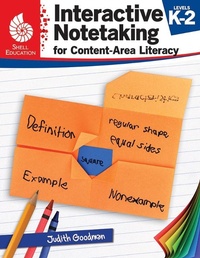
Interactive Notetaking for Content-Area Literacy, Levels K-2
Published on 1. May 2018
152 pages
978-1-4258-3030-4 (ISBN)
Description

Help students build content area literacy through interactive notetaking! This resource provides creative strategies for developing students'' interactive notetaking skills across the content areas. Lessons focus on topics including partner work, vocabulary, comprehension, and summarizing to engage students in critical thinking and analysis. This grade-range-specific resource differentiates instruction to support the needs of students at each grade level. Aligned to standards, this essential classroom resource will allow students to practice effective learning strategies, increasing retention and achievement in mathematics, language arts, social studies, and science.
More details
Series
Language
English
Place of publication
Huntington Beach
United States
Target group
Primary & secondary/elementary & high school
US School Grade: From Kindergarten to Second Grade, Interest Age: From 4 to 10 years
File size
16,18 MB
ISBN-13
978-1-4258-3030-4 (9781425830304)
Copyright in bibliographic data and cover images is held by Nielsen Book Services Limited or by the publishers or by their respective licensors: all rights reserved.
Schweitzer Classification
Other editions
Additional editions
Judith Goodman
Interactive Notetaking for Content-Area Literacy, Levels K-2
Book
05/2018
Shell Educational Publishing
€27.50
Shipment within 5-8 weeks
Content
- Cover
- Credits
- Page 3 - Table of Contents
- Page 4 - Author's Note
- Page 5 - What Is an Interactive Notebook?
- Page 6 - Using Interactive Notebooks for Content-Area Literacy
- Page 7 - Implementing Interactive Notebooks
- Page 10 - Strategies Overview
- Page 13 - How to Use This Book
- Page 14 - Correlations to Standards
- Page 15 - Workers Who Take Care of Me
- Page 23 - What Are Rain Forests?
- Page 31 - Grandpa and Me
- Page 39 - A Day in Our Lives
- Page 49 - Lots of Boxes
- Page 57 -A Mountain of Trash
- Page 65 - What Makes a Habitat?
- Page 75 - How Sound Moves
- Page 83 - Tools
- Page 91 - George Washington.
- Page 103 - Jobs Around Town
- Page 111 - Lead the Way!
- Page 121 - Happy Fourth of July!
- Page 129 - Cesar Chavez
- Page 139 - Earth
- Page 149 - Definitions of Folds and Cuts
- Page 150 - Attaching Text to the Lesson Input Pages
- Page 152 - References Cited
- Page 152 - Digital Resources
- Thank You
