

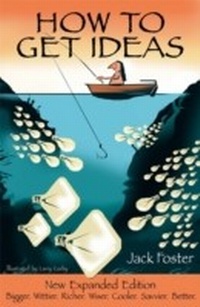
How to Get Ideas
Published on 14. April 2022
186 pages
978-1-60509-881-4 (ISBN)
Description

This new expanded second edition shows you-no matter your age or skill, your job or training-how to come up with more ideas, faster and easier.
Jack Foster's simple five-step technique for solving problems and getting ideas takes the mystery and anxiety out of the idea-generating process. It's a proven process that works. You'll learn to condition your mind to become "idea-prone," utilize your sense of humor, develop your curiosity, visualize your goals, rethink your thinking, and overcome your fear of rejection.
This expanded edition of the inspiring and enlightening classic features new information on how to turn failures to your advantage and how to create a rich, idea-inducing environment. Dozens of new examples and real-life stories show that anyone can learn to get more and better ideas.
Jack Foster's simple five-step technique for solving problems and getting ideas takes the mystery and anxiety out of the idea-generating process. It's a proven process that works. You'll learn to condition your mind to become "idea-prone," utilize your sense of humor, develop your curiosity, visualize your goals, rethink your thinking, and overcome your fear of rejection.
This expanded edition of the inspiring and enlightening classic features new information on how to turn failures to your advantage and how to create a rich, idea-inducing environment. Dozens of new examples and real-life stories show that anyone can learn to get more and better ideas.
All prices
More details
Other editions
Additional editions
Jack Foster
How to Get Ideas, 2/e
Book
01/2007
2nd Edition
Berrett-Koehler
€25.50
Shipment within 3-4 weeks
Persons
Jack Foster spent thirty-five years working in creative departments of major advertising agencies; the first ten as a writer, the last 25 as a creative director. He has helped create advertising for scores of companies including Carnation, Mazda, Sunkist, Mattel, Albertson's, Ore-Ida, Suzuki, Universal Studios, Rand McNally, and Smokey Bear. He is a recipient of the Los Angeles Creative Club's "Creative Person of the Year" award.
Content
Preface
Acknowledgments
Introduction: What Is an Idea?
Part I: Ten Ways to Idea-Condition Your Mind
1. Have Fun
2. Be More Like a Child
3. Become Idea-Prone
4. Visualize Success
5. Rejoice in Failure
6. Get More Inputs
7. Screw Up Your Courage
8. Team Up with Energy
9. Rethink Your Thinking
10. Learn How to Combine
Part II: A Five-Step Method for Producing Ideas
11. Define the Problem
12. Gather the Information
13. Search for the Idea
14. Forget about It
15. Put the Idea into Action
Notes
Index
About the Author
About the Illustrator
Acknowledgments
Introduction: What Is an Idea?
Part I: Ten Ways to Idea-Condition Your Mind
1. Have Fun
2. Be More Like a Child
3. Become Idea-Prone
4. Visualize Success
5. Rejoice in Failure
6. Get More Inputs
7. Screw Up Your Courage
8. Team Up with Energy
9. Rethink Your Thinking
10. Learn How to Combine
Part II: A Five-Step Method for Producing Ideas
11. Define the Problem
12. Gather the Information
13. Search for the Idea
14. Forget about It
15. Put the Idea into Action
Notes
Index
About the Author
About the Illustrator
