

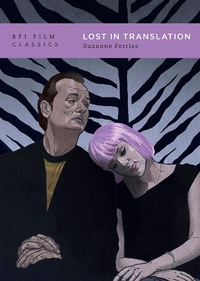
Lost in Translation
1st Edition
Published on 9. March 2023
112 pages
978-1-83902-493-1 (ISBN)
Description

Sofia Coppola's Lost in Translation (2003) brings two Americans together in Tokyo, each experiencing a personal crisis. Charlotte (Scarlett Johansson), a recent graduate in philosophy, faces an uncertain professional future, while Bob Harris (Bill Murray), an established celebrity, questions his choices at midlife. Both are distant - emotionally and spatially - from their spouses. They are lost until they develop an intimate connection. In the film's poignant, famously ambiguous closing scene, they find each other, only to separate.
In this close look at the multi-award-winning film, Suzanne Ferriss mirrors Lost in Translation's structuring device of travel: her analysis takes the form of a trip, from planning to departure. She details the complexities of filming (a 27-day shoot with no permits in Tokyo), explores Coppola's allusions to fine art, subtle colour palette and use of music over words, and examines the characters' experiences of the Park Hyatt Tokyo and excursions outside, together and alone. She also re-evaluates the film in relation to Coppola's other features, as the product of an established director with a distinctive cinematic signature: 'Coppolism'. Fundamentally, Ferriss argues that Lost in Translation is not only a cinema classic, but classic Coppola too.
In this close look at the multi-award-winning film, Suzanne Ferriss mirrors Lost in Translation's structuring device of travel: her analysis takes the form of a trip, from planning to departure. She details the complexities of filming (a 27-day shoot with no permits in Tokyo), explores Coppola's allusions to fine art, subtle colour palette and use of music over words, and examines the characters' experiences of the Park Hyatt Tokyo and excursions outside, together and alone. She also re-evaluates the film in relation to Coppola's other features, as the product of an established director with a distinctive cinematic signature: 'Coppolism'. Fundamentally, Ferriss argues that Lost in Translation is not only a cinema classic, but classic Coppola too.
More details
Series
Edition
1. Auflage
Language
English
Place of publication
United Kingdom
Publishing group
Bloomsbury Publishing PLC
Target group
Primary & secondary/elementary & high school
Illustrations
60 colour illus
ISBN-13
978-1-83902-493-1 (9781839024931)
Copyright in bibliographic data and cover images is held by Nielsen Book Services Limited or by the publishers or by their respective licensors: all rights reserved.
Schweitzer Classification
Other editions
Additional editions
Person
Suzanne Ferriss is Professor Emeritus at Nova Southeastern University, USA. She has published extensively on fashion, film and cultural studies, and is the author of The Cinema of Sofia Coppola (2021). She is currently editing The Bloomsbury Handbook to Sofia Coppola.
Content
Acknowledgments
Introduction
1. Trip Planning
2. Arrivals
3. Accommodations
4. Sights
5. Departures
6. Reception
Notes
Credits
Bibliography
Introduction
1. Trip Planning
2. Arrivals
3. Accommodations
4. Sights
5. Departures
6. Reception
Notes
Credits
Bibliography
