

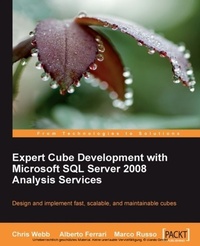
Expert Cube Development with Microsoft SQL Server 2008 Analysis Services
Design and implement fast, scalable and maintainable cubes with Microsoft SQL Server 2008 Analysis Services with this book and eBook
Published on 13. January 2025
360 pages
978-1-84719-723-8 (ISBN)
Description

Design and implement fast, scalable and maintainable cubes
Key Features
A real-world guide to designing cubes with Analysis Services 2008
Model dimensions and measure groups in BI Development Studio
Implement security, drill-through, and MDX calculations
Learn how to deploy, monitor, and performance-tune your cube
Filled with best practices and useful hints and tips
Book DescriptionMicrosoft's SQL Server Analysis Services 2008 is an OLAP server that allows users to analyze business data quickly and easily. However, designing cubes in Analysis Services can be a complex task: it's all too easy to make mistakes early on in development that lead to serious problems when the cube is in production. Learning the best practices for cube design before you start your project will help you avoid these problems and ensure that your project is a success. This book offers practical advice on how to go about designing and building fast, scalable, and maintainable cubes that will meet your users' requirements and help make your Business Intelligence project a success. This book gives readers insight into the best practices for designing and building Microsoft Analysis Services 2008 cubes. It also provides details about server architecture, performance tuning, security, and administration of an Analysis Services solution. In this book, you will learn how to design and implement Analysis Services cubes. Starting from designing a data mart for Analysis Services, through the creation of dimensions and measure groups, to putting the cube into production, we'll explore the whole of the development lifecycle. This book is an invaluable guide for anyone who is planning to use Microsoft Analysis Services 2008 in a Business Intelligence project.What you will learn
Build a data mart suitable for use with Analysis Services
Create and configure an Analysis Services project in Business Intelligence Development Studio
Use the Dimension Wizard and the Dimension Editor to build dimensions
Create measure groups and associate them with dimensions
Add calculations to the cube, including implementing currency conversion and a date tool dimension
Explore the security model, including dimension security and cell security, and implement dynamic security
Tune queries to get the best possible performance
Automate processing and partition creation
Monitor your cube to see who s actually using it
Who this book is forThis book is aimed at Analysis Services developers who already have some experience but who want to go into more detail on advanced topics, and who want to learn best practices for cube design.
Key Features
A real-world guide to designing cubes with Analysis Services 2008
Model dimensions and measure groups in BI Development Studio
Implement security, drill-through, and MDX calculations
Learn how to deploy, monitor, and performance-tune your cube
Filled with best practices and useful hints and tips
Book DescriptionMicrosoft's SQL Server Analysis Services 2008 is an OLAP server that allows users to analyze business data quickly and easily. However, designing cubes in Analysis Services can be a complex task: it's all too easy to make mistakes early on in development that lead to serious problems when the cube is in production. Learning the best practices for cube design before you start your project will help you avoid these problems and ensure that your project is a success. This book offers practical advice on how to go about designing and building fast, scalable, and maintainable cubes that will meet your users' requirements and help make your Business Intelligence project a success. This book gives readers insight into the best practices for designing and building Microsoft Analysis Services 2008 cubes. It also provides details about server architecture, performance tuning, security, and administration of an Analysis Services solution. In this book, you will learn how to design and implement Analysis Services cubes. Starting from designing a data mart for Analysis Services, through the creation of dimensions and measure groups, to putting the cube into production, we'll explore the whole of the development lifecycle. This book is an invaluable guide for anyone who is planning to use Microsoft Analysis Services 2008 in a Business Intelligence project.What you will learn
Build a data mart suitable for use with Analysis Services
Create and configure an Analysis Services project in Business Intelligence Development Studio
Use the Dimension Wizard and the Dimension Editor to build dimensions
Create measure groups and associate them with dimensions
Add calculations to the cube, including implementing currency conversion and a date tool dimension
Explore the security model, including dimension security and cell security, and implement dynamic security
Tune queries to get the best possible performance
Automate processing and partition creation
Monitor your cube to see who s actually using it
Who this book is forThis book is aimed at Analysis Services developers who already have some experience but who want to go into more detail on advanced topics, and who want to learn best practices for cube design.
All prices
More details
Edition
Digital original
Language
English
Place of publication
Birmingham
United Kingdom
Edition type
Digital original
File size
6,02 MB
ISBN-13
978-1-84719-723-8 (9781847197238)
Copyright in bibliographic data and cover images is held by Nielsen Book Services Limited or by the publishers or by their respective licensors: all rights reserved.
Schweitzer Classification
Other editions
Additional editions
Chris Webb | Marco Russo | Alberto Ferrari
Expert Cube Development with Microsoft SQL Server 2008 Analysis Services
Book
07/2009
Packt Publishing
€63.50
Shipment within 3-4 weeks
Persons
Chris Webb (chris@crossjoin.co.uk) has been working with Microsoft Business Intelligence tools for 15 years in a variety of roles and industries. He is an independent consultant (www.crossjoin.co.uk) and trainer (www.technitrain.com) based in the UK, specializing in SQL Server Analysis Services, MDX, DAX, Power Pivot, and the whole Power BI stack. He is the co-author of MDX Solutions with Microsoft SQL Server Analysis Services 2005 and SQL Server Analysis Services 2012: The BISM Tabular Model. He is a regular speaker at user groups and conferences, and blogs about Microsoft BI at http://cwebbbi.wordpress.com/. Alberto Ferrari (alberto.ferrari@sqlbi.com) is a consultant and trainer who specializes in Business Intelligence with the Microsoft BI stack. He spends half of his time consulting for companies who need to develop complex data warehouses, and the other half in training, book writing, conferences, and meetings. He is a SQL Server MVP and a SSAS-Maestro.He is a founder, with Marco Russo, of www.sqlbi.com, where they publish whitepapers and articles about SQL Server Analysis Services technology. He co-authored several books on SSAS and PowerPivot. Marco Russo is a Business Intelligence consultant and mentor. His main activities are related to data warehouse relational and multidimensional design, but he is also involved in the complete development lifecycle of a BI solution. He has particular competence and experience in sectors such as financial services (including complex OLAP designs in the banking area), manufacturing, gambling, and commercial distribution. Marco is also a book author, and in addition to his BI-related publications, he has authored books about .NET programming. He is also a speaker at international conferences such as TechEd, PASS Summit, SQLRally, and SQLBits. He achieved the unique SSAS Maestro certification and is also a Microsoft Certified Trainer with several Microsoft Certified Professional certifications.
Content
Table of Contents

