

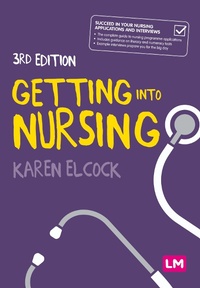
Getting into Nursing
A complete guide to applications, interviews and what it takes to be a nurse
3rd Edition
Published on 24. February 2022
168 pages
978-1-5297-8557-9 (ISBN)
Description

Considering a career in nursing and want to understand what is involved? Ready to take the plunge and looking for advice on choosing a course and succeeding in your application? This book has been written for you.
Why do you need this book?
? Learn what it is like to be a nurse today and what you'll need to get there, from personal qualities and values to practical work experience and entry requirements
? Understand the different routes into nursing and how to choose the right field
? Practical advice and activities help you to write a compelling application and practise for your interview
? Top tips from students, lecturers and nurses provide an insight into what to expect from the process, and how to avoid common pitfalls
Why do you need this book?
? Learn what it is like to be a nurse today and what you'll need to get there, from personal qualities and values to practical work experience and entry requirements
? Understand the different routes into nursing and how to choose the right field
? Practical advice and activities help you to write a compelling application and practise for your interview
? Top tips from students, lecturers and nurses provide an insight into what to expect from the process, and how to avoid common pitfalls
More details
Series
Edition
Third Edition (Revised and Updated Edition)
Language
English
Place of publication
London
United Kingdom
Publishing group
Sage Publications Ltd
Target group
College/higher education
Product notice
Reflowable
ISBN-13
978-1-5297-8557-9 (9781529785579)
Copyright in bibliographic data and cover images is held by Nielsen Book Services Limited or by the publishers or by their respective licensors: all rights reserved.
Schweitzer Classification
Other editions
Additional editions
Karen Elcock
Getting into Nursing
A complete guide to applications, interviews and what it takes to be a nurse
Book
03/2022
3rd Edition
Learning Matters Ltd
€30.30
Shipment within 15-20 days
Karen Elcock
Getting into Nursing
A complete guide to applications, interviews and what it takes to be a nurse
Book
03/2022
3rd Edition
Learning Matters Ltd
€72.20
Shipment within 15-20 days
Person
Karen Elcock is Head of Programmes, Pre-registration Nursing at Kingston University and St George's University London, one of the early implementers of the new degree programme for nursing. She has taught on and led pre-registration nursing programmes for over 20 years and has a particular interest in how student nurses learn in practice settings which makes up 50% of pre-registration nursing programmes.
Content
Chapter 1: What is nursing today?
Chapter 2: Do I have what it takes to be a nurse?
Chapter 3: Entry requirements
Chapter 4: Work experience and volunteering
Chapter 5: What is involved in undertaking a nursing course?
Chapter 6: Choosing the right field of nursing
Chapter 7: The application process and choosing the right university
Chapter 8: Preparing for the selection day
Chapter 9: Numeracy and literacy tests
Chapter 10: The selection day
Chapter 11: What happens next
Chapter 2: Do I have what it takes to be a nurse?
Chapter 3: Entry requirements
Chapter 4: Work experience and volunteering
Chapter 5: What is involved in undertaking a nursing course?
Chapter 6: Choosing the right field of nursing
Chapter 7: The application process and choosing the right university
Chapter 8: Preparing for the selection day
Chapter 9: Numeracy and literacy tests
Chapter 10: The selection day
Chapter 11: What happens next
