

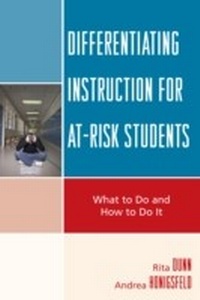
Differentiating Instruction for At-Risk Students
What to Do and How to Do it
1st Edition
Published on 16. January 2009
202 pages
978-1-57886-984-8 (ISBN)
Description

No single approach to teaching is effective with all children; each helps those with identified learning-style strengths to increase their knowledge base within the first three or four months of classroom use. Some learners will want to continue using a single method; others will prefer a variety of approaches. When the activities described herein are introduced to students whose learning styles they match, most will demonstrate strong abilities to learn and remember new and difficult content within the first four months of beginning_if not earlier. This book is written to prevent more children from becoming at risk and to help those who already have fallen behind their classmates and do not enjoy school. Each chapter describes different instructional strategies, a summary chart shows how to match at-risk learners with the specific approach most likely to substantially increase their academic achievement. These instructional approaches are designed to engage youngsters in action-oriented activities that gradually increase cognition and help children to internalize and retain what they are taught. Applications of these instructional strategies are suggested for increasing performance in literacy, mathematics, science, and social studies.
More details
Edition
1. Auflage
Language
English
Place of publication
New York
United States
Publishing group
Bloomsbury Publishing Plc
ISBN-13
978-1-57886-984-8 (9781578869848)
Copyright in bibliographic data and cover images is held by Nielsen Book Services Limited or by the publishers or by their respective licensors: all rights reserved.
Schweitzer Classification
Other editions
Additional editions
Book
01/2009
Rowman & Littlefield Education
€100.60
Article exhausted; check different version
Book
01/2009
Rowman & Littlefield Publishers
€59.20
Shipment within 3-4 weeks
Persons
Rita Dunn is professor and director of the Center for the Study of Learning and Teaching Styles, St. John's University. Andrea Honigsfeld is associate professor and associate dean in the Division of Education at Molloy College in New York.
Content
Chapter 1 Who Are Students At Risk of Academic Failure and How Should We Teach Them?
Chapter 2 What Is Learning Style?
Chapter 3 Teaching Global Students Globally
Chapter 4 Redesigning Classrooms for Increased Comfort and Concentration
Chapter 5 Teaching Tactual Students Tactually
Chapter 6 Teaching Kinesthetic Students Kinesthetically
Chapter 7 Teaching Peer-Motivated Students with Small-Group Techniques
Chapter 8 Teaching At-Risk Students with Contract Activity Packages
Chapter 9 Teaching Visual/Tactual Students Who Need Structure with Programmed Learning Sequences
Chapter 10 Teaching Unmotivated Students with Multi-Sensory Instructional Packages
Chapter 11 Experimenting with Learning-Style Instructional Strategies in Practitioner-Oriented Steps
Chapter 12 Research on the Dunn and Dunn Learning-Styles Model: How Do We Know It Works?
Chapter 13 How Schools, Parents, and Courts Can Respond to Federal Law and Improve Classroom Teaching for At-Risk Students
Chapter 2 What Is Learning Style?
Chapter 3 Teaching Global Students Globally
Chapter 4 Redesigning Classrooms for Increased Comfort and Concentration
Chapter 5 Teaching Tactual Students Tactually
Chapter 6 Teaching Kinesthetic Students Kinesthetically
Chapter 7 Teaching Peer-Motivated Students with Small-Group Techniques
Chapter 8 Teaching At-Risk Students with Contract Activity Packages
Chapter 9 Teaching Visual/Tactual Students Who Need Structure with Programmed Learning Sequences
Chapter 10 Teaching Unmotivated Students with Multi-Sensory Instructional Packages
Chapter 11 Experimenting with Learning-Style Instructional Strategies in Practitioner-Oriented Steps
Chapter 12 Research on the Dunn and Dunn Learning-Styles Model: How Do We Know It Works?
Chapter 13 How Schools, Parents, and Courts Can Respond to Federal Law and Improve Classroom Teaching for At-Risk Students
